
Directories
An Oracle DIRECTORY names an operating-system path on the database server. It is not a folder on your desktop, and a database grant does not create OS-level permissions.
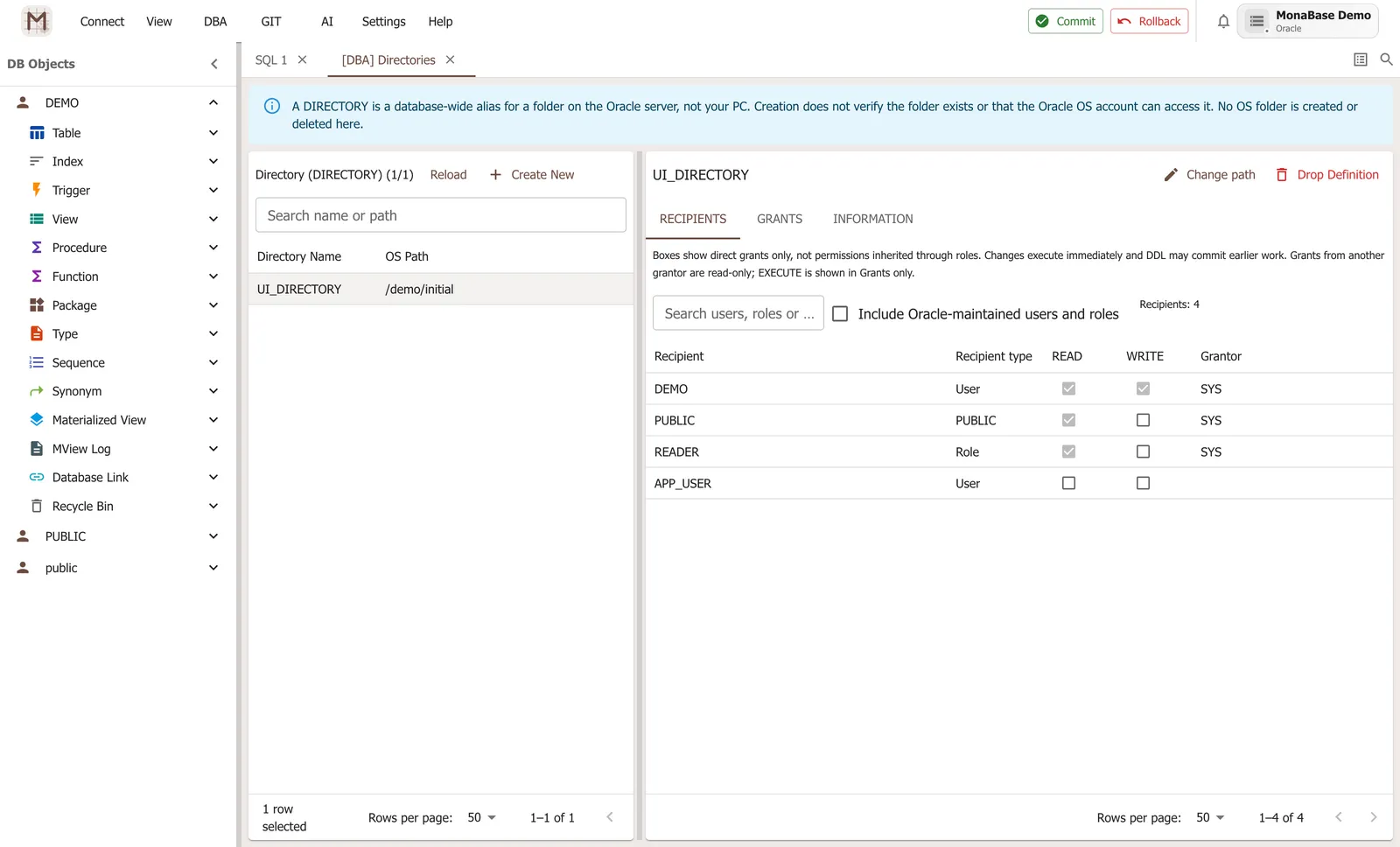
How to use this screen
Section titled “How to use this screen”- Inspect the directory name, server path and visible grants.
- Review a supported path or grant change and confirm that the path is correct on the database host.
- Apply the operation with the required authority and refresh the definition and privileges.
Database-specific behavior
Section titled “Database-specific behavior”Oracle
Section titled “Oracle”DIRECTORY objects are not owned by ordinary application schemas. Creation and removal need broad DIRECTORY privileges; review each target carefully.
Oracle: Directory list and display controls
Section titled “Oracle: Directory list and display controls”Search, selection, reload, and layout controls. Read-only actions do not change database definitions.
| Action / setting | How to use | Effect of change / execution |
|---|---|---|
| Reload | Refresh the list and the selected directory details. | Displays current definitions and privileges without changing the database. |
| Search | Filter the list by directory name or OS path. | Only the displayed list changes; no database changes occur. |
| Select a directory | Select a row in the left grid to load the right-hand details. | Loads grantees, existing grants, and information for the selected directory. |
| Page size and navigation | Choose 25, 50, or 100 rows per page and navigate pages. | Changes paging only. |
| Resize panes | Drag the divider between the list and details. | Changes the layout only. |
| Visible-scope notice | A restricted account may only see directories within its visible scope. | An omitted directory is not necessarily absent from the database. |
Recipients tab: Manage READ / WRITE
Section titled “Recipients tab: Manage READ / WRITE”Manage directly granted directory privileges by recipient. Changing a checkbox executes GRANT or REVOKE against the database.
| Action / setting | How to use | Effect of change / execution |
|---|---|---|
| Search grantees | Filter users, roles, and PUBLIC by name. | Only the list display changes; privileges are not modified. |
| Include maintained accounts | Include maintained users or roles in the candidate list. | Expands visible recipients without changing grants. |
| READ checkbox | Check to GRANT READ or clear to REVOKE a direct grant. | Changes DB privileges. Revocation and granting to PUBLIC require confirmation. |
| WRITE checkbox | Check to GRANT WRITE or clear to REVOKE a direct grant. | Changes DB privileges. Revocation and granting to PUBLIC require confirmation. |
| Grantor column | Inspect the grantor of directly assigned privileges. | Read-only; multiple grantors may be listed. |
| Disabled checkbox | Checkboxes are disabled without authorization or a verified object identity. | Prevents an unsupported change; reload after detail retrieval errors. |
Granted privileges tab: Detailed grants
Section titled “Granted privileges tab: Detailed grants”A read-only view of existing grant rows and whether they can be revoked.
| Action / setting | How to use | Effect of change / execution |
|---|---|---|
| Grantee | Shows users, roles, or PUBLIC with direct privileges. | Read-only; no database change. |
| Privilege | Displays READ or WRITE grant rows. | Shows the privilege type that was granted. |
| Grantor | Displays which principal granted the privilege. | Helps audit grants without changing them. |
| Grantable / Can Revoke | Displays grantability and whether the current connection may revoke the grant. | Informational flags, not editing controls. |
| Paging | Switch between 25, 50, and 100 grants per page. | Display-only change. |
Information tab: Definition and session privileges
Section titled “Information tab: Definition and session privileges”Inspect the selected directory definition and privileges relevant to the current session.
| Action / setting | How to use | Effect of change / execution |
|---|---|---|
| Directory name / OS path | Displays the Oracle DIRECTORY name and registered OS path. | The path refers to the database server, not the local computer. |
| Owner | Displays the owner of the directory definition. | Read-only; ownership is not changed. |
| Session privileges | Shows privilege information retrieved for the current session. | May differ in scope from the list of direct grants. |
| DDL and transactions | Read the warning about Oracle DDL used for definition changes. | DDL may implicitly commit transactions; review transactional impact. |
Create, change path, and drop: Execution controls
Section titled “Create, change path, and drop: Execution controls”These operations change the Oracle directory definition. Check the SQL, target, and server-side path before execution.
| Action / setting | How to use | Effect of change / execution |
|---|---|---|
| Create new | Enter a directory name and physical OS path, then review the SQL preview. | CREATE DIRECTORY creates a database object; it does not create the OS directory. |
| Directory name | Enter a name when creating. Unquoted names are uppercased; the name is fixed when replacing. | Invalid names prevent submission. |
| Physical OS path | Enter a server-side path. Inputs such as parent-directory traversal are rejected by validation. | Changing it redirects the DIRECTORY definition; OS existence and permissions must be managed separately. |
| Change path | Choose Change Path for the selected directory and review the replacement path and SQL. | After confirmation, CREATE OR REPLACE DIRECTORY updates the definition; no files are moved. |
| Drop definition | Select a directory, choose Drop Definition, and confirm. | DROP DIRECTORY removes the database object, not the physical folder or its files. |
| Create / Execute / Cancel | Submit when validation and permissions allow; Cancel closes the dialog. | Database changes are attempted only on submission; reload if execution or subsequent refresh reports an issue. |