
Database links
A database link allows Oracle-side SQL to reach another database. The network path originates from the database server, which may differ from the connection path used by your desktop.
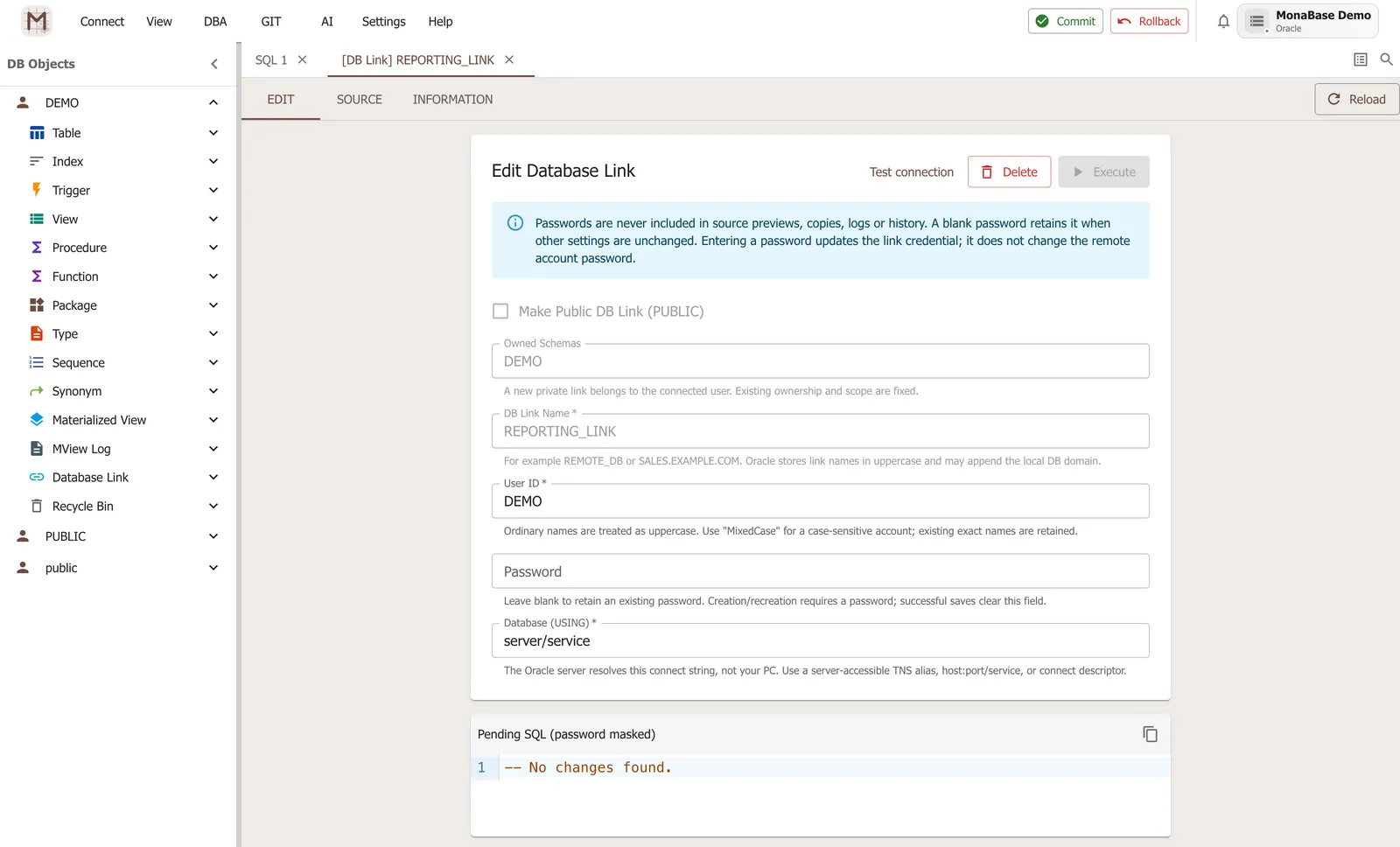
Common controls and tab navigation
Section titled “Common controls and tab navigation”Existing database links have Edit, Source, and Information tabs. Creation uses a separate form. Controls are unavailable while reloading.
| Control / setting | How to use | Effect of changes or actions |
|---|---|---|
| Reload | Click Reload at the top right. | Fetches the link definition and current permissions. Some unsaved edits may be preserved; review the fields before executing. |
| Edit / Source / Information tabs | Switch tabs for an existing link. | Does not modify the database. Source and Information describe the saved link. |
| Loading errors and Retry | Click Retry on an error alert. | Reloads the definition. Tests or changes may remain disabled until recovery. |
| Read-only and permission limits | Open a read-only connection or a link owned by someone else. | Edits and deletion are restricted. Managing public links requires separate privileges. |
Create / Edit: fields and effects
Section titled “Create / Edit: fields and effects”These fields create or modify a database link. Name and visibility cannot be changed after creation. The SQL preview masks the password.
| Control / setting | How to use | Effect of changes or actions |
|---|---|---|
| PUBLIC checkbox | Select only when creating a link. | Creates a public database link visible by name across users. Existing link scope cannot be changed. |
| Owner schema | Shows the current user or PUBLIC. | Read-only field; this form does not choose another private owner. |
| Database link name | Enter a name while creating the link. | Converted to uppercase; Oracle domain may be appended to form the full name. Cannot be renamed here. |
| User name | Enter the remote user. | Changing the stored user requires dropping and recreating the existing link. |
| Password | Enter on create or recreate, or to rotate an existing password. | Required for creation/recreation. Changing only the password plans ALTER; the field is cleared after success. |
| Connection target (USING) | Enter an Oracle connection identifier or connection string. | Changing it plans DROP and CREATE. Resolution is from the Oracle database server side. |
| Pending SQL preview | Review the generated SQL below the form or copy it. | Shows CREATE, ALTER, or DROP+CREATE; preview does not execute SQL and masks passwords. |
| Test connection | Click Test connection for an existing link. | Explicitly tests the saved link, not unexecuted form edits; displays elapsed time on success. |
| Execute | Fill in the form and click Execute. | May require confirmation. Validation, permissions, and changes determine availability; success modifies the DB definition. |
| Delete | Click Delete on an existing link and confirm. | Runs DROP DATABASE LINK and closes the tab on success. Check dependent usage first. |
Source tab: saved template and pending SQL
Section titled “Source tab: saved template and pending SQL”Keep the saved-definition template separate from planned changes. The saved template cannot recover the original password.
| Control / setting | How to use | Effect of changes or actions |
|---|---|---|
| Saved template | View the current definition in Source. | Read-only reference DDL; viewing or copying does not alter the database. |
| Pending SQL | Appears when a change is planned. | Shows the intended ALTER or recreation; updates when form inputs change. |
| Copy | Click the copy icon for either code panel. | Copies the corresponding text to the clipboard; failures are reported. |
Information tab: stored definition and connectivity
Section titled “Information tab: stored definition and connectivity”This tab primarily displays the saved link metadata. Connectivity is tested only on explicit request.
| Control / setting | How to use | Effect of changes or actions |
|---|---|---|
| Owner and name | Inspect the saved link identity. | Identifies the link and cannot be edited in this tab. |
| Authentication mode and user | Check FIXED, CONNECTED, CURRENT, or other reported modes. | Displays catalog metadata only. Unsupported authentication types may be read-only. |
| Host and creation date | Review the USING target and creation timestamp. | No changes occur. Valid connectivity is not guaranteed without a test. |
| Test connection | Click Test connection in Information. | Tests the persisted link explicitly and reports success or failure. |
Changes, confirmation, and failure handling
Section titled “Changes, confirmation, and failure handling”Database links carry credentials and remote targets. Preview is informational; changes and tests require explicit actions.
| Control / setting | How to use | Effect of changes or actions |
|---|---|---|
| No changes | Values match the saved definition and password is blank. | Execute remains disabled. |
| Password-only change | Fill the password of an existing link only. | Plans ALTER DATABASE LINK. |
| User or target change | Change the username or USING target. | Requires DROP+CREATE with confirmation. If creation fails after dropping, the link may remain absent. |
| Conflict, privileges, and refresh errors | Another operation changed the definition, permissions are missing, or reload fails. | Execution may fail or be blocked. Review errors and the console, then reload before retrying. |
| Public link creation/deletion | Create or delete a public link. | Has wider scope and requires privileges/confirmation. Does not grant remote access rights by itself. |
Console: results and history
Section titled “Console: results and history”The console opens on successful/failed operations. Logged SQL is for review, not automatic execution.
| Control / setting | How to use | Effect of changes or actions |
|---|---|---|
| Review log | Inspect timestamps, results, SQL, and error codes. | Helps determine which operation succeeded or failed. |
| Clear log | Click the trash icon. | Clears the displayed log only; the database link is unchanged. |
| Close and resize | Click Close or drag the splitter. | Changes only the console visibility/width, not the database. |
How to use this screen
Section titled “How to use this screen”- Open a link and inspect its name, scope, remote account and connection descriptor without exposing secrets.
- Use the connection check where available. Confirm the remote target before executing any remote operation.
- Review credential updates or removal carefully; refresh afterwards to distinguish success from an unconfirmed outcome.
Database-specific behavior
Section titled “Database-specific behavior”Oracle
Section titled “Oracle”CREATE DATABASE LINK and ALTER DATABASE LINK require their respective privileges. Public links require broader privileges than private links.