
Schemas / databases
PostgreSQL schemas organize objects inside a database, with ownership and USAGE/CREATE rights. MySQL uses database and schema as synonyms; use its Database information screen for visible objects, database creation and charset/collation defaults. The MySQL section distinguishes its operations from the PostgreSQL reference.
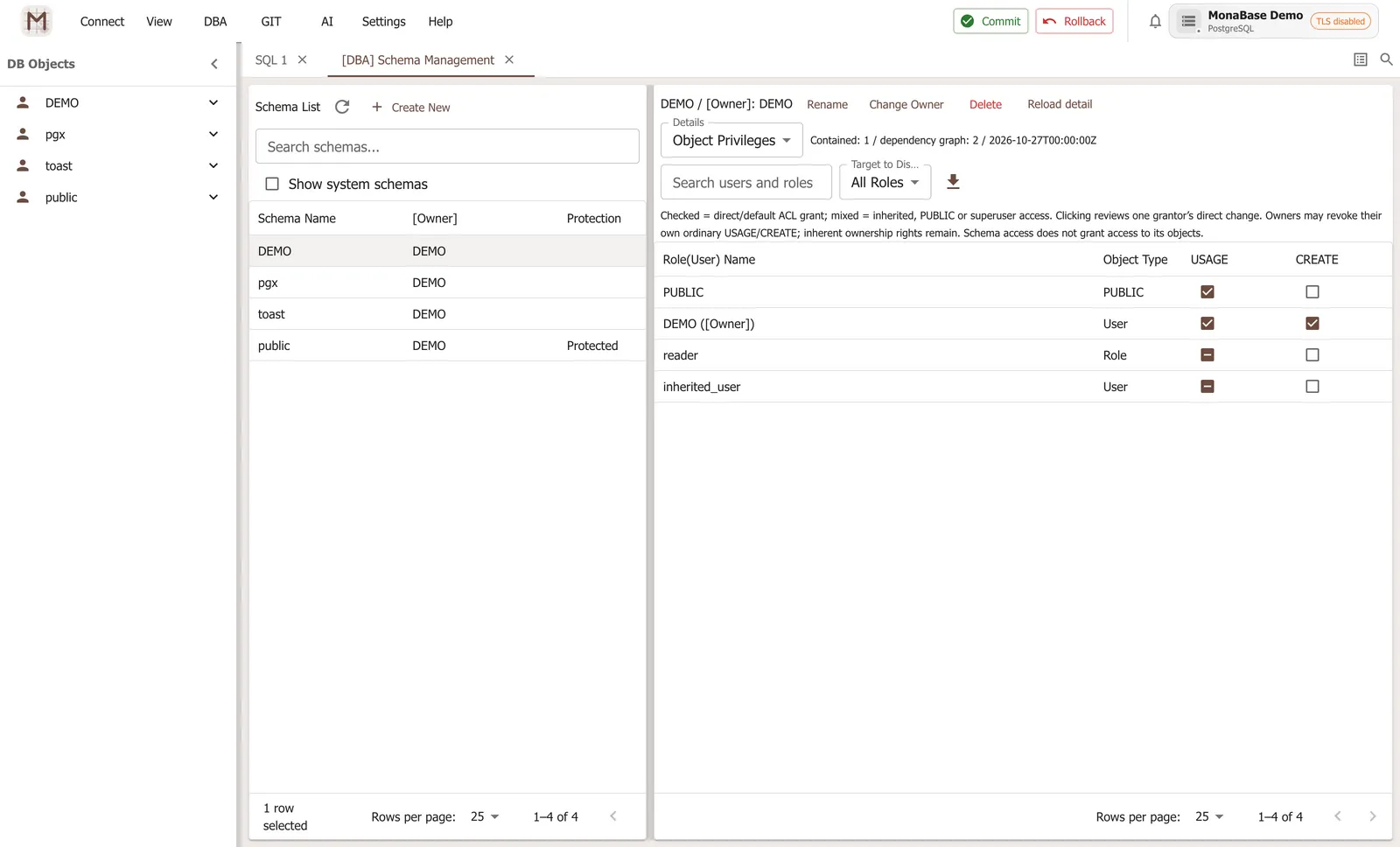
How to use this screen
Section titled “How to use this screen”- Open Schema management for PostgreSQL, or Database information for MySQL, and select the target.
- Inspect PostgreSQL owner/ACL/dependencies, or MySQL charset/collation and visible objects; review only actions offered for that database.
- Review SQL, confirm the target and apply once. Reload actual metadata. MySQL does not offer database delete/rename here.
Database-specific behavior
Section titled “Database-specific behavior”PostgreSQL
Section titled “PostgreSQL”A PostgreSQL schema is not the same as an Oracle user/schema pair. Do not assume account creation and schema creation are interchangeable.
For MySQL, open DBA → Database information. Database and schema are synonyms, so this manages database defaults rather than PostgreSQL schemas inside one database. The visible list, object search and reviewed create/default changes form the MySQL counterpart of this guide; PostgreSQL owner/ACL/CASCADE controls below do not apply.
Schema list and selection
Section titled “Schema list and selection”Find a schema in the list and inspect its details on the right.
| Action / setting | How to use | Effect of changing or executing |
|---|---|---|
| Refresh | Reload the schema list from the database. | Latest schema and ownership data replaces the displayed snapshot. |
| Search schemas | Filter by schema name or owner. | Changes visible rows only; does not modify the database. |
| Show system schemas | Toggle visibility of system schemas. | Changes the list, including protected entries; no DB changes. |
| Select schema | Select a row in the left grid. | Loads the corresponding right-side detail view. |
| Pagination and split width | Choose 25, 50 or 100 rows per page and drag the divider. | Only on-screen pagination and panel width change. |
| Refresh detail | Click Refresh detail for the selected schema. | Reloads permissions, objects and dependencies for that schema. |
Privileges tab: USAGE / CREATE
Section titled “Privileges tab: USAGE / CREATE”Review direct and effective access per principal, and change grants when authorized.
| Action / setting | How to use | Effect of changing or executing |
|---|---|---|
| Privileges tab | Choose Privileges from the detail selector. | Shows access for roles, users and PUBLIC. |
| Role search | Filter principals by name. | Only filters displayed principals. |
| All / direct / effective filter | Choose which kind of access is shown. | Filters rows based on direct grants or effective access including inherited sources. |
| USAGE checkbox | Toggle USAGE on a principal row. | Opens a GRANT/REVOKE review; the checkbox alone does not change DB access. |
| CREATE checkbox | Toggle CREATE on a principal row. | Reviews granting or revoking the ability to create objects within the schema. |
| Effective sources and grantor | Select a principal to inspect access sources and grantors. | Explains effective access, including inherited/superuser access. |
| Revoke / revoke grant option | Choose a revoke action on an existing grant. | Reviews revoking the privilege or just its grant option. |
| Export privileges | Use the export action in the privileges panel. | Exports displayed rows without modifying the DB. |
Objects tab
Section titled “Objects tab”Inspect database objects belonging to the selected schema.
| Action / setting | How to use | Effect of changing or executing |
|---|---|---|
| Objects tab | Choose Objects in the detail selector. | Displays objects found in the selected schema. |
| Type / schema / identity | Inspect the corresponding grid columns. | Identifies objects associated with the selected schema. |
| Page size | Choose 25, 50 or 100 rows. | Changes only list pagination. |
| Result coverage | Read the limits shown with the object list. | The displayed list may not be exhaustive; inspect dependencies before dropping. |
Dependencies tab
Section titled “Dependencies tab”Review dependencies that may affect schema deletion.
| Action / setting | How to use | Effect of changing or executing |
|---|---|---|
| Dependencies tab | Choose Dependencies in the detail selector. | Shows dependency types, schemas and object identities. |
| Truncation warning | Check for a warning that dependencies were truncated. | Some dependencies may be missing from the preview. |
| Counts and fetched time | Review counts and the fetched timestamp. | Shows the freshness and coverage of the displayed snapshot. |
| Pagination | Change the number of rows displayed. | Does not change any database dependency. |
Create, rename, change owner and drop
Section titled “Create, rename, change owner and drop”Review the SQL and confirmations before applying schema DDL.
| Action / setting | How to use | Effect of changing or executing |
|---|---|---|
| Create schema | Set a schema name and owner in New. | Creates a schema only after review and execution. |
| Rename | Enter a new name for the selected schema. | Changes the database schema name when executed; qualified references may be affected. |
| Change owner | Choose an eligible owner role. | Changes ownership and related administration rights when executed. |
| Drop / CASCADE | Choose whether to enable CASCADE in Delete. | CASCADE can remove dependent objects; without it, the drop can fail on dependencies. |
| Protection and authorization | Some operations are disabled for protected schemas or insufficient rights. | Prevents starting unsupported mutations in the UI. |
| Review SQL | Click Review and inspect SQL and execution identity. | Does not modify the DB; changes to draft require a new review. |
| Acknowledge and confirm name | Check the acknowledgment and enter the exact schema name when dropping. | Execute stays disabled until required confirmations are satisfied. |
| Execute / cancel | Choose Execute or Cancel after reviewing. | Execute attempts the DB mutation and refreshes results; Cancel does not apply it. |
Privilege review dialog
Section titled “Privilege review dialog”Verify principal, grantor and grant option before executing.
| Action / setting | How to use | Effect of changing or executing |
|---|---|---|
| Grantor | Choose an eligible grantor in the privileges dialog. | Changes the GRANT/REVOKE operation to review. |
| Grant option | Choose whether the recipient may regrant access. | Determines whether the recipient can grant the same privilege to others after execution. |
| Revoke grant option only | Choose to revoke only the ability to regrant. | Separates retaining access from retaining grant authority. |
| PUBLIC privileges | Review the warning when the recipient is PUBLIC. | The change can affect all roles. |
| Review / acknowledge / execute | Review SQL, acknowledge and execute. | The GRANT/REVOKE attempt occurs only at execution. |