
Transaction control
A key MonaBase feature is centralized transaction control for the main database connection. Run INSERT, UPDATE, or DELETE in an SQL or table window, inspect the result, then choose Commit or Rollback from the top toolbar. Connecting in read-only mode blocks many write operations and reduces the risk of mistakes while inspecting production data. Read-only mode is not an absolute security guarantee; pair it with least-privilege database credentials.
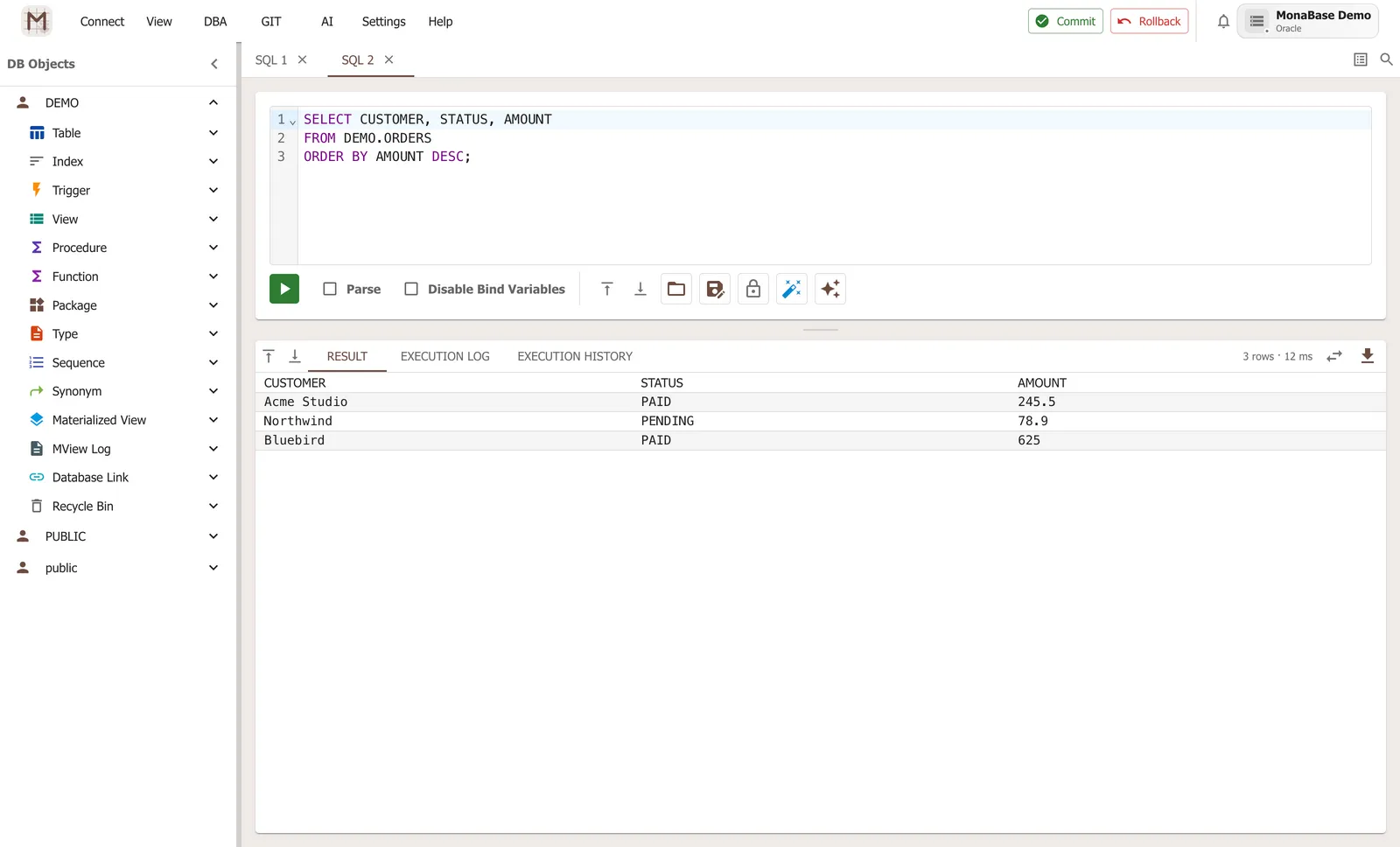
Run, inspect, and decide in one workspace
Section titled “Run, inspect, and decide in one workspace”DML issued against the main connection, including SQL-window execution and table-data editing, can be committed or rolled back from the top toolbar without closing the current tab. A normal connection shows Commit and Rollback; a warning-style status appears when an open transaction is detected. This does not commit every database connection at once: the buttons act on the current main connection.
Which changes are included?
Section titled “Which changes are included?”Typical operations include DML such as INSERT, UPDATE, and DELETE. SQL executed through the app’s main execution path shares the main connection and its transaction state. Metadata requests, background connections, and window-specific administrative SQL or DDL can use different execution paths and commit rules. Distinguish different windows on the same connection from separate background connections or connection profiles.
Use read-only connections for production inspection
Section titled “Use read-only connections for production inspection”Enable Connect as read-only at the bottom of the login screen before connecting. In read-only mode, the top Commit/Rollback buttons are replaced by a lock-icon read-only indicator. MonaBase filters submitted SQL, uses read-only transactions for Oracle and read-only session/transaction settings for PostgreSQL, and blocks routine execution and trace execution.
Why Rollback is not a universal undo
Section titled “Why Rollback is not a universal undo”Rollback only cancels changes still pending in the target transaction. It cannot undo a completed commit. Oracle DDL has implicit commit behavior, and MonaBase may commit an existing PostgreSQL main-connection transaction before certain DDL or privilege statements. Explicit COMMIT/ROLLBACK in SQL or independent commits inside routines also change what the top buttons can undo.
Checks before running SQL
Section titled “Checks before running SQL”In production, start with read-only mode and a minimally privileged account focused on SELECT. When an update is authorized, verify the connection, schema, WHERE clause, affected rows, and trigger side effects; avoid mixing DML and DDL. Resolve pending changes before switching tasks and check the result notification after committing or rolling back.
How to use this screen
Section titled “How to use this screen”- Check the target, environment label, and database account. Connect normally for authorized updates, or enable the read-only connection checkbox when you only need to inspect data.
- In a normal connection, run a carefully scoped
INSERT,UPDATE, orDELETEin an SQL or table-data window, then review the results, affected row count, and WHERE clause. - If the top toolbar shows a pending transaction, it still requires a decision. Confirm that operations in different windows belong to the same main connection.
- Click Commit to retain changes or Rollback to cancel them, and check the completion notification.
- Query the data again if needed. DDL and administrative actions have different commit behavior and must not be assumed reversible with this workflow.
Top toolbar: transaction controls
Section titled “Top toolbar: transaction controls”These buttons and the transaction indicator appear on a normal connection and act on its main transaction.
| Action / setting | How to use it | Effect of changing or running it |
|---|---|---|
| Commit button | Click after reviewing the executed SQL or edited rows. | Commits pending changes on the main connection. A later Rollback cannot undo them. |
| Rollback button | Click when you want to discard changes before committing. | Rolls back pending changes in the main transaction, not changes already committed. |
| Pending transaction indicator | Look for the warning-colored status chip in the top bar. | Appears when the database driver reports an open transaction on the main connection. |
| Commit emphasis | Observe the Commit button styling when a transaction is pending. | Highlights that a decision may be needed; it does not verify affected rows or data correctness. |
| Result notification | Read the notification after clicking either button. | Reports a success or an error. Check it before proceeding with further work. |
| Per-connection scope | Confirm the current environment and connection badge first. | Acts on the current database connection; it is not a commit-all function across profiles. |
Windows: execute DML and inspect the result
Section titled “Windows: execute DML and inspect the result”Understand which actions use the main SQL execution path and which do not.
| Action / setting | How to use it | Effect of changing or running it |
|---|---|---|
| UPDATE in an SQL window | Execute an UPDATE with a carefully checked WHERE clause. | Creates pending changes in a normal connection until committed, subject to SQL and database behavior. |
| INSERT / DELETE | Review the target rows and criteria before execution. | Successful DML may still be pending and reversible. Verify trigger side effects separately. |
| Edit table data | Use the table-data editor and inspect execution results. | Edits executed via the main SQL path are controlled by the top toolbar; typing in a field is not a commit. |
| Affected rows and verification | Check the reported row count, and query again as necessary. | Helps catch unexpectedly broad updates; it is not an automatic correctness guarantee. |
| Work across tabs | Track DML issued from multiple tabs on the same connection. | Pending work sharing the main connection is affected by the same Commit/Rollback decision. |
| DDL and admin SQL | Separate CREATE/ALTER/DROP and administration from ordinary DML. | These operations may commit automatically or use separate connections; top Rollback is not a universal undo. |
Connection screen: read-only mode
Section titled “Connection screen: read-only mode”For production inspection, combine read-only connection mode with database privileges that do not permit writes.
| Action / setting | How to use it | Effect of changing or running it |
|---|---|---|
| Connect as read-only checkbox | Enable the checkbox at the bottom of the login screen before connecting. | Marks the connection read-only and restricts SQL execution and certain editing or administration actions. |
| Switch to normal mode | Use a normal connection only when changes are authorized. | Removing the application-level restriction makes database-permitted write operations possible again. |
| Save connection profile | Choose save/overwrite when you want to retain the settings. | Stores the profile including the read-only option; it does not change database account privileges. |
| Read-only toolbar indicator | Verify the lock icon and read-only label after connecting. | Replaces the normal Commit and Rollback controls in the top bar. |
| Oracle read-only connection | Connect with a non-SYS account and run permitted read queries. | SYS/SYSDBA connections are rejected in this mode; permitted reads use read-only transactions. |
| PostgreSQL read-only connection | Execute permitted queries after connecting read-only. | Uses the session’s read-only default and BEGIN READ ONLY transactions to reject writes at the database level. |
Read-only restrictions and caveats
Section titled “Read-only restrictions and caveats”Read-only mode is an accident-prevention measure, not a substitute for database access control.
| Action / setting | How to use it | Effect of changing or running it |
|---|---|---|
| SELECT and WITH queries | Run read queries, noting that syntax and called functions are inspected. | Allowed reads pass application checks; not every SELECT expression is accepted. |
| DML / DDL execution | Attempt to run a write or definition statement while read-only. | Write statements are blocked rather than executed normally. |
| Stored routines and trace | Open the routine or trace functionality. | Execution is restricted in read-only mode because it may have side effects. |
| Functions inside SELECT | Be cautious about user functions and external connections. | SQL filtering is not proof of complete safety; database permissions remain essential. |
| Least-privilege account | Use an account whose database grants are primarily read access. | Reduces the impact of errors across applications; keep auditing and backups in place. |
Oracle / PostgreSQL / MySQL: transaction differences
Section titled “Oracle / PostgreSQL / MySQL: transaction differences”Review both database behavior and MonaBase’s implementation.
| Action / setting | How to use it | Effect of changing or running it |
|---|---|---|
| Oracle: ordinary DML | Run INSERT/UPDATE/DELETE on the main connection. | Top buttons control pending changes; the indicator uses the Oracle driver transaction state. |
| Oracle: implicit DDL commits | Avoid running DDL while DML remains pending. | DDL can implicitly commit prior changes; a later Rollback cannot undo them. |
| PostgreSQL: DML and BEGIN | Run DML on the main connection. | MonaBase begins a transaction as needed and uses the top controls to commit or roll it back. |
| PostgreSQL: certain DDL | Check pending changes before CREATE/ALTER/DROP on the main connection. | The app commits an existing transaction before certain DDL/privilege statements, so earlier DML may become permanent. |
| PostgreSQL: after an error | Inspect the error and pending state. | The app may protect individual SQL with savepoints; always review the overall transaction state after failure. |
| MySQL: InnoDB DML | Run INSERT/UPDATE/DELETE on the main connection, then use Commit or Rollback. | Manual transaction control keeps edits pending. A plain SELECT does not activate the pending-write buttons; background metadata reads do not commit the main connection. |
| MySQL: implicit DDL commits | Check pending edits before CREATE/ALTER/DROP or account/privilege changes. | These statements can commit preceding DML, even before a DDL attempt fails. Rollback cannot undo committed changes or DDL. Nontransactional tables are outside transactional editing support. |
| MySQL: after an error | Review the error and actual transaction state before deciding to continue or roll back. | MonaBase does not automatically rerun SQL or roll back the entire transaction. MySQL itself may roll back a statement or a transaction, depending on the error. |
Production use: review checklist
Section titled “Production use: review checklist”Operational guidance for separating inspection from authorized updates.
| Action / setting | How to use it | Effect of changing or running it |
|---|---|---|
| Read-only investigation | Enable read-only mode and use a database account without write grants. | Layers app and database restrictions to reduce accidental writes; does not eliminate all risk. |
| Verify the target | Check connection badge, schema, WHERE clause, and expected row count. | Reduces the risk of changing the wrong environment or too many rows. |
| Review before commit | Inspect results, affected-row counts, and verification SELECTs. | Lets you choose Rollback before committing if the result is unexpected. |
| Avoid DDL while pending | Keep schema changes separate from pending DML. | Helps prevent implicit Oracle commits or the app’s PostgreSQL pre-DDL commit from finalizing changes. |
| Resolve each unit of work | Choose Commit or Rollback explicitly and check the notification. | Avoids ambiguity from leaving transactions open when switching tasks or disconnecting. |
| Permissions, audit, backup | Maintain independent grants, logging, and recovery procedures. | Provides safeguards beyond the application read-only setting. |
Database-specific behavior
Section titled “Database-specific behavior”Oracle
Section titled “Oracle”Ordinary DML uses the main Oracle connection transaction, which the top Commit/Rollback controls. Oracle DDL such as CREATE, ALTER, or DROP performs implicit commits and can commit earlier pending DML. In read-only mode, MonaBase checks the SQL and executes allowed reads within read-only transactions. Read-only connections using SYS or SYSDBA are rejected.
PostgreSQL
Section titled “PostgreSQL”For ordinary DML, MonaBase starts BEGIN on the main PostgreSQL connection as needed and completes the transaction through the top Commit/Rollback controls. Before certain main-connection DDL or privilege changes, the application explicitly commits an existing transaction. Read-only mode sets the session default to read-only and executes allowed SQL inside BEGIN READ ONLY.
MySQL uses manual Commit/Rollback for the main InnoDB connection and observes native transaction state. A plain SELECT does not light up the pending-write buttons. DDL and account/privilege changes can implicitly commit earlier work, including before a DDL attempt fails. Rollback cannot undo committed DDL. Errors are not automatically rerun or followed by an application-wide rollback; MySQL itself may roll back a statement or transaction.