
Stored-program regression tests
A regression test checks that a source change has not broken previously checked behavior. Save a verified execution as a case, edit arguments and expectations, and run it again on a test database. Oracle package subprograms are supported alongside procedures and functions.
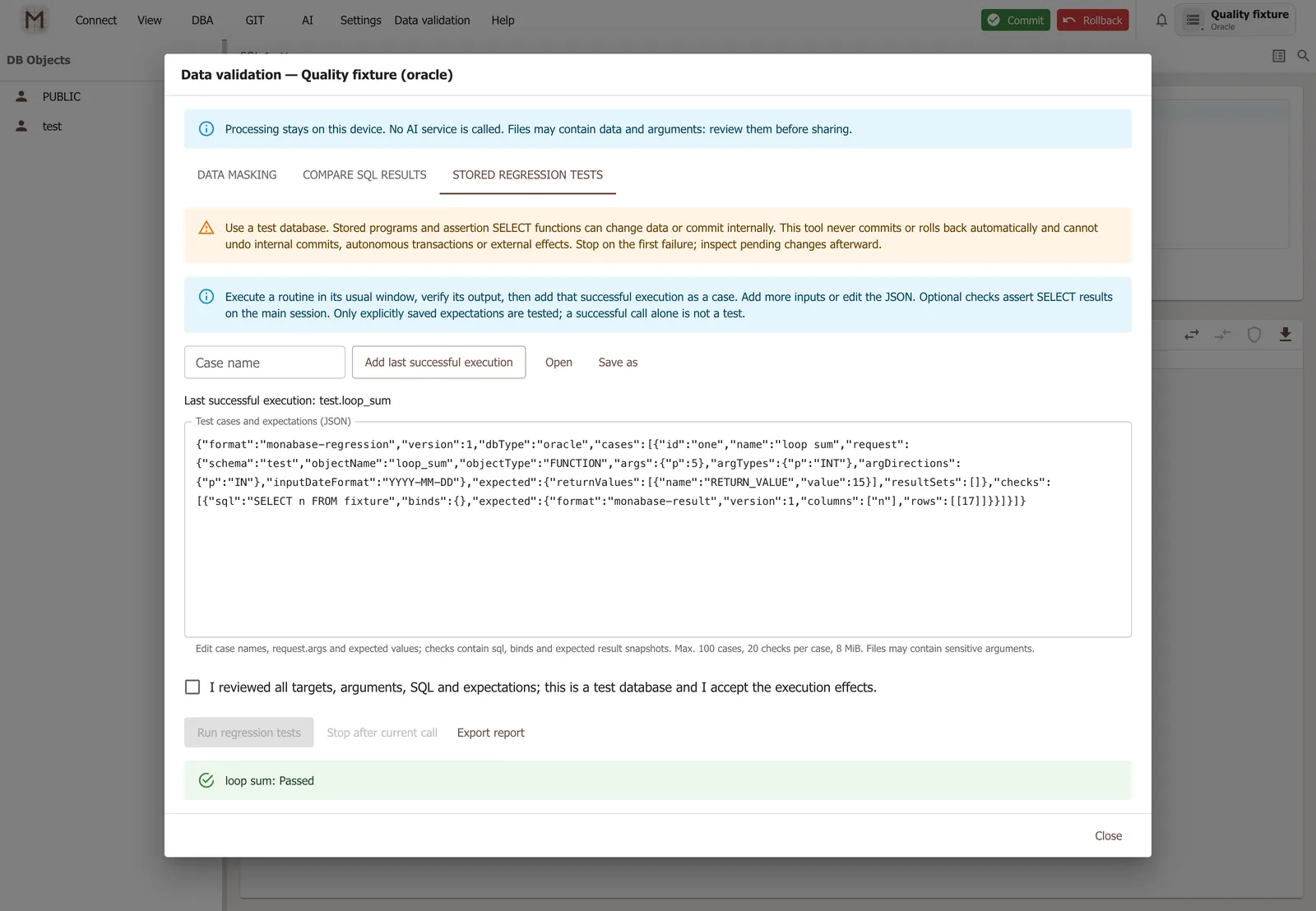
Controls and settings
Section titled “Controls and settings”Open this tool from Data validation in the top menu. Review the settings below before running it.
| Control or setting | How to use it | What happens |
|---|---|---|
| Case name / Add last successful execution | Capture a reviewed execution from a stored-program or Oracle package window. | Retains arguments, overload/subprogram identity and expected values. A call succeeding alone does not prove correctness. |
| Test cases and expectations (JSON) | Edit names, request.args, expected outputs and checks; each case needs a distinct id. | At most 100 cases, 20 checks per case and an 8 MiB suite. |
| Return / OUT values and result sets | Keep independently verified values as the baseline. | Return values are compared strictly. Row sets ignore row order and count duplicates. Timings and console text are not assertions. |
| Verification SELECTs (checks) | Specify sql, binds and an expected MonaBase result snapshot. | Runs on the main session to inspect pending updates. A case with no return values or result sets requires a check. SELECT functions may still have effects. |
| Open / Save as | Explicitly save and open suite JSON files. | Opening a file or launching MonaBase never automatically executes a suite. Imported suites must match the connected database product. |
| Confirm / Run regression tests | Review the connection, schemas, programs, arguments, SQL and expectations before confirming. | Runs sequentially, stops at the first failure/error and marks later cases not run. No automatic retry. |
| Stop after current call / Export report | Request a stop or save outcomes with actual failure evidence. | Does not cancel an already submitted call or undo its effects. On-screen evidence is limited to 8,000 characters. |
Prepare repeatable inputs
Section titled “Prepare repeatable inputs”Test ordinary, zero, NULL and boundary inputs where applicable. Prepare the same data state before each run. Do not replace expectations with unverified outputs after a source edit. See stored programs and packages for normal execution.
Database behavior and definition changes
Section titled “Database behavior and definition changes”Oracle programs may commit internally or use autonomous transactions. PostgreSQL CALL can commit through native behavior when no transaction is already open. MySQL cases retain the reviewed routine fingerprint: after an intentional definition change, update only the request fingerprint from a reviewed execution while preserving the expected values. No tool can undo internal commits or external effects. See transaction control.
How to use this screen
Section titled “How to use this screen”- Run a routine in its usual window and independently verify its return/OUT values or result sets.
- Open Data validation → Stored regression tests, name the case and add the last successful execution. Add boundary inputs or edit the JSON.
- Save or load the suite, prepare a known test state, review every target, argument and assertion, then confirm and run.
- Inspect pass/fail/error/not-run outcomes and actual values. Check pending updates and explicitly Commit or Rollback as appropriate.