
Packages
Oracle packages have a specification (PACKAGE) and implementation body (PACKAGE BODY). Existing objects show Source, Version control and Information; a recorded body also offers Trace analysis. The tables below explain the controls, member selection and argument settings, distinguishing DB changes from source history and trace replay.
AI assistance is available for this feature. See the AI assistant guide for details.
After independently verifying an execution, save its arguments and expectations in stored-program regression tests to check later source changes.
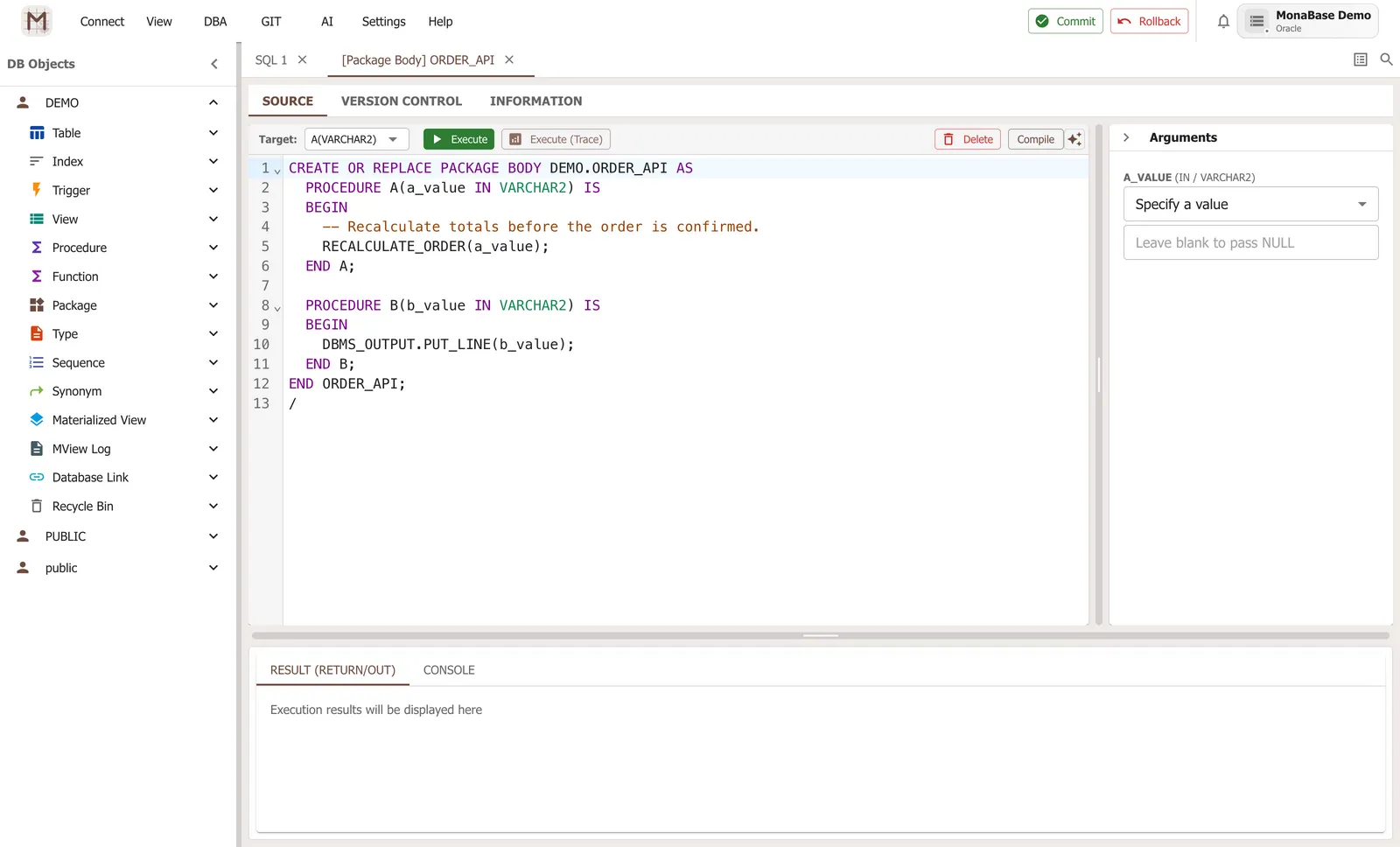
Choose the specification or body first
Section titled “Choose the specification or body first”Oracle-only. Existing packages have Source, Version control and Information; a body with a recording also offers Trace analysis. The specification and body are separate editing targets, not two interchangeable source drafts.
| Button / setting | How to use it | What changes |
|---|---|---|
| Specification (PACKAGE) | Open the specification from the package’s sidebar entries. | Edits the public declarations. This screen does not show member execution controls or trace acquisition for the specification. |
| Body (PACKAGE BODY) | Open the body to edit implementation and run a supported public member. | Adds target selection and argument/result panels. Member availability comes from the loaded package metadata, not every private local routine in the source. |
| New specification / body | Start the selected kind with its template and edit the package name in that schema. Create the required specification before a matching body. | Initially exposes source editing; compile success identifies the newly created object. Creating a body does not automatically create or synchronize its specification. |
| Validity of both parts | Inspect PACKAGE and PACKAGE BODY status in Information before executing members. | A valid specification alone is insufficient for body execution. Invalid status prompts compilation/diagnostic review rather than treating the package as ready. |
Source tab — edit and compile the selected part
Section titled “Source tab — edit and compile the selected part”Edit only the opened specification or body. Public declarations and implementations must remain compatible; saving one part is not a complete migration of the whole package and its callers.
| Button / setting | How to use it | What changes |
|---|---|---|
| Source editor / asterisk | Edit the full definition with line numbers and completion for SQL/PLSQL, DB objects and local symbols. | Changes the draft. The Source asterisk signals a difference from the loaded/compiled baseline; it is not an automatic DB save or Git commit. |
| Compile / target validation | Keep the opened schema/name and PACKAGE versus PACKAGE BODY kind, then click Compile. | Executes the definition on the main DB connection and checks compilation diagnostics. A different target/kind is rejected; success clears trace replay and reloads the existing object. |
| Errors / warnings | Read marked source positions and the lower console after compilation. | Compilation errors block a clean success. Warnings are displayed separately and can remain after successful compilation; checking only a success message is insufficient for a full review. |
| Definition load failure / Retry | Use Retry in the definition error and wait for source/status metadata to load. | Reloads required metadata while preserving an existing edited draft. Normal member execution requires both valid definition state and matching loaded arguments. |
| Ask AI to code | Configure AI, open the source AI button and describe the intended specification/body change and relevant references. | Prepares coding assistance for the selected part. Review generated/applied source, check the other part and compile deliberately; AI does not directly connect to the DB. |
| Delete specification / body | Use Delete only after checking which part is open and the confirmation. | Issues DROP PACKAGE or DROP PACKAGE BODY. Deleting a package member is not what this button does; trace/Git cleanup is attempted separately from DB deletion. |
| Right panel / panel sizes | On the body, open/close the argument panel; drag the boundaries to adjust source/result space. | Changes layout only. Execution, compilation and AI preparation disable conflicting actions while busy. |
| After compilation / record source | Inspect the refreshed object and record the reviewed specification/body from Version control when needed. | DB compilation and Git recording are separate. Do not assume both parts or their Git history were synchronized just because one compile succeeded. |
Source tab — select a member and set arguments
Section titled “Source tab — select a member and set arguments”Available on an existing body. The target label includes argument types so overloaded members remain distinguishable; the selected member’s internal identity is used to load its exact arguments.
| Button / setting | How to use it | What changes |
|---|---|---|
| Target / overloaded members | Choose the intended member, such as HELLO(NUMBER) versus HELLO(VARCHAR2), rather than relying only on the name. | Loads that member’s arguments and scrolls toward its source. Switching targets resets input modes/values, return results and current trace replay to avoid reusing another member’s state. |
| Supported argument / return types | Inspect types before execution. This panel supports scalar families such as NUMBER, VARCHAR2, DATE and TIMESTAMP. | Unsupported object/record/collection, cursor or other types can block execution, including unsupported return types. Use the SQL window for a separately prepared invocation. |
| Specify a value / NULL | Enter IN or IN/OUT values; leave a field empty only when SQL NULL is intended. | Blank/missing input becomes NULL. Whitespace and the text null are explicit values, not a request to use a parameter default. |
| Use default / date input | For a defaulted argument select default mode; for an explicit date use the input example or calendar. | Default mode disables the input and omits that argument. Date input is converted with type information; supported numeric fields are checked before execution. |
| Argument failure / Retry | Use Retry for the currently selected target if its argument load fails. | Keeps execution/trace disabled until the selected member’s arguments load successfully. It does not silently treat a read failure as a no-argument routine. |
| Execute | After verifying the target, validity and inputs, click Execute. | Runs the DB-installed member with typed arguments, not an uncompiled draft. Package initialization/state and member code can affect results or data. |
| Result (RETURN / OUT) | Read the lower results after a function/procedure completes. Pure OUT and function return values are outputs, not input fields. | Shows available returned/output values. An empty output list does not prove that the routine made no changes. |
| Console / clear log | Read DBMS_OUTPUT, compilation diagnostics and execution errors; use the trash icon only when finished with the current analysis. | In the package window, clear log also clears the current replay and trace timestamp display, hiding its trace tab. It does not undo DB work or mean that saved trace files were deleted. |
Trace analysis tab — record and replay a member
Section titled “Trace analysis tab — record and replay a member”Available only on a body with trace data. Acquisition and replay are different operations. For detailed steps, supported programs and limitations, see the Trace analysis guide.
| Button / setting | How to use it | What changes |
|---|---|---|
| Execute trace | Choose a member and inputs on Source, then use Execute trace in a suitable test environment. | Executes the supported instrumented program and records its steps/values. It can have real side effects, unlike replaying an existing recording. |
| Compile edits first | Resolve the Source asterisk before acquiring a trace; inspect specification/body validity and argument readiness. | Tracing an unsaved package draft is rejected. Acquisition uses the DB-saved definition, avoiding a misleading recording for uncompiled text. |
| Recording identity / timestamp | Check the selected member, analysis time and recorded arguments before investigating. | Target changes clear current playback. A saved recording is restored only when the app can associate it safely; do not assume all overloads share one compatible trace. |
| Play / Resume | Use Play to start or Resume after a replay pause. | Moves through recorded execution without invoking the package again. A freshness check can reject an old recording after definition changes. |
| Step into / Stop | Step through captured events or stop replay from the debug toolbar. | Changes the analysis position only. Stopping replay is not rollback or cancellation of the original DB execution. |
| Breakpoints / conditions | Toggle a margin breakpoint and right-click for hit count or variable comparison conditions. | Controls where playback pauses when recorded events match; it does not change the member’s stored code. |
| Variables / recorded arguments / search | Use right-side variables and arguments, any available Conditions tab, and source search while replaying. | Shows recorded snapshots and inputs. Missing values are not proof of NULL; a source-text match is not proof that a line executed. |
| Ask AI to analyze the trace | With AI configured, use the trace AI button, review prepared context and state the observed issue. Confirm large-data requests when offered. | Prepares trace evidence and current source for AI reasoning. The AI does not attach to a DB debugger or execute package members directly. |
Version control tab — specification/body source history
Section titled “Version control tab — specification/body source history”Set up local Git before recording. The shared view receives the currently opened PACKAGE or PACKAGE BODY source, so check both object kind and draft state.
| Button / setting | How to use it | What changes |
|---|---|---|
| Current source / copy | Inspect/copy the current editor text for the selected part. | May include uncompiled edits. Copying a specification does not include its body or restore package data/state. |
| Fetch latest source | Use the refresh icon to reload source/status/member information. | Preserves an existing edited draft and retains the selected member when possible. Refresh does not silently discard all edits. |
| Record / commit message | Record the reviewed part with a useful message; configured AI can help summarize its changes. | Creates a local source-history commit. Record specification/body consistently when an interface change needs both; committing does not compile either part into the DB. |
| History / revision comparison / schema changes | Select a revision, compare two revisions or review schema-level source changes. | Shows source differences without executing them. Review the public interface and implementation together, not only a member’s changed lines. |
| Open recovery SQL | Select the intended version and open its SQL for review. | Prepares SQL rather than automatically restoring a package. Plan specification/body order and dependent objects; it does not reverse prior member data changes. |
| Push / refresh history | Check the configured repository/remote before Push; reload Git state when needed. | Sends source commits or reads repository state. It does not deploy both package parts to another Oracle database. |
Information tab — status, members and dependencies
Section titled “Information tab — status, members and dependencies”Both specification and body windows expose the package-level information view. This is read-only metadata, separate from editing and from the runtime argument values.
| Button / setting | How to use it | What changes |
|---|---|---|
| Refresh / Retry | Use the outlined refresh button or Retry after an information error. | Reloads catalog information without executing a member. A failed retrieval is shown as an error, not as an empty package. |
| PACKAGE / PACKAGE BODY status | Read each displayed status and AUTHID value for the package. | Distinguishes specification/body validity and execution-rights mode. Viewing the values does not change rights or compile an invalid body. |
| Member names / overloads | Inspect members listed with their argument-type signatures. | Lets you distinguish same-name declarations. This catalog list is not a source-level inventory of every private helper in the body. |
| Parameters / return / defaults | Read name/type, IN/OUT, function return type and default availability for each member. | Describes the declared contract, not runtime values. A user-defined type may be displayed even when the execution panel cannot handle it; default availability is not the full default expression. |
| References / dependents | Read each object’s owner, name and type before changing the public interface or deleting the package. | Provides visible direct dependencies for impact review. It does not automatically fix callers after a signature change. |
| Dependency scope | Treat the lists as catalog-visible direct links, not all external calls or a complete recursive graph. | Dynamic SQL, application calls and inaccessible objects can be absent. An empty list does not prove that a package is safe to delete. |
Example: change an overloaded package member
Section titled “Example: change an overloaded package member”Inspect specification and body together, record their current source, and review member signatures in Information. Modify the intended implementation, compile the necessary parts and inspect status/diagnostics. On the body, select HELLO(NUMBER) or HELLO(VARCHAR2) deliberately, re-enter the inputs and verify RETURN/OUT and DBMS_OUTPUT. A successful compile and a successful member run are separate checks; record the reviewed specification/body after verification.
From package execution to trace replay
Section titled “From package execution to trace replay”Use representative inputs in a dedicated environment and compile pending edits before acquisition. Confirm the exact member, acquire the trace, inspect its timestamp/arguments, then replay with breakpoints and recorded values. Switching members or clearing package logs resets the current replay; a source change also needs a new recording for verification. For detailed acquisition/replay steps and supported-program limitations, see the Trace analysis guide.
State, data changes and AI assistance
Section titled “State, data changes and AI assistance”Package initialization and session state can influence repeated member runs. Running or recording a trace can have side effects; replay only inspects an existing run. Oracle DDL can implicitly commit pending work, and member code can perform its own transaction control or external work. Review the actual environment and results. Source AI assistance and trace AI investigation use the configured provider and prepared context; generated code still needs your review/compilation, and AI receives no direct DB connection.
How to use this screen
Section titled “How to use this screen”- Open the specification/body as intended and inspect both statuses, member signatures and dependencies in Information. Preserve current source before changing it.
- Compile the intended definitions, select the exact member on the body, load its arguments, choose explicit values/NULL/defaults and execute in a suitable environment.
- Inspect outputs/diagnostics, acquire and replay a fresh trace when needed, and record the reviewed specification/body in Git. Use the trace guide for detailed debugging.
Database-specific behavior
Section titled “Database-specific behavior”Oracle
Section titled “Oracle”Package state and initialization can influence repeated executions in a session. A valid specification does not guarantee a valid body.