
Synonyms
A synonym provides an alternative name for another object. Confirm the owner and target instead of assuming the alias points to an object in the current schema.
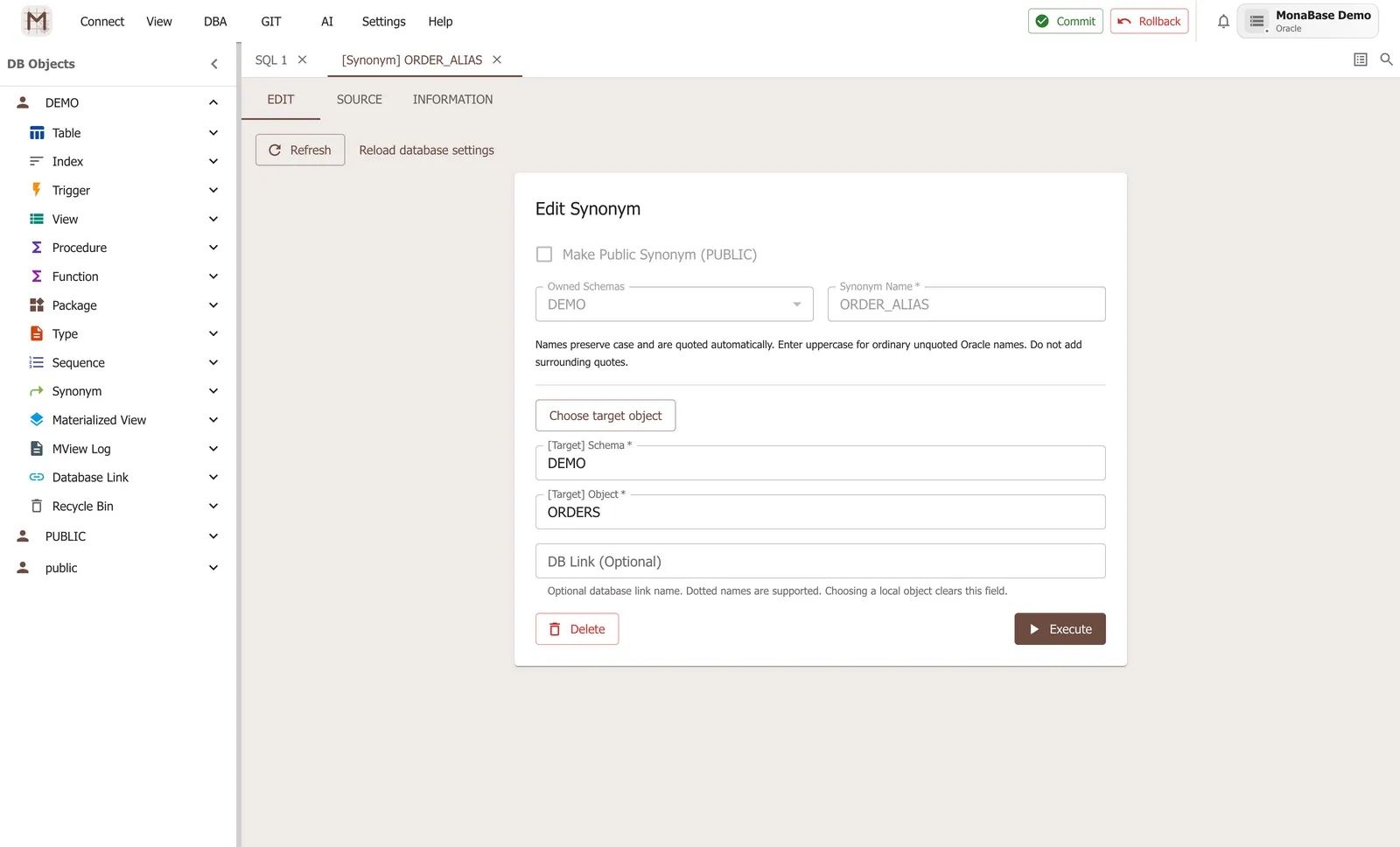
Common controls for an existing synonym
Section titled “Common controls for an existing synonym”Refresh and discard controls appear above existing-synonym tabs. Unsaved edits are separate from changes in the database.
| Control or setting | How to use | Result or effect |
|---|---|---|
| Refresh | Reload the database definition and saved DDL. | Updates unedited fields; pending local edits are normally preserved unless explicitly discarded. |
| Discard edits | Confirm that pending edits should be discarded. | Replaces local edits with the freshly loaded database definition. |
| Edit / Source / Information | Switch tabs; Information is absent when creating a new synonym. | Changes the displayed tools only; switching tabs never modifies the database. |
| Load error / Retry | Retry when loading the current definition fails. | Operations remain unavailable until the definition is ready; saved-DDL errors are shown separately. |
Edit tab: identity, target and execution
Section titled “Edit tab: identity, target and execution”Creation and existing-edit modes expose different fields. The app builds a SQL preview from the form; Execute applies it to the database.
| Control or setting | How to use | Result or effect |
|---|---|---|
| Public synonym | Toggle only when creating; fixed for existing synonyms. | Creates a PUBLIC synonym with wider name-resolution scope and an extra confirmation; it does not grant target privileges. |
| Owner schema | Choose the owner for a new private synonym; locked for PUBLIC or existing entries. | Selects the namespace where the synonym will be created; appropriate privileges are required. |
| Synonym name | Enter a name when creating; existing names cannot be edited. | Sets the alias name; a pre-existing name causes the operation to stop before execution. |
| Choose target | Pick one object in the object-selection dialog. | Fills in target schema and object name, and clears the database-link field. |
| Target schema | Enter the target schema; it can be omitted in some database-link cases. | Changes the qualified target name; SQL preview validates the entered definition. |
| Target object | Enter the target object name (required). | Changes what the alias points to; target existence and privileges still matter when used. |
| DB link (optional) | Enter a database-link name for a remote target. | Adds an @link suffix to the generated SQL; ordinary information loading does not automatically connect remotely. |
| Execute | Click when the generated SQL is valid. | Runs CREATE for new aliases or CREATE OR REPLACE for existing changes; a no-change edit does not execute SQL. |
| Delete | Available only for an existing synonym and requires confirmation. | Runs DROP SYNONYM or DROP PUBLIC SYNONYM; closes the tab after success. |
Source tab: saved DDL and planned SQL
Section titled “Source tab: saved DDL and planned SQL”Inspect read-only text for the saved definition and for SQL generated from the current form.
| Control or setting | How to use | Result or effect |
|---|---|---|
| Saved DDL | Review the saved-source panel for an existing synonym; it is absent for new entries. | Shows retrieved database-source text, not a directly editable SQL editor. |
| Planned SQL | Change form fields and inspect the generated statement. | Displays SQL regenerated from current inputs; viewing or copying it does not change the database. |
| Copy | Use the copy button on either source panel. | Copies saved DDL or planned SQL to the clipboard; failures are reported. |
| Source fetch error / Retry | Retry after failure to retrieve saved DDL. | Attempts another fetch; invalid planned SQL also prevents Execute. |
Information tab: target and dependencies
Section titled “Information tab: target and dependencies”This tab appears only for existing synonyms. It inspects the saved target and its directly reported dependents.
| Control or setting | How to use | Result or effect |
|---|---|---|
| Refresh information | Click Refresh inside the Information tab. | Reloads target-resolution status and dependencies without saving form edits. |
| Owner and target | Inspect owner, synonym name, target schema/object and optional DB link. | Shows the saved database definition, not unsaved edits in the form. |
| Target status and types | Review the resolved object type and status when available. | Shows an unavailable or unknown state when the target cannot be resolved. |
| Open target | Use Open target for supported local object types. | Opens the target window; this action is not offered for database-link targets. |
| Check remote | For a DB-link target, confirm the explicit remote inspection. | Performs an opt-in remote target check; network conditions and privileges may cause failure. |
| Dependent objects | Inspect the owner, name and type list. | Shows returned direct dependencies; it is not an exhaustive map of indirect dependencies. |
| Information error / Retry | Retry from the Information tab error message. | Requests target status and dependencies again; it does not alter the synonym. |
Concurrency checks and edit protection
Section titled “Concurrency checks and edit protection”Before updating or deleting an existing synonym, the app re-reads its definition and warns about concurrent changes.
| Control or setting | How to use | Result or effect |
|---|---|---|
| Detect external changes | Appears when the current database definition differs from the loaded baseline during save or delete. | Stops the pending update or delete and displays the conflict. |
| Keep local changes | Click the button in the conflict warning. | Preserves entered values while updating the comparison baseline; it does not save immediately. |
| No changes | Execute without changing the loaded definition. | Reports that there are no changes and avoids unnecessary SQL execution. |
| Privileges and target validity | Review PUBLIC scope, cross-owner access and DB-link targets before execution. | Valid preview and prechecks do not guarantee SQL execution: database privileges and target rules still apply. |
Console: operation results
Section titled “Console: operation results”Successful SQL operations add entries; failed operations expose errors and their associated SQL.
| Control or setting | How to use | Result or effect |
|---|---|---|
| Operation log | Review timestamps, result messages, SQL and any error lines. | Helps identify which statement ran; the console opens automatically on failure. |
| Clear log | Click the clear icon in the console. | Clears in-window log entries without deleting database objects or definitions. |
| Close / Resize | Click Close or drag the console boundary. | Changes only console visibility or width, not database state. |
How to use this screen
Section titled “How to use this screen”- Open a synonym and inspect its owner, target name and database-link reference when present.
- Check the actual target and required privileges before changing the alias.
- Save a supported definition change and refresh the information to verify resolution.
Database-specific behavior
Section titled “Database-specific behavior”Oracle
Section titled “Oracle”A synonym does not grant access to the target. Public and private synonyms have different scopes and privileges.