
Types
TYPE windows have Source, Version control and Information tabs. Type changes can affect table columns, stored programs and existing data. Oracle compiles the opened TYPE declaration; PostgreSQL plans supported additions to ENUM/standalone composite types. The tables below explain controls, confirmation steps and the scope of each view.
AI assistance is available for this feature. See the AI assistant guide for details.
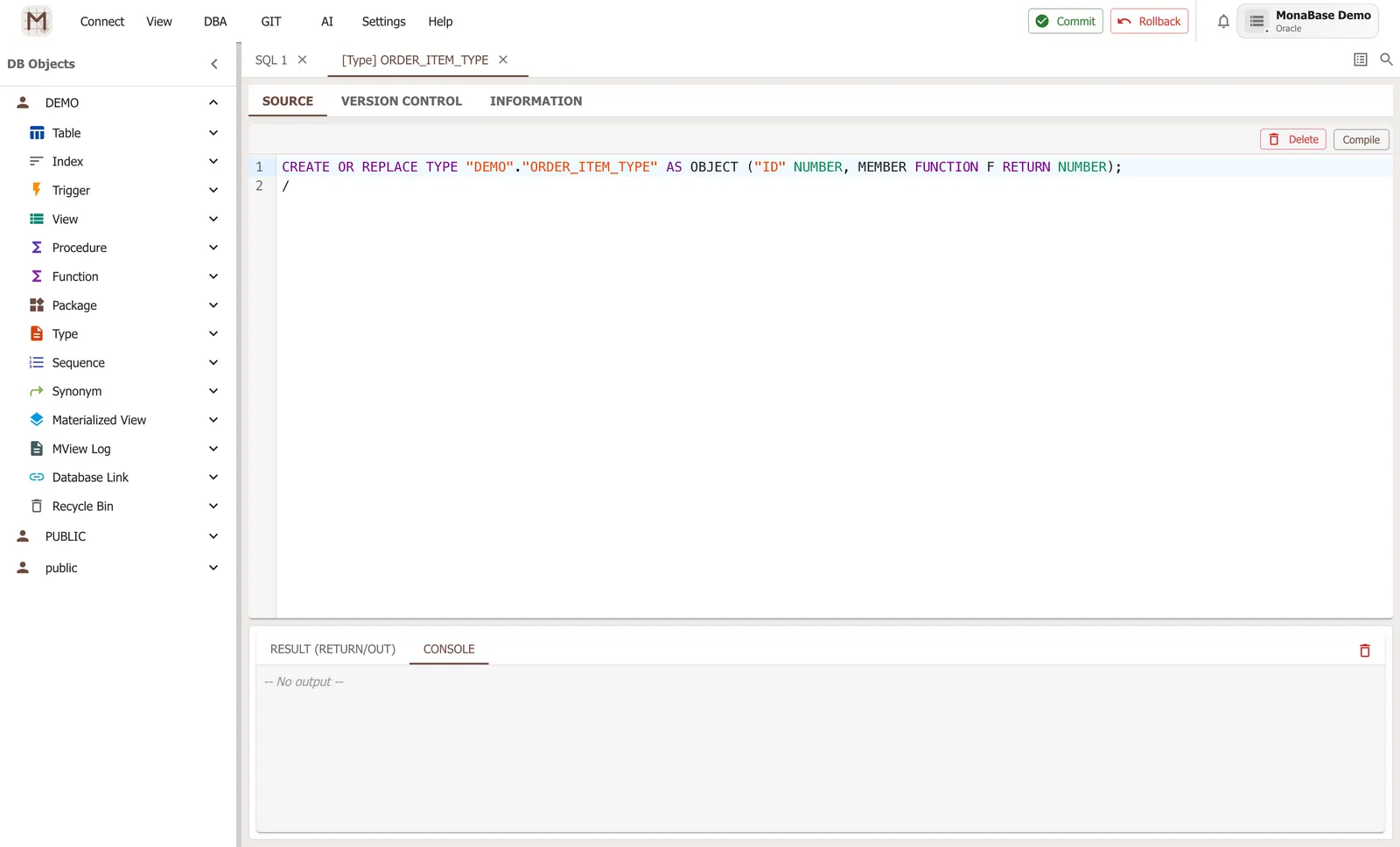
Source tab — edit the opened type
Section titled “Source tab — edit the opened type”Both database versions have Source, Version control and Information tabs. This window maintains the opened type; the CREATE text is a definition to review, not a generic new-type creation form or a routine execution window.
| Button / setting | How to use it | What changes |
|---|---|---|
| Source editor / asterisk | Edit the displayed definition with SQL highlighting, line numbers and schema completion. | Changes an editing draft; the Source asterisk means it differs from the loaded/saved baseline. It is not an automatic DB save. |
| Target name / statement scope | Keep the opened schema/name and use the supported CREATE TYPE form for that database. | Rejects target changes and unsupported/multiple statements before applying a definition. PostgreSQL also refuses type-kind changes; use a separately reviewed SQL workflow for other migrations. |
| Compile / Save (Execute) | Oracle: click Compile. PostgreSQL: click Save (Execute) and inspect the generated change dialog when changes exist. | Oracle executes the TYPE definition and checks diagnostics. PostgreSQL plans supported ALTER changes instead of issuing CREATE against the existing type. |
| Source load error / Retry | Use Retry after a definition/metadata read fails; wait for a successful load before applying or deleting. | Keeps apply/delete disabled while the source is unready and preserves an existing edited draft during reload. A failed read is not an empty type. |
| Delete type | Click Delete, review the exact target and dependent objects, then confirm deliberately. | Issues DROP TYPE; PostgreSQL explicitly uses RESTRICT. It does not silently add FORCE/CASCADE or remove and recreate dependents; Git cleanup is a separate operation. |
| Console / error line / clear | Read diagnostics in the lower console, click a line-numbered message to jump to source, or use the trash icon to clear messages. | Helps locate problems. Clearing messages does not roll back applied DDL; this type window does not execute methods to populate RETURN/OUT results. |
| During an operation / confirmation | Wait for active reads/execution; close a PostgreSQL change preview before returning to source editing. | Locks conflicting controls while busy and prevents editing the reviewed source while its change dialog is open. |
Source tab — Oracle TYPE scope
Section titled “Source tab — Oracle TYPE scope”Oracle source is fetched with DBMS_METADATA for TYPE. TYPE BODY is inspected separately in Information; the source compiler does not accept a TYPE BODY definition.
| Button / setting | How to use it | What changes |
|---|---|---|
| Object / collection definition | Review the fetched TYPE declaration, including attributes, method declarations or collection element definition as applicable. | Compiles the opened TYPE declaration. Dependents and existing stored data can restrict a replacement; the app does not automatically rebuild all users of the type. |
| TYPE BODY is read-only here | Read the body and its diagnostics in Information when the type has one. | Does not compile the body from the TYPE editor. Body implementation changes need a separately reviewed SQL operation. |
| Compilation diagnostics / status | Review error/warning markers and TYPE/TYPE BODY status after compilation. | Errors prevent treating the definition as successfully saved to Git. Warnings and body diagnostics remain distinct; a valid TYPE does not prove a valid body. |
| DDL result versus Git result | Check DB diagnostics first, then any Git failure message after a successful save. | A valid saved TYPE is read back and recording is attempted. A Git failure does not undo DB DDL, and Oracle DDL can implicitly commit earlier work. |
Source tab — PostgreSQL additions and limits
Section titled “Source tab — PostgreSQL additions and limits”This editor supports existing ENUM and standalone composite types. It reads a CREATE TYPE definition as the desired shape and infers only the additions below; it does not drop and recreate the type.
| Button / setting | How to use it | What changes |
|---|---|---|
| Add an ENUM label | Keep all existing labels in order and insert new quoted values at the intended positions in the definition. | Generates ALTER TYPE ADD VALUE, using BEFORE when needed. Existing values stay in their original order; the label text is a value, not an SQL expression. |
| Add composite attributes | Keep existing attribute names/types/order unchanged and append new attributes at the end. | Generates ALTER TYPE ADD ATTRIBUTE … RESTRICT. Adding a field can affect consumers; the DB can reject dependencies even when the change is additive. |
| Remove / rename / reorder / change types | Do not remove/rename existing ENUM values or rewrite existing composite attributes in this editor. | Rejects unsupported structural edits, including kind/identity changes and reordered existing items, rather than replacing the type destructively. |
| Domains / base / row / other types | Use this window for ENUM or standalone composite definitions, not every pg_type entry. | Domains, table row types, range/base and other unsupported kinds are not maintained here. A metadata/unsupported-kind error does not mean the object disappeared. |
| Definition syntax | Use one CREATE TYPE … AS ENUM (…) or CREATE TYPE … AS (…) statement for the same schema/name. | Parses desired labels/attributes and plans ALTER statements. It does not accept arbitrary ALTER/DROP scripts or CREATE OR REPLACE TYPE as a shortcut. |
| Unchanged definition | Save a definition with no supported differences only when you intend to verify/record the current state. | Performs no inferred ALTER and reads/records the current definition. It does not rebuild the type merely because Save was pressed. |
PostgreSQL change dialog — review, execute and retry
Section titled “PostgreSQL change dialog — review, execute and retry”Save with differences opens a numbered SQL plan. This is where additions are confirmed; the CREATE text itself is not run against the existing object.
| Button / setting | How to use it | What changes |
|---|---|---|
| Statement count / planned SQL | Inspect each ALTER statement and target in the change dialog. | Shows what will actually execute, including ENUM insertion positions and composite RESTRICT. No change is applied merely by opening the preview. |
| Execute / fresh recheck | Click Execute after review. If the plan changes, inspect the updated statements before confirming again. | Re-reads the current DB definition before execution. Concurrent changes produce a new plan instead of silently using stale statements. |
| Applied / failed / pending | Check the statement-by-statement status and completed/total counts after an error. | Stops after a failure; earlier applied DDL can remain under the app’s commit policy. Pending does not mean successful or automatically rolled back. |
| Review remaining changes | After partial failure, use the remaining-change review button when metadata is ready. | Builds a fresh plan from the requested source and current DB state, avoiding blind resend of the complete old plan. |
| Close | Close the dialog to return to editing; close/execute controls are locked during an active operation. | Keeps the requested draft without applying unexecuted SQL. Closing after a partial failure does not undo already applied additions. |
Version control tab — type source history
Section titled “Version control tab — type source history”Configure local Git before recording. The shared version-control view receives the type editor text; DB apply, local source recording and remote Push are separate operations.
| Button / setting | How to use it | What changes |
|---|---|---|
| Current source / copy | Inspect/copy current text and check whether Source has an asterisk. | May include unapplied edits. Copying CREATE text does not create or replace the DB type. |
| Fetch latest source | Use the source refresh icon after an external change or when validating saved state. | Reloads the saved baseline while preserving an existing edited draft. Refresh is not a command to discard all local edits. |
| Record / commit message | Record the reviewed definition with a useful message; configured AI can help summarize changes. | Records a local source version. Successful apply also attempts Git recording; a Git error is reported separately from an already successful DB save. |
| History / compare revisions / schema changes | Select history, compare two revisions or review changes across schema objects. | Shows definition differences without applying them. Include users of the type when reviewing impact; a source diff does not analyze every application consumer. |
| Open recovery SQL | Select an intended revision and inspect its SQL before running anything. | Does not automatically revert ENUM additions or dependent data. A historical CREATE definition can require a separate migration and must respect the editor’s supported-change limits. |
| Push / refresh history | Verify repository/remote settings and use Push or refresh Git state as needed. | Transfers source history or reads repository state. It does not apply the type to another database. |
Information tab — kind, members and dependencies
Section titled “Information tab — kind, members and dependencies”Information is read-only and DB-specific. Oracle can expose TYPE/TYPE BODY status, attributes, collections and methods; PostgreSQL exposes supported ENUM labels or composite attributes.
| Button / setting | How to use it | What changes |
|---|---|---|
| Refresh / Retry | Use the outlined refresh button or Retry on a metadata error. | Reloads information without compiling or changing the type. A failure is displayed as an error, not as an empty definition. |
| Kind / Oracle statuses | Read the kind; on Oracle inspect TYPE and any TYPE BODY status. Collection information can include element type and upper bound. | Describes the actual catalog kind. It is not a control for converting ENUM to composite or editing collection limits directly. |
| Attributes | Inspect attribute names/types in declaration order where provided. | Shows the type’s field layout, including available Oracle length/precision/type-owner details. Changing this table is not supported; use source within the supported scope. |
| ENUM values | Read the numbered PostgreSQL label list; quotes/escapes distinguish whitespace and special values. | Shows stored labels in their actual order, rather than alphabetically sorting them or silently trimming them. |
| Oracle methods | Inspect each method’s name/kind and parameter/result counts. | Summarizes declarations; this information view does not execute a method or replace a full argument/source review. |
| TYPE BODY source / diagnostics | When available, read the body and its error/warning messages below the information lists. | Keeps body diagnostics separate from the TYPE declaration editor. The body is read-only here. |
| References / dependents / scope | Read catalog-visible direct references and dependents before apply/delete. | Helps assess impact without claiming every indirect, dynamic-SQL or application reference. An empty list does not prove the type is unused. |
Example: add an ENUM value or composite field
Section titled “Example: add an ENUM value or composite field”For ENUM labels new/done, retain both and insert review at the intended position in the CREATE definition. Save (Execute), inspect ADD VALUE and its BEFORE position, then execute the reviewed plan. For a composite, leave existing fields unchanged and append the new name/type at the end. If a later statement fails, inspect completed/pending status and review the remaining changes from current DB state rather than resending the original list.
Oracle declaration and body review
Section titled “Oracle declaration and body review”Inspect Information first for type kind, attributes/methods, dependencies and any body. Edit only the opened TYPE declaration, compile, read diagnostics and recheck both TYPE and TYPE BODY status. A dependent column/routine or existing data can restrict evolution. Preserve the source and plan any required body/application changes separately; this window does not automatically execute a migration for all dependents.
DB apply, Git and partial success
Section titled “DB apply, Git and partial success”The console and PostgreSQL change dialog report DB outcomes; Git reports source-history recording separately. A Git failure does not mean DB DDL failed. Conversely, a partial plan is not complete just because some statements succeeded. Closing a dialog or clearing console text does not undo applied definitions. Verify the actual schema and application commit policy before planning recovery, especially Oracle implicit commits and additive PostgreSQL type changes.
How to use this screen
Section titled “How to use this screen”- Open the type and inspect Information for kind, attributes/labels, any Oracle body and direct dependencies. Preserve the current source before changes.
- Edit within the supported scope. On Oracle compile the TYPE declaration; on PostgreSQL save the desired definition and review its generated ALTER plan.
- Inspect DB status/diagnostics, any completed/pending changes and separate Git outcomes. After a partial failure, recompute the remaining difference instead of blindly rerunning old SQL.
Database-specific behavior
Section titled “Database-specific behavior”Oracle
Section titled “Oracle”The Source tab compiles TYPE declarations. Information can show a separate TYPE BODY and its diagnostics read-only. Check TYPE validity, warnings, dependencies and body status; compilation is real Oracle DDL and can implicitly commit pending work.
PostgreSQL
Section titled “PostgreSQL”This editor supports ENUM label additions and attributes appended to standalone composite types. It does not maintain domains or other unsupported type kinds, or remove/rename/reorder existing items. Review generated ALTER SQL before applying and inspect partial results separately from Git recording.