
Materialized views
OraclePostgreSQL
Materialized views store query results and can become stale. Inspect the definition, data and refresh information before deciding whether to refresh or change the object.
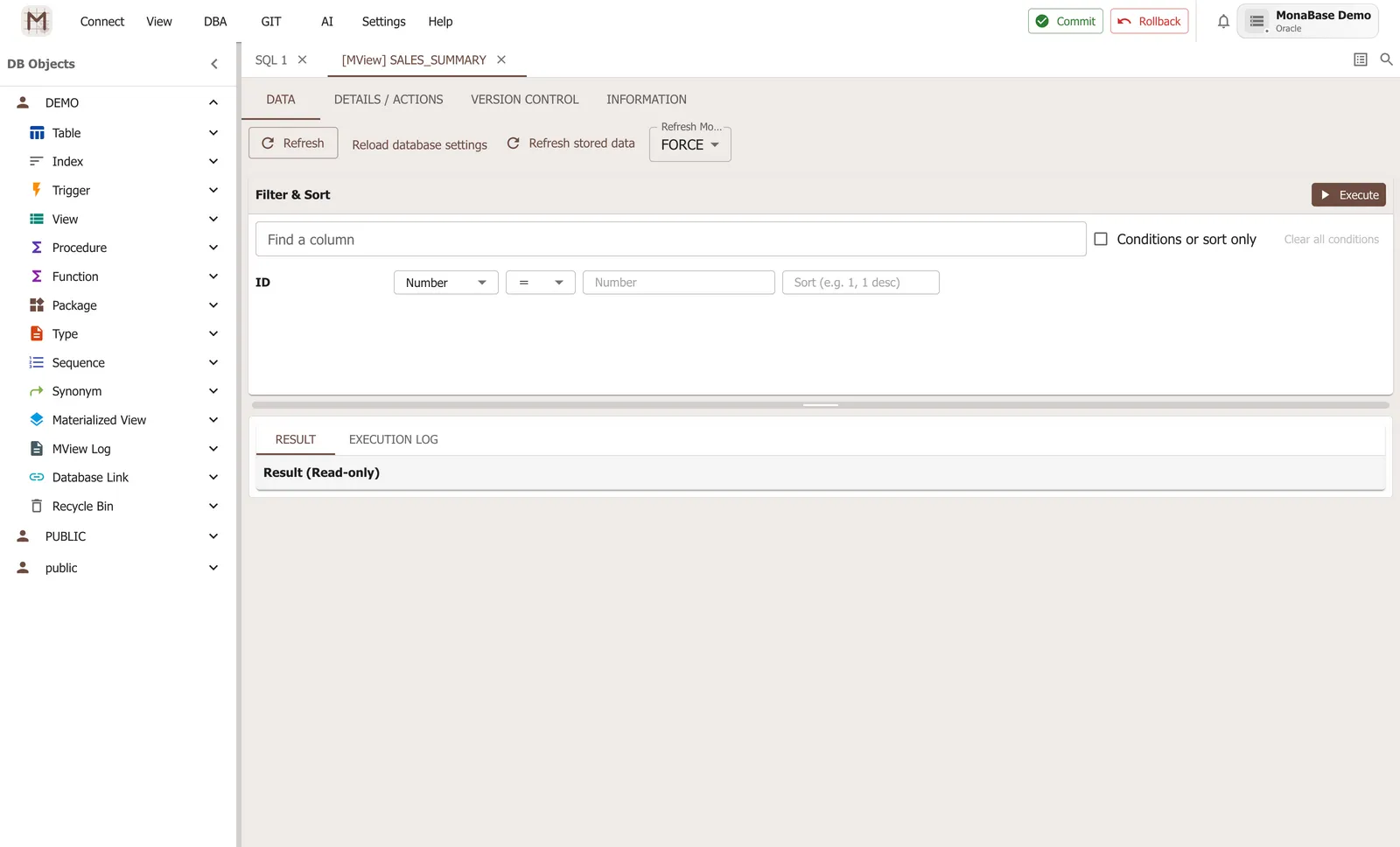
Common toolbar and refresh
Section titled “Common toolbar and refresh”Controls available for an existing materialized view.
| Control / field | How to use it | Effect of changing / running |
|---|---|---|
| Refresh (toolbar) | Reload the definition and metadata from the database. | Reloads current database values; edited form values may be replaced or trigger a conflict notice. |
| Discard edits | Discard unsaved changes in the form. | Restores values from the latest loaded definition; does not roll back any executed SQL. |
| Refresh now | Execute a materialized-view data refresh. | Refreshes stored rows in the database, not merely the on-screen display; operation can take time. |
| Oracle refresh mode | Choose FORCE, COMPLETE or FAST for Refresh now. | Changes the refresh method used for this operation; it does not by itself save a changed definition. |
| PostgreSQL CONCURRENTLY | Enable concurrent refresh when metadata says it is available. | Requests CONCURRENTLY for Refresh now; it has database prerequisites and is disabled if unavailable. |
Data tab
Section titled “Data tab”View the stored rows and empty-state behavior.
| Control / field | How to use it | Effect of changing / running |
|---|---|---|
| Data tab | Browse the currently stored materialized-view rows using the database-specific data grid. | The tab displays stored results, not an automatic execution of the defining SELECT. |
| Unpopulated view (PostgreSQL) | A message appears when the view has not been populated. | Rows are not displayed until the materialized view is populated by a refresh. |
Create / Details & Actions
Section titled “Create / Details & Actions”Editable fields, generated SQL and database-changing actions.
| Control / field | How to use it | Effect of changing / running |
|---|---|---|
| Schema and view name | Choose the target schema and name when creating a new view. | These identifiers become the creation target; existing view identifiers are read-only. |
| Query (AS SELECT) | Write the defining SELECT when creating a view. | Controls what data the view stores; for an existing view this editor is read-only. |
| Refresh method (Oracle) | Set FORCE, FAST or COMPLETE for the Oracle definition. | Changing the selection updates the planned ALTER statement where supported; no database change occurs until Execute. |
| Refresh timing (Oracle) | Choose ON DEMAND, ON COMMIT or supported ON STATEMENT. | Controls refresh timing; ON STATEMENT is restricted by capability and existing-view rules. |
| Updatable / Real time (Oracle) | Set Updatable and, when supported, Real time at creation. | Affects the CREATE statement; existing-view checkboxes are read-only. |
| START WITH / NEXT (Oracle) | Enter the refresh schedule for ON DEMAND when editable. | Changes the planned schedule; disabled for other timings or unknown existing schedule metadata. |
| WITH DATA (PostgreSQL) | Choose whether a new view is initially populated. | Off creates an unpopulated materialized view until a later refresh. |
| Planned SQL / validation | Review generated SQL and any preview validation notice. | The preview changes with inputs; Execute is unavailable when the preview has an error. |
| Execute / Delete | Create a new view, apply supported Oracle changes, or delete an existing view. | These actions change database objects; PostgreSQL existing views do not offer Execute for definition edits. |
| Rename (PostgreSQL) | Enter a new name and select Rename on an existing view. | Changes the name in the database; it is a separate action from source editing. |
Version control tab
Section titled “Version control tab”Source history and distinct Git outcomes.
| Control / field | How to use it | Effect of changing / running |
|---|---|---|
| Version control tab | Compare the database-derived source with Git-managed versions. | Shows source differences and version history; Git operations are separate from database execution. |
| Reload source | Reload current database source before comparing. | Updates the comparison baseline; an unsaved form is not implicitly executed. |
| Git retry warning | Use Retry Git after a database change succeeded but Git synchronization failed. | Retries the separate Git step without assuming the database transaction was undone. |
Information tab
Section titled “Information tab”Database metadata, status and dependencies.
| Control / field | How to use it | Effect of changing / running |
|---|---|---|
| Information tab | Read properties and metadata returned for the view. | Displays database-derived information; values can differ between Oracle and PostgreSQL. |
| Refresh / Retry | Reload metadata and dependency information. | Refreshes the displayed metadata; does not refresh materialized-view data rows. |
| PostgreSQL population / concurrency | Read populated status and whether concurrent refresh is available. | Explains why rows may be absent or the CONCURRENTLY option disabled. |
| Oracle next date | Inspect the next scheduled refresh timestamp if provided. | A missing or unknown value is not a promise that no refresh will ever run. |
| Relations / index list | Review the direct dependency and index information shown by the catalog query. | The list is scoped to the returned catalog relationships; it is not an exhaustive impact analysis. |
Console and pending operations
Section titled “Console and pending operations”Log visibility and failure/retry boundaries.
| Control / field | How to use it | Effect of changing / running |
|---|---|---|
| Console output | Review logged SQL, result messages and errors in the side console. | Helps distinguish an executed database change from a separate Git failure. |
| Clear / Close | Clear console messages or hide the console panel. | Only changes the displayed log panel; does not undo executed operations. |
How to use this screen
Section titled “How to use this screen”- Open the materialized view and wait for metadata to finish loading.
- Inspect columns, stored data, dependencies and available refresh settings.
- Review the refresh or definition operation, execute it with suitable privileges, and check the resulting status.
Database-specific behavior
Section titled “Database-specific behavior”Oracle
Section titled “Oracle”Oracle refresh methods and supporting materialized-view logs have specific prerequisites. A requested fast refresh is not guaranteed to be available.
PostgreSQL
Section titled “PostgreSQL”PostgreSQL refresh options depend on the object and its indexes. A refresh can hold locks and take time on large datasets.