
Check constraints
CHECK constraints validate row conditions inside the database. Existing constraints have Edit and Source tabs; new constraints open a creation form. Edit changes the permitted name/state settings, while Source shows generated ADD DDL. Review these operations separately from the condition itself and the actual database validation state.
Edit / create form — define a new rule
Section titled “Edit / create form — define a new rule”From a table’s Structure tab, use Add in the check-constraint list, or double-click an existing constraint to edit it. New constraints show a form; existing constraints have Edit and Source tabs.
| Button / setting | How to use it | What changes |
|---|---|---|
| Schema / target table | Confirm the disabled schema and table fields at the top of the form. | The originating table is fixed. To target another table, open its Structure tab rather than trying to redirect this form. |
| Constraint name (required) | Enter an explicit name. Oracle input is uppercased; PostgreSQL retains the typed case. | Becomes the name in ADD CONSTRAINT. This form requires a name even though some database SQL supports automatic naming. |
| Check expression | Enter only the condition, such as AMOUNT >= 0 AND STATUS IN (‘A’, ‘B’). Do not enter a surrounding CHECK(…) or a full ALTER TABLE command. | The app wraps the expression in CHECK (…). The database validates syntax, permitted expressions and existing data when creation is executed. |
| Expression editor / completion | Use line numbers and completion for table columns, database objects and DB-specific functions. | Helps compose the condition. A completion suggestion is not proof that a function is legal inside this database’s CHECK expression. |
| Oracle Enable at creation | Keep Enable checked to create an active rule, or clear it to create a disabled rule. | Adds ENABLE or DISABLE to Oracle DDL. A disabled rule is defined but not enforced; this control is not available in the PostgreSQL form. |
| Create | Review the fixed target, required name, expression and any Oracle state setting, then click Create. | Executes ALTER TABLE ADD CONSTRAINT CHECK on the main DB connection. Success refreshes the table/sidebar and changes the new form to the created object. |
| Empty input / database error | Supply both name and expression; if the DB rejects the statement, read the error before retrying. | Blank required values stop creation before SQL execution. An incompatible rule does not automatically repair existing rows or transform their values. |
Edit tab — rename, change state or delete
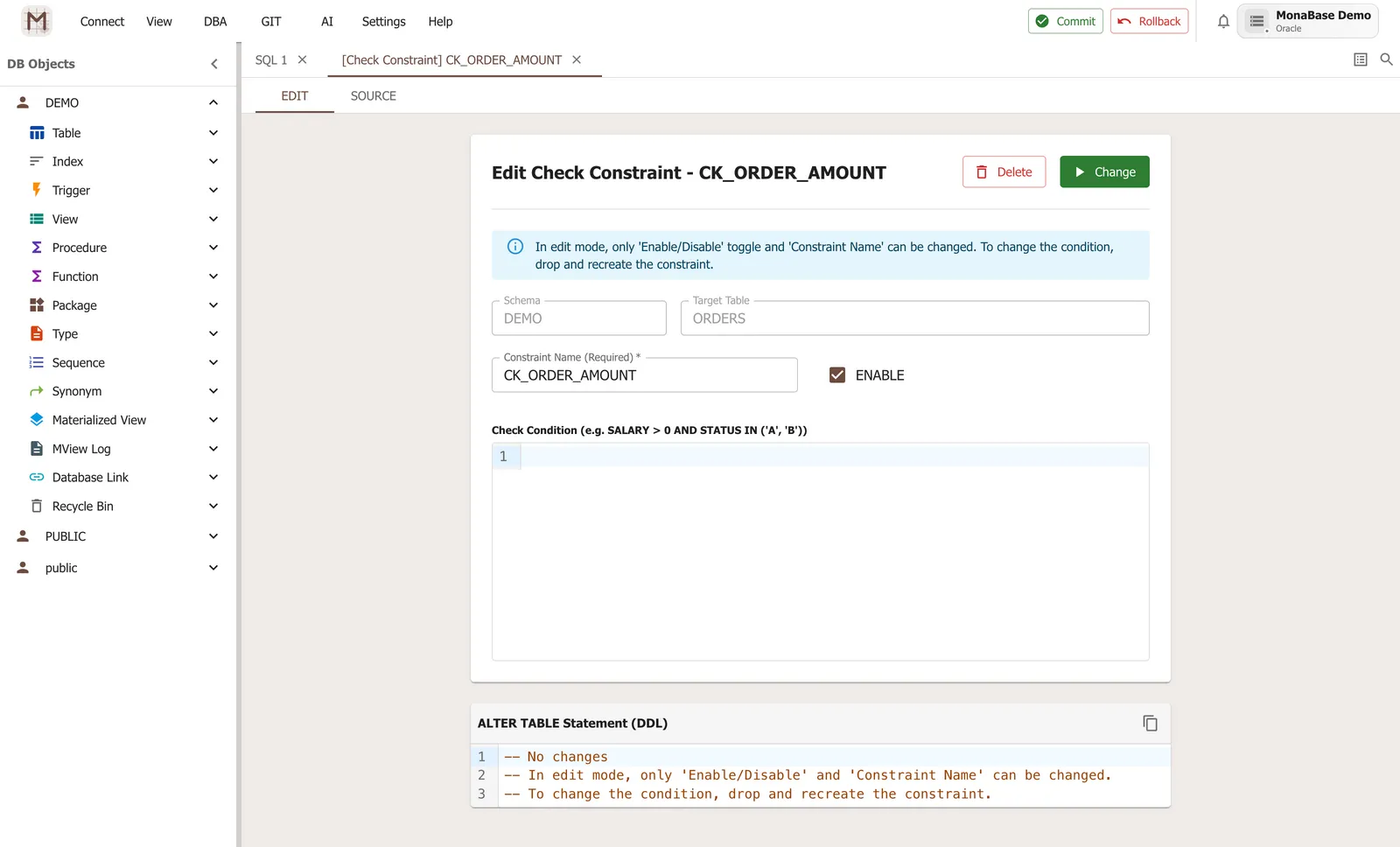
Section titled “Edit tab — rename, change state or delete”The existing expression is read-only. Oracle supports rename and enable/disable here; PostgreSQL supports rename only. These operations alter the table’s actual constraint, not a private UI setting.
| Button / setting | How to use it | What changes |
|---|---|---|
| Rename constraint | Edit the name, review the ALTER preview below the form and click Change. | Executes ALTER TABLE RENAME CONSTRAINT. The condition itself remains unchanged; use a nonempty name even in existing-constraint mode. |
| Oracle Enable / Disable | Toggle Enable and click Change after reviewing the statement. | Issues ENABLE/DISABLE CONSTRAINT. Enabling can fail if existing data violates the condition; disabling does not remove or fix records. |
| PostgreSQL state control | Use the rename control; there is no Enable checkbox in this form. | This screen does not offer CHECK enable/disable, NOT VALID or VALIDATE controls. Use a separately reviewed SQL workflow for features outside this form. |
| Existing condition is locked | Read the stored expression but do not expect direct editing in existing mode. | Changing the rule needs a deliberately planned replacement. The app does not silently drop and recreate it when only the name or state changes. |
| ALTER preview / Copy | Read the planned ALTER TABLE statement(s) and use the copy icon if needed. | Updates the read-only preview as name/state inputs change. Oracle may generate state change then rename as separate statements; copying executes neither. |
| Change / no changes | Click Change only after reviewing the intended operations; if nothing supported differs, read the no-changes message. | Executes supported statements in order and stops after an error. Earlier successful Oracle DDL may remain effective if a later statement fails; no-changes does not recreate the rule. |
| Delete | Click Delete and confirm the displayed constraint target. | Runs ALTER TABLE DROP CONSTRAINT and closes the tab on success. It removes the rule, not existing table rows; later writes are no longer protected by that rule. |
Source tab — generated ADD DDL and copy
Section titled “Source tab — generated ADD DDL and copy”Available for existing constraints. Unlike the index Source tab, this source is assembled from the current form values. It is a generated ADD statement, not a full original catalog DDL export.
| Button / setting | How to use it | What changes |
|---|---|---|
| Generated ADD statement | Read ALTER TABLE … ADD CONSTRAINT … CHECK (…). | Shows how to add the rule represented by the current name/condition. An unsaved name change also changes this text, so it need not match the currently installed constraint name. |
| Oracle state suffix | Check ENABLE or DISABLE at the end of the generated statement. | Reflects the current Enable checkbox. It does not export every Oracle constraint attribute such as validation-related settings. |
| PostgreSQL source scope | Read the generated CHECK ADD statement separately from the existing object’s full catalog properties. | The form does not preserve options such as NOT VALID or NO INHERIT in this generated text. Do not treat it as a complete backup/migration for special constraints. |
| Copy / read-only editor | Use the source copy icon. The text itself is not editable on this tab. | Copies ADD DDL without running it. The copy icon on Edit instead copies the planned ALTER name/state changes. |
| Executing copied DDL | If using the copied statement in the SQL window, review the target, existing name and missing special options first. | ADD is not an automatic replacement: running it against an existing named rule can fail. This screen has no Git history or one-click restore tab. |
Condition examples — boundaries and NULL
Section titled “Condition examples — boundaries and NULL”Example column: numeric AMOUNT. CHECK normally accepts true or unknown (from NULL), so a nonnegative rule alone does not make the column required. Combine an explicit NULL check or a suitable NOT NULL definition when required.
| Button / setting | How to use it | What changes |
|---|---|---|
| Positive value | Condition: AMOUNT >= 0. Example input: 100. | The condition is true and the CHECK permits the value; other constraints may still reject the record. |
| Boundary value | Condition: AMOUNT >= 0. Example input: 0. | Zero is allowed. Use a strictly positive expression if zero is not valid for the business rule. |
| Negative value | Condition: AMOUNT >= 0. Example input: -1. | The condition is false and an enforced CHECK rejects the write; the app does not round or repair the value. |
| NULL with a comparison only | Condition: AMOUNT >= 0. Example input: NULL. | Evaluates as unknown and does not by itself violate CHECK. It can still be rejected by a separate NOT NULL constraint. |
| Explicit NULL rejection | Condition: AMOUNT IS NOT NULL AND AMOUNT >= 0. | Rejects both NULL and negative values. Test valid/invalid/boundary examples before adding it to existing data. |
Example: add and verify an amount rule
Section titled “Example: add and verify an amount rule”Open the table’s Structure tab, choose Add in the check-constraint list and enter a name such as CK_ORDER_AMOUNT. Enter AMOUNT IS NOT NULL AND AMOUNT >= 0 as the expression if both NULL and negative values should be disallowed. Check Oracle Enable, create deliberately, and inspect the refreshed structure. Test representative writes only in a dedicated test environment, then inspect the DB result rather than assuming that opening the source tab applied the rule.
Changing the condition and confirming database state
Section titled “Changing the condition and confirming database state”Existing expressions are locked, so changing the rule requires a separately planned replacement. Inspect existing rows and the exact definition first; the form provides no automatic backup, migration or refresh/retry button. If the definition looks incomplete or another tool changed it, reopen the window and verify the table’s Structure tab before execution. Oracle ENABLE/ADD and other DDL may validate existing rows, acquire locks and implicitly commit prior work. PostgreSQL controls outside simple add/rename/drop belong in a reviewed SQL workflow.
CHECK and NULL: database documentation
Section titled “CHECK and NULL: database documentation”For the three-valued result of CHECK expressions and its distinction from NOT NULL, see Oracle constraint documentation and PostgreSQL 16 constraints. The available controls described above refer to MonaBase, not every feature supported by those databases.
How to use this screen
Section titled “How to use this screen”- Use the table Structure tab’s check-constraint list to add or open a rule, then verify the fixed schema and table.
- For creation, enter a required name and condition; for existing rules, review supported name/state changes. Check NULL, boundary values and existing rows before execution.
- Execute Create or Change deliberately, read any error and inspect the refreshed table structure. Treat generated ADD source as a reference, not automatic application or complete recovery SQL.