
Data generator
Build test data with business-like formats and values tailored to your application. Combine sequences, format patterns, plausible amounts, statuses and date ranges for the selected table. Use AI to propose the generation settings, then review the preview before inserting.
AI assistance is available for this feature. See the AI assistant guide for details.
To transform a copy of existing query results rather than generate new rows, see data masking.
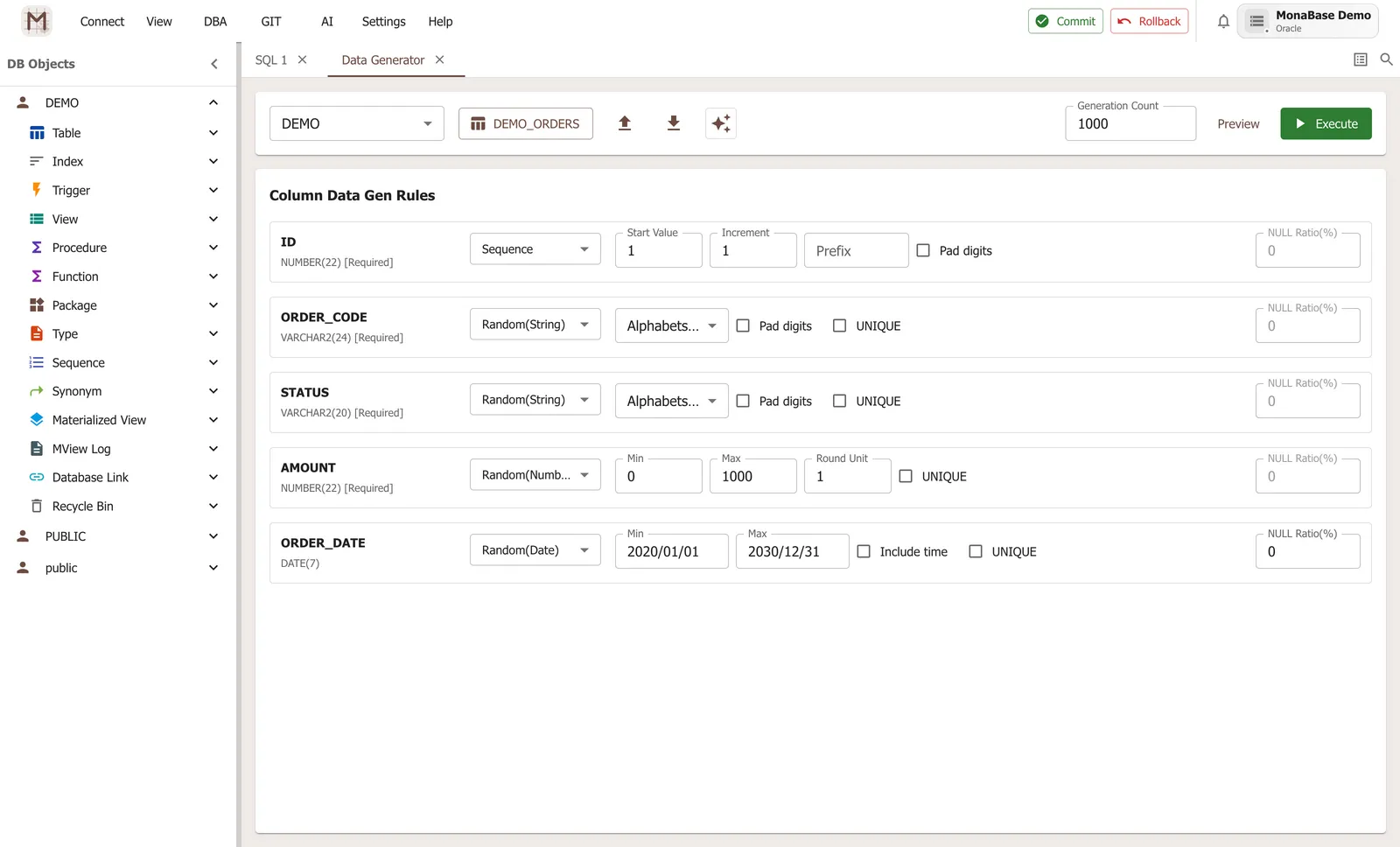
Column generation rules
Section titled “Column generation rules”Choose a rule for each supported column. The following options are shared by Oracle and PostgreSQL, subject to the column type. On narrow screens, scroll the table horizontally.
| Rule / option | How to configure it | What you can create | Example |
|---|---|---|---|
| Sequential numbers | Choose Sequence; set the start and increment. | Predictable numeric IDs or counters, including decimal increments where the column permits them. | Start 1001, increment 1 → 1001, 1002, 1003. |
| Sequence prefixes and padding | For a text column, set a prefix or enable padding. Zero padding uses the column length; the final value including its prefix must fit. | Readable product/order codes or fixed-width identifiers. | Prefix ORD- → ORD-1. Separately, padding in a six-character column → 000001. |
| Sequential dates | Choose Sequential date and enter the starting date. Subsequent rows advance one day at a time. | Daily schedules, calendar rows or ordered date-based scenarios. | Start 2026/01/01 → January 1, 2, 3…; display follows your date format. |
| Random numbers | Set minimum, maximum and rounding unit; optionally enable Unique. The rounding unit is the interval between generated values. | Prices, quantities, scores and representative numeric ranges. | Min 0, max 1000, unit 0.01 → values such as 19.99 and 845.20. |
| Random strings | Choose Random string, then alphabetic, numeric or alphanumeric characters. Padding fills to the supported column length; Unique avoids duplicates within this generation. | Synthetic labels, tokens and string-length boundary data. | Alphanumeric → A7k29. Use padding to exercise longer column values. |
| Full-width strings | In the Japanese app interface, select Full-width under Random string. | Synthetic full-width text for Japanese input and length/encoding checks; not automatically realistic personal names. | Check how full-width text is stored, displayed and exported. |
| Regular-expression strings | Choose Random string → Regular expression and enter a supported pattern. The generated string must fit the target column. | Formatted postal codes, product IDs or other synthetic business identifiers. | [0-9]{3}-[0-9]{4} → 123-4567; ORD-[0-9]{6} → ORD-042815. |
| Random dates and times | Set the date range; enable Include time when needed. Unique is available. Date/time input and supported precision depend on the column type and settings. | Order timestamps, reservation dates and activity within a test period. | Choose January 2026, with time enabled, for order timestamps during that month. |
| Choices | Enter comma-separated candidates. Each generated value is selected from that list; no separate percentage-weight setting is provided. | Status codes, fictional company names or known valid parent IDs. | NEW,PAID,SHIPPED or fictional company names. For foreign keys, use IDs that actually exist. |
| Fixed values | Choose Fixed and enter the value appropriate to the column type. | A shared test marker, tenant code or a specific boundary case. | Set a text marker to DEMO or a numeric quantity to 0. |
| Unspecified / excluded columns | Unspecified omits the column from INSERT and is unavailable for NOT NULL columns in the selector. Unsupported column types are excluded automatically. | Allow database defaults or nullable-column behavior to apply; avoid trying to generate unsupported values. | An omitted defaulted column uses its database default. Existing triggers and constraints still apply. |
Additional controls
Section titled “Additional controls”Combine the rules with NULL probability, uniqueness, a row count and reusable settings.
| Rule / option | How to configure it | What you can create | Example |
|---|---|---|---|
| NULL ratio | For nullable generated columns, enter a percentage from 0 to 100. Not available for NOT NULL or unspecified/excluded columns. |
Exercise optional values, missing-data searches and NULL handling. This is a per-row probability, not an exact final count. | 20 gives each generated row a 20% chance of NULL. |
| Unique random values | Enable Unique for random number, string or date rules; provide enough distinct values for the requested rows. | Avoid duplicates within that generated column for this run. It does not pre-check every existing database value. | A range with only ten distinct values cannot supply 100 unique rows. |
| Row count and preview | Set a positive row count, configure columns and inspect the preview before inserting. If settings change, create a new preview. | Start small, check realistic formats and required fields, then insert a reviewed dataset. | Preview an order scenario first, then execute 100 rows after checking the target. |
| Save / load settings | Save generation settings as JSON and load them for the matching table. | Reuse generation rules across test runs; random output is newly generated rather than reproduced from a fixed seed. | Keep a reviewed order-data configuration for repeated regression checks. |
Example: realistic fictional order data
Section titled “Example: realistic fictional order data”Assume an order table with these compatible columns. Match the rules to your actual schema; the examples are fictional and do not promise exact random output.
| Rule / option | How to configure it | What you can create | Example |
|---|---|---|---|
ORDER_ID |
Sequence: start 1001, increment 1. |
A simple identifier for each generated order. | 1001, 1002, 1003 |
ORDER_CODE |
Regex ORD-[0-9]{6}; enable Unique if enough distinct codes are available. |
A realistic-looking external order number. | ORD-042815 |
CUSTOMER_ID |
Choice of valid IDs from the parent table, for example 101,102,103 when those rows exist. |
Orders linked to existing test customers. | 101 or 103 |
STATUS |
Choice NEW,PAID,SHIPPED. |
Multiple states for filtering and grouping tests. | PAID |
AMOUNT |
Random number: min 100, max 10000, unit 0.01. |
Prices with a range and decimal values. | 2580.50 |
ORDER_DATE |
Random date range within January 2026; include time if the column supports it. | Orders spread across a reporting period. | A date/time within the chosen range. |
MEMO |
Choice Gift,Standard,Rush, NULL ratio 20. |
Readable fictional notes plus optional-field cases. | Gift or NULL. |
Ask AI for a realistic scenario
Section titled “Ask AI for a realistic scenario”Use the AI request action in Data generator. MonaBase prepares column definitions and the current JSON settings template, plus foreign-key context and up to 100 referenced sample values per relationship when retrieval succeeds. Describe the scenario and ask AI to return generation-rule JSON. Review and apply the proposed settings, then preview the rows; the AI service does not connect directly to the database or insert rows. Reference samples included in the request are sent to your configured provider.
Example AI request
Section titled “Example AI request”“Prepare settings for 100 fictional orders. Use sequential IDs starting at 1001, formatted order codes, NEW/PAID/SHIPPED statuses, amounts from 100 to 10000 in 0.01 increments, and dates in January 2026. Use the supplied valid customer IDs as choices. Give the nullable memo column a 20% NULL probability. Keep the existing schema and return the JSON configuration.” Adjust column names and types to your table before sending.
Realistic formats, reviewed business consistency
Section titled “Realistic formats, reviewed business consistency”Choice values can supply meaningful fictional names or valid parent IDs; regex can shape codes and postal formats. Generation rules operate per column: they do not automatically guarantee cross-column conditions such as shipment after order date, exact status distributions or uniqueness against existing rows. Check those relationships, database constraints and triggers with a small preview/test run. Use synthetic or approved non-sensitive reference data.
How to use this screen
Section titled “How to use this screen”- Use the table selection button. The selector starts with the table category selected and shows the first 100 tables in the current schema.
- Configure each column using the rule tables below, or request a JSON configuration from AI and review it. Set the row count and preview formats, required values and valid references.
- Choose Execute after reviewing the preview. Inspect confirmed inserted rows and any failure before committing or retrying.