
Materialized view logs
An Oracle materialized-view log records changes to a base table for eligible refresh workflows. Review the base table and consumers before changing the log definition.
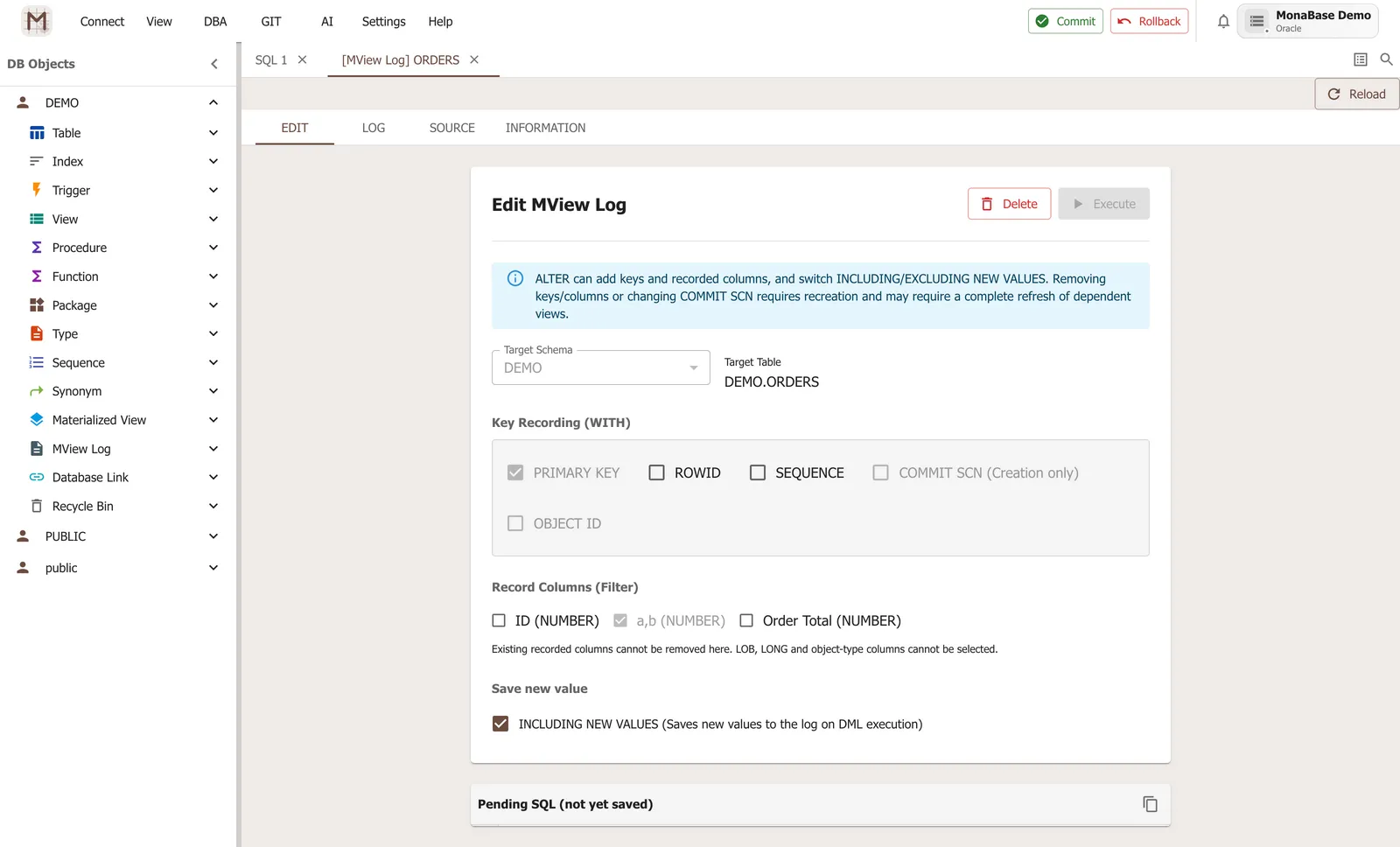
Common controls
Section titled “Common controls”An existing log has four tabs; the new-log form has no tabs.
| Control / setting | How to use | Effect / behavior |
|---|---|---|
| Reload | Click Reload at the upper right | Fetch the master table and log definition again. Pending edits are generally preserved for the same object, but a changed target or load state can reset them. |
| Tabs | Select Edit, Log, Source, or Information | Switches the visible panel; switching tabs does not execute DDL. |
Create / Edit options
Section titled “Create / Edit options”Form changes update the proposed DDL only; press Execute to apply them.
| Control / setting | How to use | Effect / behavior |
|---|---|---|
| Target schema | Choose schema when creating | Changing it clears the chosen table and form options; cannot be changed when editing an existing log. |
| Select table | Pick one TABLE in the selected schema | Excludes tables already having a log and loads primary key, columns, and LOB metadata. |
| PRIMARY KEY | Enable primary-key recording | Requires a primary key on the master table; an existing recording option cannot be removed here. |
| ROWID | Enable ROWID recording | Records row identifiers in the log; an existing option cannot be removed in this editor. |
| SEQUENCE | Enable sequence recording | Adds sequence information to the log to help order changes; cannot remove an existing setting here. |
| COMMIT SCN | Creation only | Creates a commit-SCN-based log; unavailable for master tables with LOBs and immutable in the existing-log editor. |
| OBJECT ID | Object tables only | Available for object tables, not ordinary relational tables. |
| Filter columns | Check eligible master-table columns | Adds selected filter columns to the log; unsupported types cannot be selected and existing log columns cannot be removed here. |
| INCLUDING NEW VALUES | Toggle new-value recording | Controls whether new values are recorded for DML changes; can also be altered later. |
| SQL preview and Copy | Read-only SQL preview and copy icon | Shows CREATE SQL for new logs or delta ALTER SQL for existing logs. Copying does not change the database. |
| Execute | Validate and apply | Rechecks metadata and conflicts just before executing DDL, reloads on success, and records the result in the console. |
Existing-log limits and deletion
Section titled “Existing-log limits and deletion”Only supported additions or changes can be applied by ALTER; the current definition is checked for conflicts.
| Control / setting | How to use | Effect / behavior |
|---|---|---|
| Allowed changes | Add recording options/columns; toggle new values | Removing existing options/columns, changing the master, or changing COMMIT SCN is unsupported; such changes require recreation. |
| No pending changes | Leave options unchanged | No ALTER statement is generated and Execute stays disabled. |
| Delete | Confirm deletion | Executes DROP MATERIALIZED VIEW LOG and closes the tab on success; review this database-side change carefully. |
Log tab
Section titled “Log tab”Browse the Oracle materialized-view log table; this is not trace debugging.
| Control / setting | How to use | Effect / behavior |
|---|---|---|
| Log tab | Open Log on an existing log | Reads and displays the internal log table. Shows a message if the log-table name cannot be retrieved. |
| Browse rows | Use available data grid controls and paging | Changes the current display and page, not the log definition. |
Source tab
Section titled “Source tab”Inspect the creation DDL; this editor does not allow direct source edits.
| Control / setting | How to use | Effect / behavior |
|---|---|---|
| CREATE SQL | Open the Source tab | Displays the database-derived CREATE MATERIALIZED VIEW LOG statement read-only. |
| Copy | Use the copy button | Copies the DDL to the clipboard without executing or saving it. |
Information tab
Section titled “Information tab”Inspect metadata and status retrieved from the database.
| Control / setting | How to use | Effect / behavior |
|---|---|---|
| Metadata list | Open the Information tab | Shows fetched owner, master and log tables, recording modes, new-value option, purge details, and other metadata. |
| Refresh information | Use Reload | Fetches current database metadata; the Information tab itself is read-only. |
Console
Section titled “Console”Shows executed SQL and results; clearing affects displayed messages only.
| Control / setting | How to use | Effect / behavior |
|---|---|---|
| Execution results | Opens on execution or failure | Shows SQL, success/failure messages, and error details. |
| Clear / Close | Use trash or × | Clears displayed messages or hides the console; does not undo database DDL. |
| Resize | Drag the splitter | Adjusts console width between 200 and 800 pixels. |
How to use this screen
Section titled “How to use this screen”- Open the log and confirm the base table and recorded columns.
- Review key, row identity and other available logging attributes together with dependent materialized views.
- Apply supported changes and refresh the information. Check affected refresh workflows before removing a log.
Database-specific behavior
Section titled “Database-specific behavior”Oracle
Section titled “Oracle”This screen is Oracle-only. It is not the application SQL execution log or the stored-program trace log.