
Tablespaces
Tablespace management can change physical storage. Read-only inspection and storage-changing actions require different levels of care and authority.
How to use this screen
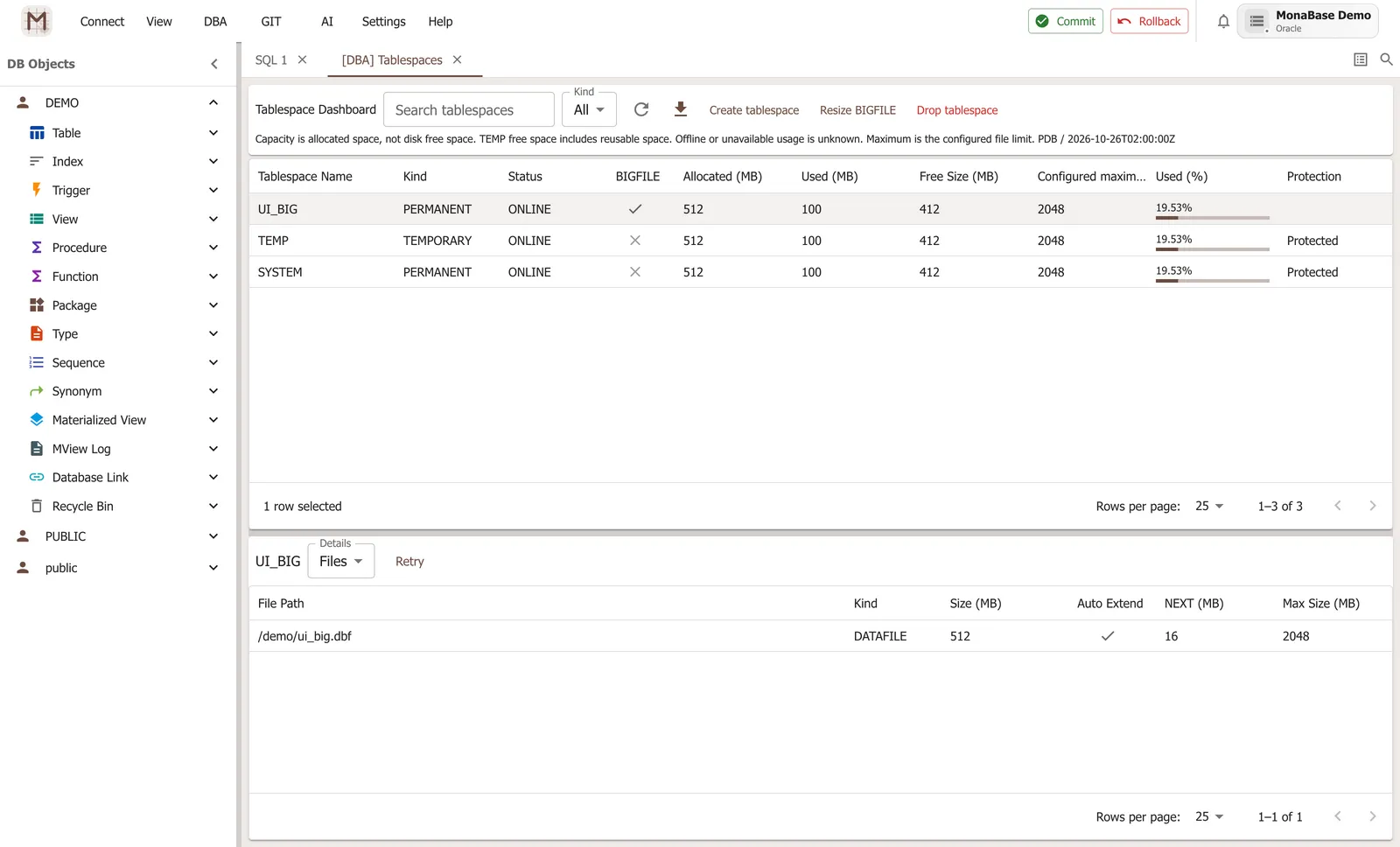
Section titled “How to use this screen”- Open the tablespace list and inspect type, capacity and available details.
- Inspect files, users, quotas or stored objects where the database exposes them.
- Before any supported storage change, review the exact target, path and consequences with the database administrator.
Database-specific behavior
Section titled “Database-specific behavior”Oracle
Section titled “Oracle”Oracle permanent, temporary and undo tablespaces have different rules. Required dictionary privileges also differ by detail view.
PostgreSQL
Section titled “PostgreSQL”PostgreSQL tablespaces are cluster-wide; paths refer to the database server, not the desktop running MonaBase.
MySQL uses this guide’s storage screen for reference only. It lists available InnoDB tablespace/file/object metadata; it does not implement Oracle/PostgreSQL-style tablespace creation, resize, file moves or deletion.
Oracle tablespace list and filters
Section titled “Oracle tablespace list and filters”Covers Oracle toolbar, filtering, and capacity indicators.
| Action / setting | How to use | Effect when changed / executed |
|---|---|---|
| Search | Filter listed tablespaces by name and other searchable text. | Changes only visible rows; no database changes. |
| Type filter | Choose All, PERMANENT, TEMPORARY, or UNDO. | Filters rows without changing tablespace type. |
| Refresh / Retry | Reload the list or retry after loading fails. | Fetches current database state without modifying it. |
| Export | Open the list export dialog. | Exports listed data to a file; no DB mutation. |
| Select a row | Select a tablespace to show its lower detail pane. | Changes the detail target and available actions. |
| Capacity and protection | Review allocated, used, free, maximum, usage bar, and protection. | Usage reaches warning coloring at 80% and error coloring at 90%; protected entries restrict dropping. |
| Page size and split | Choose 25/50/100 rows per page; drag or keyboard-adjust the divider. | Only the UI pagination and panel height change. |
Oracle details: files, users, quotas and segments
Section titled “Oracle details: files, users, quotas and segments”What the lower details selector shows.
| Action / setting | How to use | Effect when changed / executed |
|---|---|---|
| Files | Choose Files to view path, kind, size, autoextend, NEXT and maximum size. | Reads datafile or tempfile metadata only. |
| Users | Choose Users to view accounts and their default/temporary tablespaces. | Shows related accounts without changing assignments. |
| Quotas | Choose Quotas for per-user MAX_BYTES. | Displays quota information; this view does not edit quotas. |
| Segments | Choose Segments to see owner, name, type, partition and count. | Helps identify objects consuming the tablespace. |
| Retry details | Use Retry in the lower detail area. | Reloads detail for the selected tablespace. |
| Scope and read-only notice | Review visible-scope warnings and read-only notifications. | Clarifies information coverage and why editing may be unavailable. |
Oracle: create, add files and resize
Section titled “Oracle: create, add files and resize”Mutating operations are reviewed before execution.
| Action / setting | How to use | Effect when changed / executed |
|---|---|---|
| Create | Use Create and enter a name and BIGFILE option. | Prepares a new tablespace; review alone does not create it. |
| Add file / Resize | For a selected tablespace, use Add for non-BIGFILE and Resize for BIGFILE. | Prepares a new file or a capacity change. |
| OMF / Server path | For file creation, choose OMF when supported or a server file path and enter its full path. | The path is on the database server, not the desktop machine. |
| Size (MB) | Enter size when creating, adding, or resizing. | Execution changes allocated capacity; shrinking raises a warning. |
| Autoextend, NEXT, Max | Toggle autoextend; when enabled, enter NEXT increment and maximum size. | Controls file growth behavior and its cap after execution. |
| SQL review, acknowledge, execute | Use Review to inspect SQL, acknowledge the change, then Execute. | Review and Cancel do not mutate the DB; Execute attempts the change. |
Oracle: drop and operation results
Section titled “Oracle: drop and operation results”Destructive actions and outcome handling.
| Action / setting | How to use | Effect when changed / executed |
|---|---|---|
| Drop | Select Drop, inspect warnings and related files, users, quotas and segments. | Execution attempts to drop the tablespace; protected entries and referenced users restrict this action. |
| Name confirmation / Acknowledge | Type the target name and check acknowledgement for Drop. | Execution remains disabled until confirmation requirements are met. |
| Outcome and recheck | Review completed and attempted steps and any error. | An operation may be partially applied; reload to verify state after errors. |
PostgreSQL: list, details and filters
Section titled “PostgreSQL: list, details and filters”PostgreSQL emphasizes owner and storage location.
| Action / setting | How to use | Effect when changed / executed |
|---|---|---|
| Search, refresh, export | Filter by name, owner or location, refresh or export the list. | Only filters, fetches or exports; no DB mutation. |
| Select, paginate, split | Select a row, choose 25/50/100 page size, or resize upper/lower panes. | Changes the detail target and UI layout. |
| Owner, location, protection | Inspect owner, location (OS path/default/global) and protection. | Shows metadata and protected entries. |
| Size, OID, options | Inspect size when available, OID, owner and options below. | Size lookup may show a warning if unavailable. |
| Using databases and objects | Review databases using the tablespace, defaults, and objects/count. | Helps assess impact; object lists may be truncated. |
| Detail retry / Read only | Retry detail loading and check read-only notice. | Reloads details; read-only mode disables mutations. |
PostgreSQL: create, rename, change owner and drop
Section titled “PostgreSQL: create, rename, change owner and drop”Settings, SQL review and database effects of write actions.
| Action / setting | How to use | Effect when changed / executed |
|---|---|---|
| Create: name, path, owner | Use Create to specify name, server-side physical path, and owner. | Execute attempts creation; the path is on the DB server, not the client. |
| Rename | Select a tablespace, choose Rename and enter a new name. | Execute attempts to rename the tablespace. |
| Change owner | Choose Change owner and select an eligible role. | Execute attempts to change the tablespace owner. |
| Drop | Choose Drop, review warning/SQL and type the target name. | Execute attempts deletion; in-use and protected entries may be restricted. |
| Review SQL / Acknowledge | Click Review, inspect generated SQL, and acknowledge. | This stage does not mutate the database. |
| Execute, Cancel, recheck | Use Execute to attempt the change or Cancel to close; refresh after errors. | Execution alone attempts mutation; refresh failure can occur after a successful change. |
MySQL: tablespace and storage list
Section titled “MySQL: tablespace and storage list”This MySQL screen is read-only; it does not provide Oracle-style storage administration.
| Control / item | How to use | Behavior and limitations |
|---|---|---|
| Search / type filter | Search name, SPACE ID, type or state; choose All or an observed type. | Filters the loaded InnoDB/catalog entries. It is not a complete OS-disk or every-engine inventory. |
| Refresh / Export | Refresh the current catalog or export the filtered list. | Background reads preserve the main transaction. Read-only app connections can use the screen. |
| File size / allocated bytes | Compare the two byte columns, encryption, state and page size. | Logical file size and disk allocation differ, especially for sparse/compressed files. They are not used/free capacity or free-space percentages; unknown values stay unknown. |
MySQL: Files, Tables and Information tabs
Section titled “MySQL: Files, Tables and Information tabs”Select a space in the upper grid and resize the horizontal divider.
| Control / item | How to use | Behavior and limitations |
|---|---|---|
| Files | Open the Files tab to inspect server paths and status. | Paths are metadata only. MonaBase does not open or manipulate those server files. |
| Tables | Open Tables to inspect InnoDB NAME, TABLE ID and row format. | Keeps native database prefixes, encoded names and partition suffixes rather than guessing decoded SQL names. |
| Information / retry | Inspect SPACE ID, row format, block size, encryption and state; retry a failed detail read. | Binds the requested space ID/name; unavailable fields remain unknown rather than fabricated. |
MySQL: visibility and read-only limits
Section titled “MySQL: visibility and read-only limits”Required catalogs must be accessible; no storage-changing action is sent.
| Control / item | How to use | Behavior and limitations |
|---|---|---|
| Permissions / source catalogs | Use an account with PROCESS and access to INNODB_TABLESPACES, FILES and the relevant InnoDB table catalog. | Permission failures are explicit errors, not empty successful results. No automatic grants are made. |
| Size limits / live metadata | Check errors when catalogs exceed 5,000 rows or the 8 MiB response limit. | Oversized results are not shown as a complete partial list. Concurrent DDL can change live observations. |
| Unsupported changes | Use this screen to inspect information only. | No create/drop/resize/relocation/encryption changes, filesystem access or automatic ANALYZE/OPTIMIZE. No Oracle-style quotas or free-space management. |