
Locks
Lock inspection connects waiting sessions to their blockers. Ending the wrong session can roll back valuable work, so identify the cause before choosing an action.
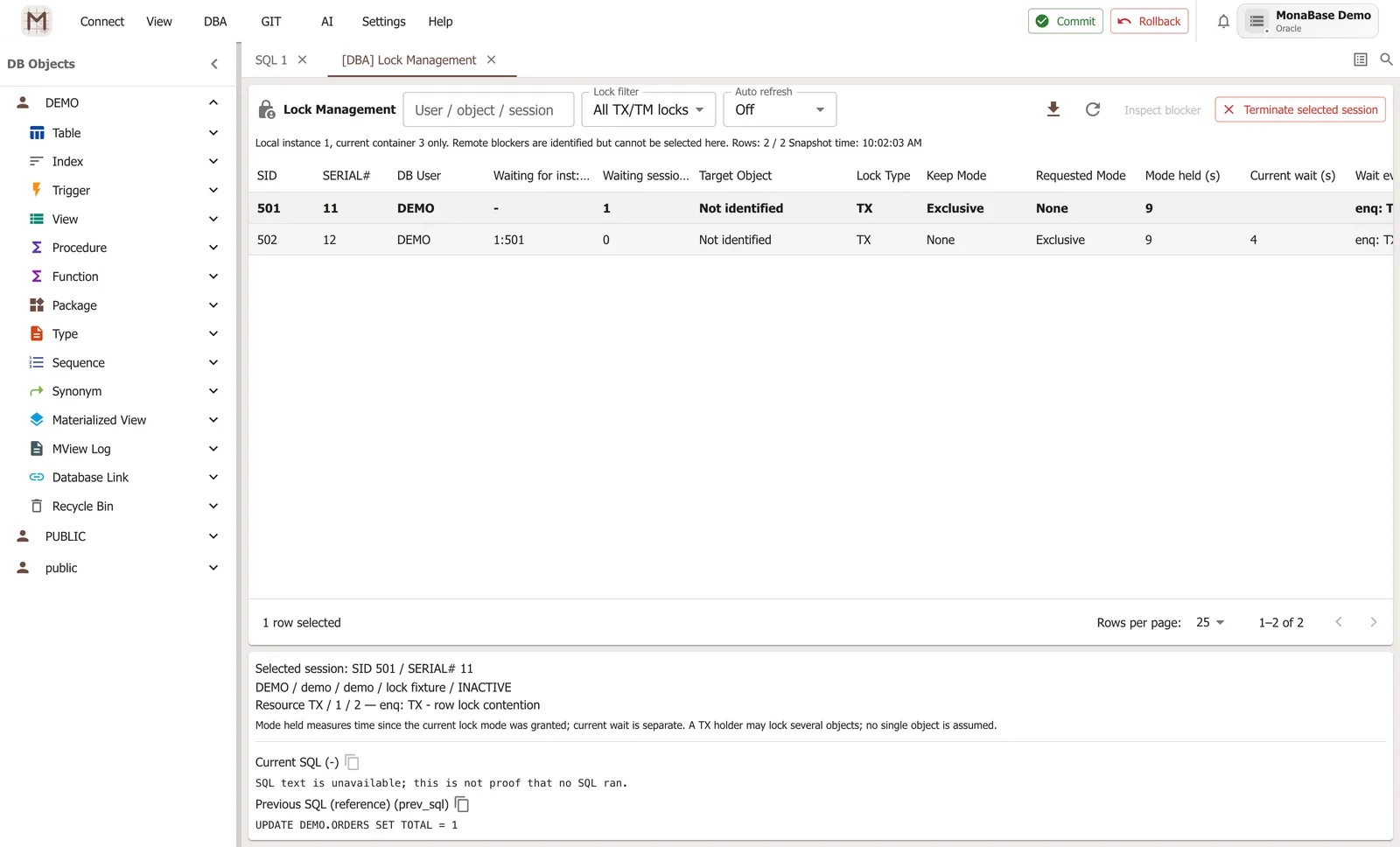
How to use this screen
Section titled “How to use this screen”- Refresh locks and inspect the blocking and waiting session identities.
- Inspect SQL and connection ownership. Refresh again if the observation may be stale.
- Choose a supported cancel or terminate action only after review, then confirm the wait has actually cleared.
Database-specific behavior
Section titled “Database-specific behavior”Oracle
Section titled “Oracle”Oracle lock views require dynamic-performance view privileges; a disconnect may be reported as pending.
PostgreSQL
Section titled “PostgreSQL”PostgreSQL distinguishes cancelling the current query from terminating its connection. A cancelled connection can remain usable.
MySQL locks come from Performance Schema data_locks/data_lock_waits, with waiting/blocking edges and related sessions. These are live observations, not an atomic history or an exact lock-age measurement.
Oracle: Lock list and filters
Section titled “Oracle: Lock list and filters”Control display and refresh options for Oracle locks.
| Action or setting | How to use | Effect of changing or running |
|---|---|---|
| Search | Filter rows by SID, database user, OS user, program, machine, object name, wait event, or SQL ID. | Filters displayed rows only; database locks are unaffected. |
| Filter (All / Waiting / Blocking) | Switch between all rows, pending lock requests, and rows blocking other sessions. | Changes visible rows and resets pagination to its first page. |
| Auto-refresh (Off / 5 / 10 / 30 seconds) | Re-fetch lock information at the selected interval while the tab is active. | Updates the snapshot; shorter intervals issue more read requests to the database. |
| Refresh | Fetch the latest lock snapshot manually. | Refreshes rows and retrieval time; selection clears if that row no longer exists. |
| Export | Export the currently displayed lock rows with the export dialog. | Outputs the rows after filtering; database state is unchanged. |
| Row selection and pagination | Select a row or change the page to inspect a lock session. | Changes the detail panel and the selected target for actions. |
Oracle: Lock details and blocker inspection
Section titled “Oracle: Lock details and blocker inspection”Inspect the selected Oracle lock and its associated SQL.
| Action or setting | How to use | Effect of changing or running |
|---|---|---|
| Lock modes and wait information | Read held/requested modes, hold/wait durations, wait event, and waiter count. | Displays the captured lock state without changing or releasing locks. |
| Object and resource | Inspect object owner/name, lock type, and ID1/ID2 resource identifiers. | Helps identify the locked resource; the object name may be unavailable. |
| Inspect blocker | Select the blocking session referenced by the waiting row. | Clears search/filter and selects the blocker only when the matching row is available in the same instance/container. |
| Current / previous SQL | Inspect SQL text and SQL IDs associated with the selected session. | Shows unavailable text when it cannot be retrieved; does not execute SQL. |
| Copy SQL | Use the copy button beside the current or previous SQL. | Copies the available SQL text to the clipboard. |
Oracle: Termination and safeguards
Section titled “Oracle: Termination and safeguards”Understand the impact and limits of terminating Oracle sessions.
| Action or setting | How to use | Effect of changing or running |
|---|---|---|
| Terminate selected session | Select a row and confirm the termination dialog. | Requests termination and reloads the snapshot; work may be interrupted and uncommitted changes rolled back. |
| Termination eligibility | Available only after a successful read, with permission, and for a non-protected selected row. | Disabled for read-only/insufficient privileges, unavailable protection checks, or an ongoing operation. |
| Result notice and verification | Review the operation message, errors, and refreshed lock list. | A requested or marked termination does not guarantee immediate disappearance; verify the refreshed state. |
| Errors and retry | Use Retry to reload the list after a read error. | Re-fetches the snapshot; it does not blindly repeat a failed termination. |
PostgreSQL: Lock list and filters
Section titled “PostgreSQL: Lock list and filters”Filter and refresh PostgreSQL lock rows.
| Action or setting | How to use | Effect of changing or running |
|---|---|---|
| Search | Filter by PID, database, user, program, client address, object, mode, event, or SQL text. | Only the visible rows/count change; lock state is unaffected. |
| Filter (All / Waiting / Blocking) | Waiting shows ungranted lock rows; Blocking shows rows with waiters. | Filters the rows and resets the page to the beginning. |
| Auto-refresh (Off / 5 / 10 / 30 seconds) | Read locks periodically while the tab is active. | Updates the snapshot and timestamp; frequent polling increases read load. |
| Refresh and retry | Refresh the snapshot manually, or retry after an error. | Updates rows and clears selection for a lock row that disappeared. |
| Export | Export visible lock rows using the export dialog. | Exports the filtered rows. |
| Page size (25 / 50 / 100) | Change the number of visible rows per page. | Changes pagination without modifying database locks. |
PostgreSQL: Details and blocker inspection
Section titled “PostgreSQL: Details and blocker inspection”Inspect selected lock rows, SQL text, and blockers.
| Action or setting | How to use | Effect of changing or running |
|---|---|---|
| Select lock row | Choose a row by PID, lock kind, or mode. | Updates the lower detail panel and the target of cancellation/termination. |
| Grant state and blocker PIDs | Inspect granted/waiting state, blocker PIDs, wait event, and duration. | Shows captured state without changing the database. |
| Inspect blocker PID | Click a blocker PID button in the lower detail pane. | Clears filtering and selects the blocker if its row exists in the snapshot. |
| Resize detail panel | Adjust the separator between the list and lower detail pane by pointer or keyboard. | Changes screen layout only. |
| View and copy SQL | Read the selected query and use the copy button. | Copies its text to the clipboard; does not execute SQL. |
PostgreSQL: Cancellation and termination
Section titled “PostgreSQL: Cancellation and termination”Distinguish management commands and their database effects.
| Action or setting | How to use | Effect of changing or running |
|---|---|---|
| Cancel SQL | Select an eligible row and confirm Cancel SQL. | Requests cancellation of the current query; it does not terminate the connection. |
| Terminate connection | Select an eligible row and confirm termination. | Requests backend termination, affecting in-flight work and transactions. |
| Disabled action buttons | Check row protection, privileges, snapshot readiness, and ongoing operations. | Prevents destructive actions for protected or ineligible targets. |
| Operation notices | Review notices and the refreshed list after an action. | Distinguishes requested, query-ended, backend-ended, or observation-failed outcomes; verify current state. |
| Read-only or protection warning | Read the warning and check privileges and connection state. | Restricts available actions; the UI does not bypass safeguards. |
MySQL: lock list and filters
Section titled “MySQL: lock list and filters”Inspect InnoDB data-lock relationships reported by Performance Schema.
| Control / item | How to use | Behavior and limitations |
|---|---|---|
| Search / All / Waiting / Blocking | Search connection, user, object, transaction or lock mode, then choose a filter. | Waiting selects WAITING locks; Blocking selects locks with observed waiters. Metadata and advisory locks are outside this view. |
| Auto-refresh / Refresh | Choose Off, 5, 10 or 30 seconds, or refresh manually. | Reads do not overlap and pause during review. Catalogs are live observations rather than an atomic snapshot. |
| Columns / Export | Inspect object/index, lock type/mode/status, transaction and blocker IDs; export the displayed list. | State duration is not lock age. Missing mappings remain unknown; inaccessible catalogs are errors, not an empty success. |
MySQL: blocker navigation and SQL details
Section titled “MySQL: blocker navigation and SQL details”Select a lock to inspect its identity and observed dependencies.
| Control / item | How to use | Behavior and limitations |
|---|---|---|
| Selected lock | Inspect ENGINE_LOCK_ID, THREAD_ID, object, index and transaction. | Separates the lock identity from the connection identity; missing thread mappings prevent operations. |
| Inspect blocker | Use the toolbar action or an individual blocker button. | Clears filters and moves to the blocker row and page; multiple blockers can be inspected separately. |
| SQL / copy / retry | Inspect current and latest retained completed SQL; copy text or retry a failed detail read. | Unavailable statement history remains unconfirmed; it does not prove that the session has no SQL. |
MySQL: actions on waiting and blocking sessions
Section titled “MySQL: actions on waiting and blocking sessions”Confirm the target before sending a cancellation or termination request.
| Control / item | How to use | Behavior and limitations |
|---|---|---|
| Cancel SQL | Select a verified waiting statement and review KILL QUERY. | Cancels that statement while keeping its connection; earlier transaction work may remain. |
| Terminate selected session | Review KILL CONNECTION for the selected lock holder or waiter. | Terminates the connection and rolls back its pending transaction, rather than releasing one lock independently. |
| Confirm / inconsistent observations | Enter the exact connection ID and acknowledge the impact. | A 60-second single-use review rechecks locks, edges and sessions. Inconsistent, protected or unknown targets cannot authorize changes; unknown outcomes are not retried. |