
Sequences
Existing sequence windows have Settings, Source and Information tabs; new sequences show a creation form. They distinguish metadata reference values, local restart candidates and actual DB numbering. The tables below explain common settings, Oracle options, explicit restart and safe review of concurrent changes.
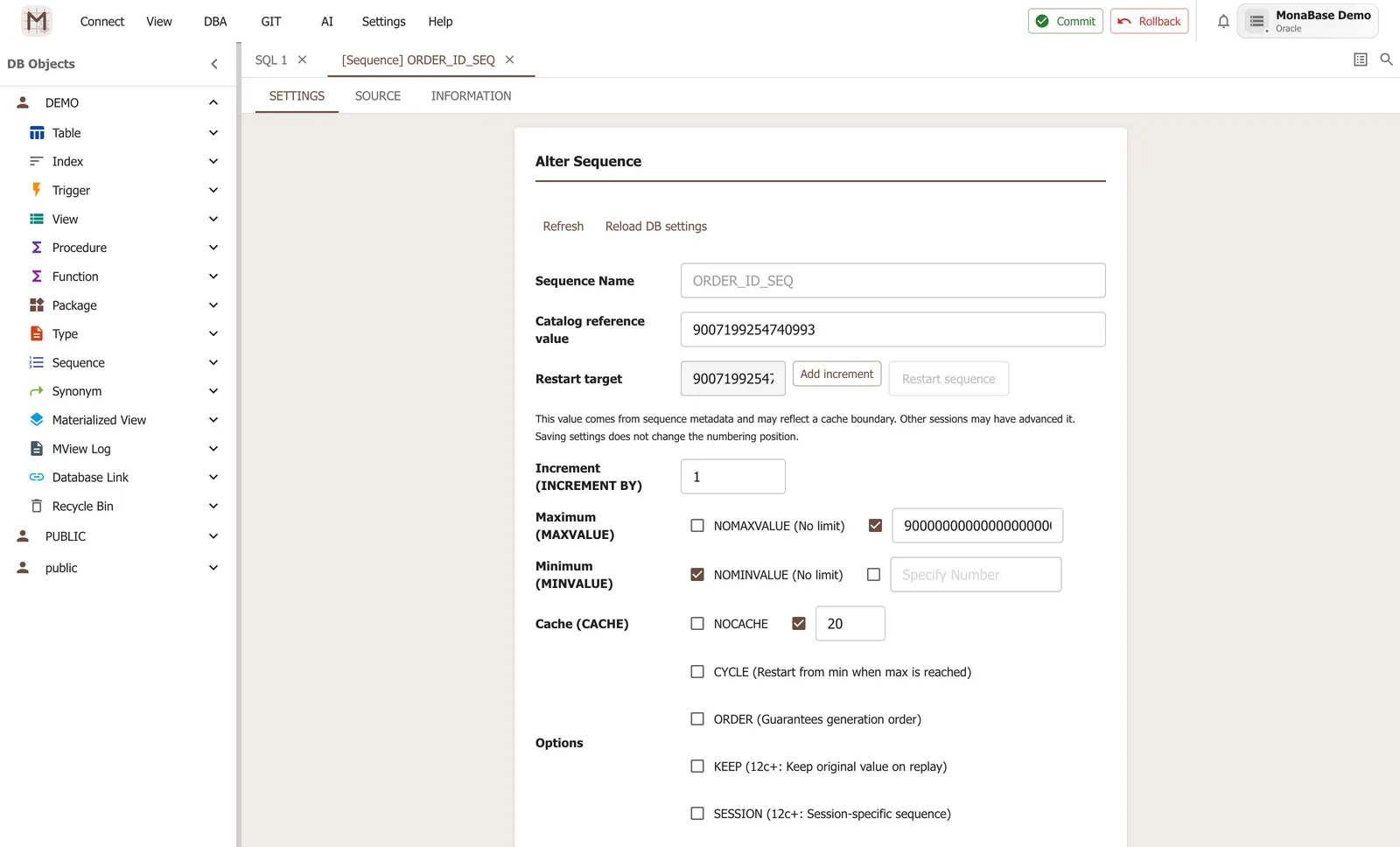
Settings tab — name, range and numbering policy
Section titled “Settings tab — name, range and numbering policy”Existing sequences have Settings, Source and Information tabs. New sequences open only the creation form. Saving settings and restarting numbering are deliberately separate actions.
| Button / setting | How to use it | What changes |
|---|---|---|
| Sequence name | Enter a name when creating. Existing names are read-only; creation normalizes Oracle names to uppercase and PostgreSQL names to lowercase. | Chooses the sequence created in the selected schema. This form does not rename an existing sequence. |
| START WITH | For creation only, enter a starting integer within the chosen limits and direction. | Sets the initial start for CREATE SEQUENCE. Existing numbering is moved only by the separate Restart action. |
| INCREMENT BY | Enter a nonzero integer, positive for ascending or negative for descending numbering. | Changes the step for subsequent numbering after save. Recheck default limits and the creation start when changing sign. |
| MINVALUE / default minimum | Choose an explicit minimum or the no-explicit-limit option. | Default bounds depend on DB, increment direction and PostgreSQL sequence data type; no-explicit-limit does not mean unlimited arbitrary integers. |
| MAXVALUE / default maximum | Choose an explicit maximum or the no-explicit-limit option. Keep maximum greater than minimum. | Sets the upper bound used by validation and subsequent numbering; start/restart values must lie within the applicable range. |
| Cache | Choose caching and an integer size. Oracle uses NOCACHE when disabled; PostgreSQL uses CACHE 1. | Controls preallocated numbers, not table rows. The form checks DB-specific sizes; Oracle SESSION ignores cache and disables these controls. |
| CYCLE | Enable only when reuse after reaching a bound is intended. | Ascending numbering wraps to the minimum and descending to the maximum. This is not duplicate detection against existing table data. |
| Create sequence | Review the name, start, limits and options, then use Create in the new form. | Executes CREATE SEQUENCE and changes the window/navigation to the created object. PostgreSQL creation uses bigint here; this form has no data-type selector. |
| Save existing settings | Edit only the settings you want and click Save. | Rechecks the latest definition and applies supported ALTER clauses. It does not drop/recreate the sequence or apply the separate restart candidate; unchanged settings issue no ALTER. |
| Integer validation | Use integer literals for step, bounds, cache and start/restart values. | Rejects decimals, SQL fragments and invalid ranges before execution. Large integer values are handled without ordinary floating-point rounding. |
Settings tab — Oracle-only options
Section titled “Settings tab — Oracle-only options”ORDER, KEEP and SESSION are available on the Oracle form. They are DB sequence clauses, not display preferences; effective behavior depends on the DB feature, privileges and environment.
| Button / setting | How to use it | What changes |
|---|---|---|
| ORDER | Toggle ORDER when sequence generation must follow request order. | Requests DB ordering; it is not commit order or gapless numbering. SESSION disables this setting. |
| KEEP | Choose KEEP for the intended Oracle Application Continuity replay behavior. | Concerns NEXTVAL reuse during qualifying DB replay, subject to ownership/privileges. It is unrelated to MonaBase trace replay or preserving the current UI candidate. |
| SESSION | Toggle SESSION for a session sequence rather than the normal GLOBAL behavior. | Uses session-local sequence state. CACHE/ORDER are ignored by Oracle and disabled in the form; this is not a globally unique numbering policy. |
Settings tab — reference value and explicit restart
Section titled “Settings tab — reference value and explicit restart”Reading metadata does not call NEXTVAL/nextval. Treat the observed value, local restart candidate and actual DB restart as three different things.
| Button / setting | How to use it | What changes |
|---|---|---|
| Observed value | Read the read-only value and cache note; unknown can be shown when metadata has no usable value. | May represent a cache boundary or be overtaken by other connections. It is not a promise of the next number any application will receive. |
| Restart target | Enter the intended integer for an existing sequence, then review range and possible reuse. | Changes a local candidate and enables the separate restart action when supported. It does not execute SQL by typing or by ordinary settings Save. |
| Add increment | Use the button next to the restart target to add the currently entered increment to that candidate. | Performs exact local integer arithmetic. It does not obtain the next sequence value, consume a number or change the DB sequence. |
| Restart | Press Restart only after changing a candidate and confirm the named schema/sequence, value and latest observed reference. | Validates against current DB settings and executes ALTER SEQUENCE RESTART. It does not save other unsaved limit/step edits or update existing table IDs. |
| Oracle support / version unknown | Read the support message if Restart is disabled. Reload settings to retry version detection. | MonaBase enables native restart when it identifies Oracle 18 or later; older/unknown versions keep restart disabled while supported setting changes remain separate. It does not emulate restart by recreating the object. |
| Number reuse / concurrent users | Review existing IDs and other sequence consumers before confirming a restart. | Issued numbers can be issued again after restart or cycle. The app does not synchronize every caller or prove uniqueness against every consuming table. |
Settings tab — refresh and concurrent changes
Section titled “Settings tab — refresh and concurrent changes”For an existing sequence, settings Save compares the loaded baseline, your edits and the latest DB settings. Changing a display reference or a different connection’s numbering does not itself mean the sequence must be recreated.
| Button / setting | How to use it | What changes |
|---|---|---|
| Refresh / Retry | Use Refresh in settings, or Retry after metadata retrieval fails. | Reloads metadata/support information without numbering. An edited settings draft keeps its original baseline so conflicts remain detectable; operations stay blocked until metadata is ready. |
| Reload DB settings / discard edits | Use the reload/discard button and confirm that you want to discard edited settings. | Replaces the settings draft with DB values. The separately touched restart candidate is retained, so review it before any later restart. |
| Concurrent-change notice | Read the original/latest/your values if another connection changed the same field. | Stops that save for review. Nonconflicting changes can be merged with the latest DB definition rather than overwriting unrelated settings. |
| Keep my changes for the next save | Use this action only after deciding to keep your edited settings, then Save again. | Adopts the reviewed latest baseline and keeps intended local differences. The button itself executes no ALTER; the next Save rechecks the DB again. |
Source tab — creation DDL and copy
Section titled “Source tab — creation DDL and copy”Available for existing sequences. This is a read-only creation reference, not an editable migration or an exact backup of the current numbering position.
| Button / setting | How to use it | What changes |
|---|---|---|
| Oracle / PostgreSQL creation source | Read Oracle DBMS_METADATA DDL or PostgreSQL’s reconstructed CREATE SEQUENCE from metadata. | PostgreSQL retains the existing data type/settings and includes OWNED BY when appropriate. This text is not generated from unapplied setting inputs. |
| Refresh / Retry | Use Refresh to fetch source or Retry after a source error. | Refreshes the source snapshot without consuming numbers or discarding settings edits. A source-read error disables its copy action until a successful load. |
| Copy | Use the copy icon after source loading succeeds. | Copies DDL without executing it. The source editor is read-only and has no compile/save or Git-history control on this tab. |
| Creation reference / IDENTITY association | Review the source note and ensure any owning table/column exists before using copied SQL. | CREATE does not restore the exact next number. PostgreSQL IDENTITY ownership is noted, not recreated by a normal OWNED BY clause; recreate that association through the table definition. |
Information tab — type, ownership and dependencies
Section titled “Information tab — type, ownership and dependencies”Information reads current catalog metadata separately from the settings draft. It provides inspection controls, not a way to edit ownership or allocate the next number.
| Button / setting | How to use it | What changes |
|---|---|---|
| Refresh / Retry | Use the outlined refresh button or Retry for information errors. | Reloads settings/usage metadata without calling NEXTVAL/nextval or changing settings inputs. |
| Data type / current settings | Read NUMBER on Oracle or smallint/integer/bigint on PostgreSQL, plus effective limits/cache/options. | Shows loaded DB settings rather than unapplied edits. The form preserves an existing PostgreSQL type; it does not offer a type-conversion selector. |
| Observed reference | Read the same cache/unknown note as on Settings. | Is a metadata observation, not a guaranteed next value or proof that no other consumer has advanced numbering. |
| Owned by / IDENTITY | On PostgreSQL inspect the table/column association and any IDENTITY marker. | Describes a column relationship rather than the sequence’s login/role owner. Oracle has no PostgreSQL-style OWNED BY association in this view; None does not mean unused. |
| Dependents / scope | Read visible direct catalog references before deletion or restart. | Helps review recorded dependencies, but dynamic SQL, indirect links and application consumers may be absent. It is not an inventory of every issued ID. |
Example: change the step without restarting
Section titled “Example: change the step without restarting”Open an existing sequence, wait for metadata, change Increment from 1 to 10 and Save only the settings. This applies the step change without resetting the numbering position. Inspect current settings and dependencies afterward. If you truly need numbering to restart from 1000, separately enter 1000 as the restart candidate and review the named confirmation; do not infer that a shown metadata value is the next application ID.
Numbering is not gapless data recovery
Section titled “Numbering is not gapless data recovery”Sequence allocation, cached values, concurrent callers and table transactions are distinct. Disabling cache or enabling ORDER is not a gapless-numbering or duplicate-cleanup mechanism. Restart/cycle can reuse numbers, while saving settings does not repair existing rows or coordinate every caller. Review the actual environment and dependencies; Oracle DDL can implicitly commit pending work. For DB clause semantics see Oracle CREATE SEQUENCE and PostgreSQL 16 CREATE SEQUENCE.
How to use this screen
Section titled “How to use this screen”- Open the sequence, wait for metadata and inspect limits, cache/options, data type and usage. Treat the observed reference as metadata, not a guaranteed next number.
- Save intended setting changes separately from a restart. Review conflicts, reload DB values or keep local edits for a new checked save.
- Use Restart only when moving subsequent numbering deliberately; confirm target/value and inspect ownership/dependencies. Use Source only as creation reference, not exact numbering-state recovery.
Database-specific behavior
Section titled “Database-specific behavior”Oracle
Section titled “Oracle”Restart support depends on the Oracle version. Unsupported or unverifiable versions disable restart while allowing valid ordinary setting changes.
PostgreSQL
Section titled “PostgreSQL”PostgreSQL sequence data types and OWNED BY relationships are preserved in source inspection. A sequence can depend on a table column.