
Object privileges
Object privilege management must distinguish direct grants from ownership, inherited rights and PUBLIC access. Revoking one grant does not necessarily remove all access.
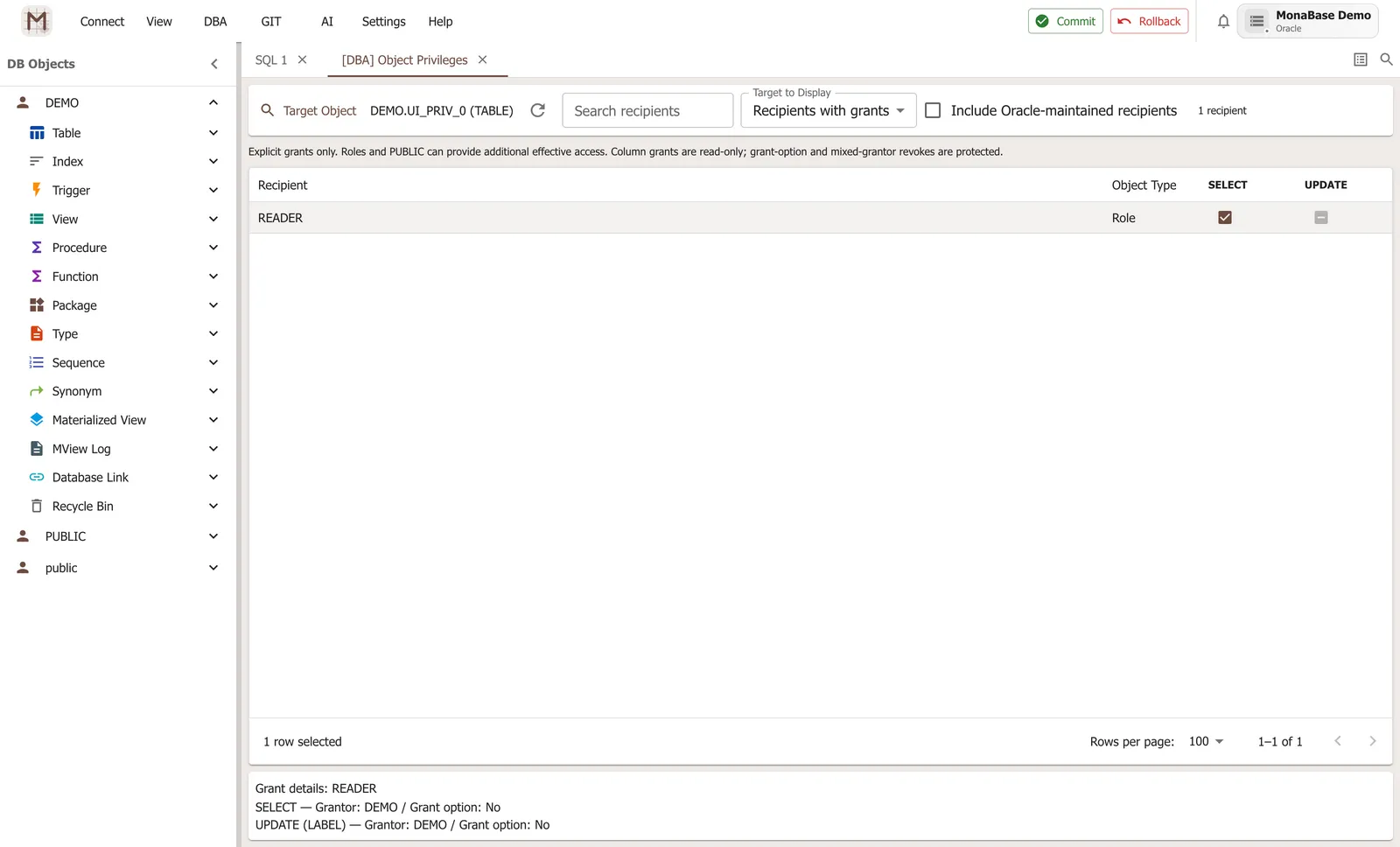
How to use this screen
Section titled “How to use this screen”- Select the exact object and inspect the effective grant information and recipients.
- Choose the privilege and recipient, then review the generated grant or revoke action.
- Execute with suitable authority and refresh. Investigate warnings, dependencies or unverified results before retrying.
Database-specific behavior
Section titled “Database-specific behavior”Oracle
Section titled “Oracle”Oracle grantable privileges and dictionary visibility depend on object ownership and account authority.
PostgreSQL
Section titled “PostgreSQL”PostgreSQL overloads, column ACLs, sequence rights and multiple grantors need separate review. A table revoke can also affect matching column rights.
MySQL privileges target an exact user@host and an object identity. The matrix shows direct grants, not a full effective-permission calculation including all global/database/role paths. Changes may implicitly commit and cannot be undone by Rollback.
Oracle: Users and roles list
Section titled “Oracle: Users and roles list”List and display settings in the Users / Roles tab.
| Action / setting | How to use | Effect of changing or executing |
|---|---|---|
| Object kind | Choose users or roles. | Changes the list and selection, without modifying the database. |
| Search | Filter the list by name. | Shows matching users or roles only. |
| Include Oracle-maintained users | Enable to include Oracle-maintained accounts. | Expands results; it does not grant permission to modify protected accounts. |
| Refresh / Retry | Reload data or retry a failed load. | Re-queries the database for display data. |
| Export | Open the list export dialog. | Exports displayed information without changing database definitions. |
| Selection, page size, split | Select a row, choose 25/50/100 rows per page, or resize the detail panel. | Shows grants and dependencies for the selection; only presentation changes. |
Oracle: User and role operations
Section titled “Oracle: User and role operations”Review the SQL before executing a database-changing operation.
| Action / setting | How to use | Effect of changing or executing |
|---|---|---|
| Create | Enter a user/role name and a password when creating a user. | Creates the selected principal only after review and execution. |
| Change password | Choose a user and provide a new password. | Updates that account’s authentication credentials on execution. |
| Lock / Unlock | Lock or unlock a selected user. | Affects future logins; existing sessions are a separate concern. |
| Grant / Revoke direct privileges | Use Grant in direct grants or the remove icon on a grant row. | Changes membership/system privileges and may change effective access. |
| Tablespace quota | Use Change/Set Quota and enter amount, unit, or unlimited. | Changes tablespace storage limits; UNLIMITED TABLESPACE may override individual quotas. |
| Drop / CASCADE | Remove the principal; CASCADE is available for user deletion. | Destructive; dependencies may be affected. Review and name confirmation are required. |
| SQL review / acknowledgement / Execute | Inspect generated SQL; acknowledge and enter the name if required before Execute. | Review alone changes nothing; execution modifies the DB if privileges and protections permit. |
Oracle: Object privileges
Section titled “Oracle: Object privileges”Privilege matrix in the Object Privileges tab.
| Action / setting | How to use | Effect of changing or executing |
|---|---|---|
| Target object | Choose schema, category, and object in the picker. | Loads direct grants for the selected object. |
| Search / Recipient filter | Search principals and toggle granted-only/all recipients. | Changes visible principal rows, not permissions. |
| Include maintained recipients | Include Oracle-maintained principals. | Expands visible rows without bypassing protections. |
| Privilege checkbox | Use the principal/privilege intersection (for example SELECT or EXECUTE). | Requests grant/revoke where allowed; unavailable cells are disabled. |
| Indeterminate cell / Detail pane | Column-only grants are indeterminate; select a recipient to see grantors and details. | Distinguishes object-wide direct grants from column-level privileges. |
| Refresh / Read-only scope | Reload data and check read-only/visibility warnings. | Refreshes results; write actions remain restricted by privileges. |
PostgreSQL: Roles list and details
Section titled “PostgreSQL: Roles list and details”The Users / Roles tab distinguishes login-capable roles using LOGIN.
| Action / setting | How to use | Effect of changing or executing |
|---|---|---|
| Search / System roles | Search by name and include or exclude system roles. | Filters the list only. |
| Refresh / Export | Reload from the DB or export the list. | Refreshes or exports data without changing privileges. |
| Role selection / Split pane | Select a role and resize the divider. | Inspects attributes such as LOGIN, SUPERUSER, CREATEDB and CREATEROLE, memberships, and dependencies. |
| Direct / Effective roles | Inspect direct memberships and effective roles. | Distinguishes directly assigned roles from inherited/effective access. |
| Page size / Retry | Change page size or retry a failed load. | Changes pagination or reloads the display. |
PostgreSQL: Role operations
Section titled “PostgreSQL: Role operations”Inspect generated SQL and target before execution.
| Action / setting | How to use | Effect of changing or executing |
|---|---|---|
| Create role / LOGIN | Create a named role and set LOGIN. | Creates a login-capable or non-login role. |
| Password mode | Choose whether to set a password and enter it when needed. | Updates role authentication settings. |
| LOGIN / SUPERUSER toggle | Change LOGIN or SUPERUSER for an eligible role. | Changes connection capability or superuser power; treat SUPERUSER carefully. |
| Grant role membership | Choose a member role and grantor, ADMIN, and on PostgreSQL 16+, INHERIT/SET. | Changes membership and its admin/inheritance/set-role semantics. |
| Revoke membership | Select Revoke and its scope for a direct membership. | Removes membership or options and may reduce effective permissions. |
| Drop role | Review dependencies and choose Delete. | May be blocked by ownership or membership dependencies. |
| Review / Acknowledge / Execute | Inspect SQL, acknowledge, and enter role name for deletion before executing. | No change until execution; afterwards the role or memberships are modified. |
PostgreSQL: Object privileges
Section titled “PostgreSQL: Object privileges”The Object Privileges tab differentiates direct and effective access.
| Action / setting | How to use | Effect of changing or executing |
|---|---|---|
| Target object | Choose an object in the picker. | Loads its privilege matrix. |
| Search / Display mode | Filter by role name and choose all, direct, or effective. | Changes visible rows, not DB grants. |
| Direct / Effective / Column-level | Inspect matrix checks, indeterminate indicators, and selected role detail. | Distinguishes direct grants, role-derived access, and column grants. |
| Grant / Revoke | Use a matrix cell or Revoke button to open the review dialog. | GRANT/REVOKE applies to the DB only when executed. |
| Grantor / GRANT OPTION | Select grantor and optional GRANT OPTION during review. | Can enable onward grants; take care when granting to PUBLIC. |
| Revoke grant option only | Choose the option-only revoke action on an eligible grant. | May preserve usage rights while removing delegation ability. |
| SQL review / Execute / Refresh / Export | Review SQL and affected columns before Execute; use refresh/export for reporting. | Execution changes DB privileges; refresh/export are read-only. |
MySQL: object and recipient selection
Section titled “MySQL: object and recipient selection”Use the privilege matrix for direct grants on a selected native object.
| Control / item | How to use | Behavior and limitations |
|---|---|---|
| Target object | Choose a database and TABLE, VIEW, PROCEDURE or FUNCTION in the picker, 100 objects per page. | Other accessible databases can be selected. Same-named procedures and functions are separate targets. |
| Recipient search / display mode | Search user@host; choose Granted only or All recipients. | Shows matching accounts and roles. User and host together identify the recipient. |
| Include protected accounts / Refresh | Include hidden protected accounts when inspecting them, or reread the object. | Displaying an account does not permit editing it. Background refresh preserves pending main-session work. |
MySQL: privilege matrix and recipient details
Section titled “MySQL: privilege matrix and recipient details”Check the supported privilege and its grant scope before editing.
| Control / item | How to use | Behavior and limitations |
|---|---|---|
| Privilege checkbox | Toggle one supported privilege to open a GRANT or REVOKE preview. | No change occurs before Execute. Tables/views expose their supported privileges; routines offer EXECUTE and ALTER ROUTINE. |
| Recipient detail | Select a recipient to inspect direct grants, column grants, GRANT OPTION and Grantor. | Column grants are read-only here. Same-kind column grants or GRANT OPTION disable unsafe matrix edits. |
| Direct grants versus effective access | Review global, database and role-based access separately when needed. | Revoking a direct object grant does not prove that all access has disappeared. Grantor is not an independent per-privilege grant chain. |
MySQL: confirmation and permission limits
Section titled “MySQL: confirmation and permission limits”Inspect the exact SQL and implicit-commit impact before execution.
| Control / item | How to use | Behavior and limitations |
|---|---|---|
| Execute confirmation | Enter the exact user@host and acknowledge the warning. | The review is connection-bound, expires after five minutes and is single-use. Definition and grants are checked again before sending. |
| Partial visibility / protected recipient | Inspect the scope notice when metadata is incomplete or management is unavailable. | Incomplete catalog visibility disables changes. Self/internal/root/admin recipients are protected; MonaBase does not elevate privileges. |
| Implicit commit / refresh failure | Check pending work before GRANT/REVOKE and inspect the reported result. | Changes may commit earlier work and cannot be undone by Rollback. Applied-but-unrefreshed and unknown results are reported separately; no automatic resend. |