
Users & roles
Account management affects access across a database. Inspect details and dependencies before creating, altering or removing a user or role.
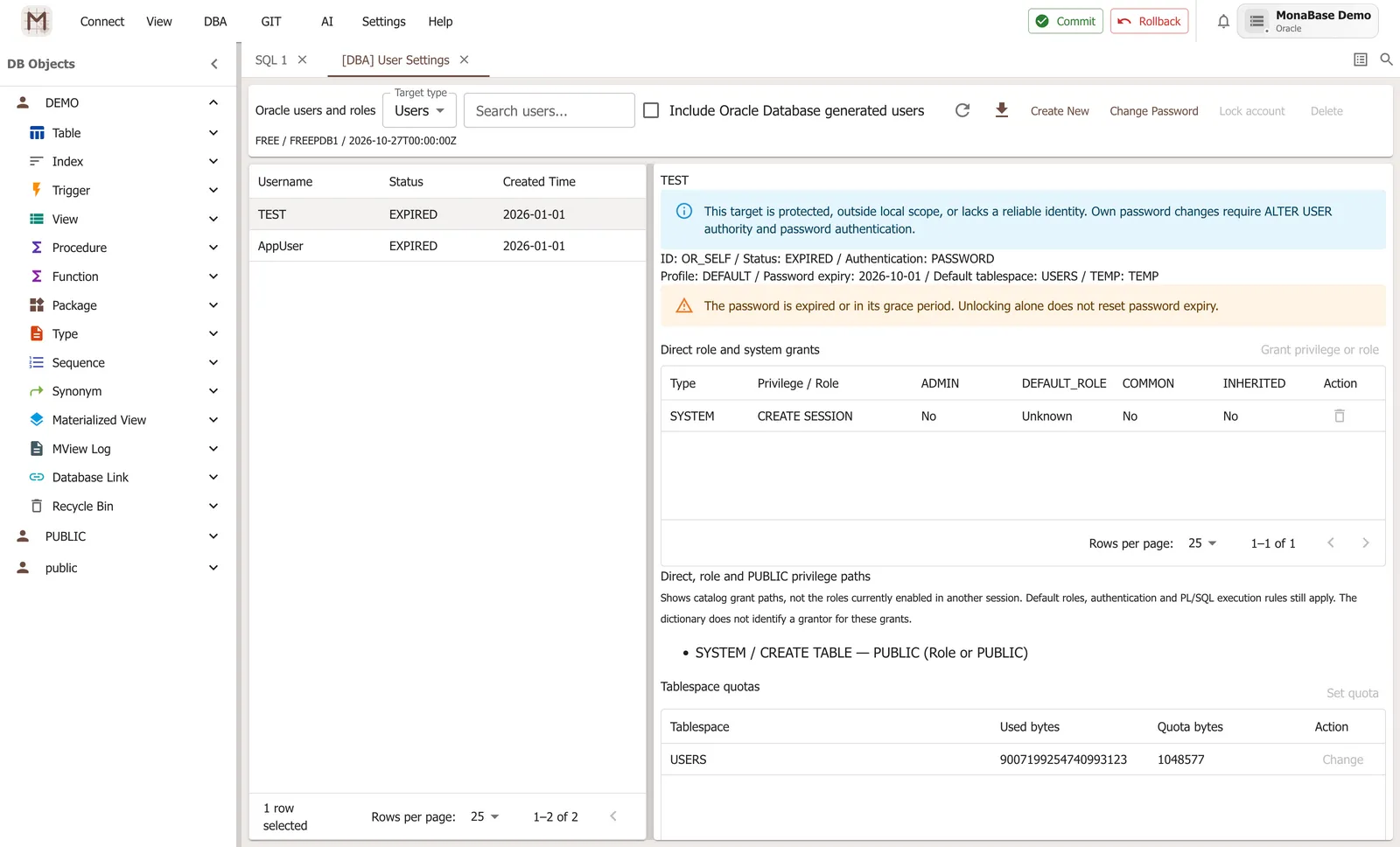
How to use this screen
Section titled “How to use this screen”- Load the list and inspect the selected account, memberships and available privilege details.
- Review a supported change and any required acknowledgement; keep passwords out of shared SQL or screenshots.
- Apply the operation and verify the actual account state. Review dependencies before any cascading deletion.
Database-specific behavior
Section titled “Database-specific behavior”Oracle
Section titled “Oracle”Oracle users and roles have different properties; account status, expiry and quotas matter independently.
PostgreSQL
Section titled “PostgreSQL”PostgreSQL roles can have LOGIN, membership and ownership relationships. Inspect cluster-level dependencies as well as the current database.
MySQL accounts are user@host pairs; roles use MySQL role membership/default-role semantics, not PostgreSQL LOGIN/SUPERUSER or Oracle quotas/containers. With insufficient catalog visibility, only the current account and SHOW GRANTS may be available and mutation stays disabled.
Oracle: user/role list and filters
Section titled “Oracle: user/role list and filters”Manage which users and roles are shown or selected. Filtering does not modify the database.
| Action / Setting | How to use | Effect of changing or executing |
|---|---|---|
| Users / Roles | Select USER or ROLE in the kind selector. | Changes the list and available actions for the selected kind. |
| Search | Filter the list by name. | Only visible entries change; database accounts remain unchanged. |
| Include Oracle-generated users | Toggle the checkbox for Oracle-managed accounts. | May include Oracle-maintained accounts in the list. |
| Refresh / Retry | Use the refresh icon or Retry after an error. | Fetches a new snapshot; selection and details may be updated. |
| Export / Page size | Export the grid or choose 25, 50, or 100 rows per page. | Affects exported data or pagination only; does not change the DB. |
| Select / Resize panes | Select a row and drag the divider. | Loads the selected account details and resizes the panes. |
Oracle: details, grants, and tablespace quotas
Section titled “Oracle: details, grants, and tablespace quotas”Inspect a selected user or role and open permitted management actions.
| Action / Setting | How to use | Effect of changing or executing |
|---|---|---|
| Direct / Effective grants | Inspect directly assigned privileges/roles and effective privileges. | Read-only display; effective privileges can include role-derived access. |
| Grant | Search and choose a candidate privilege or role and its options. | After SQL review and execution, privileges or role membership change. |
| Revoke | Use the revoke icon on a directly granted entry. | Execution removes that direct grant; effective access may remain via other roles. |
| Tablespace quota | Choose a tablespace, amount, unit, or unlimited option in the quota dialog. | Execution modifies the quota for that tablespace; unlimited quotas require care. |
| Dependencies / Retry details | Check dependent objects, truncation warnings, or retry a failed detail fetch. | Refreshes read-only details; does not delete dependencies. |
Oracle: create, password, lock, and delete
Section titled “Oracle: create, password, lock, and delete”Write actions can be unavailable depending on permissions, scope, and protected targets.
| Action / Setting | How to use | Effect of changing or executing |
|---|---|---|
| Create | Choose USER or ROLE, enter a name, and provide a password when creating a user. | After review and execution, creates the new user or role. |
| Change password | Enter a new password for the selected user. | Execution changes the account credential. |
| Lock / Unlock | Choose Lock or Unlock according to the selected user status. | Execution affects subsequent login availability; it is distinct from existing sessions. |
| Drop / CASCADE | Choose Delete and optionally CASCADE for a user. | Execution removes the target; CASCADE can also affect owned objects. |
| Review / Acknowledge / Execute | Review generated SQL, acknowledge the warning, and enter the target name for deletion. | Review alone is read-only; Execute applies DDL and refresh verification may fail. |
PostgreSQL: role list, attributes, and details
Section titled “PostgreSQL: role list, attributes, and details”PostgreSQL users are roles with the LOGIN attribute.
| Action / Setting | How to use | Effect of changing or executing |
|---|---|---|
| List / Search / Refresh | Search/select a role and refresh the snapshot. | Only list and detail display change; role definitions remain intact. |
| Export / Page size | Export list data or select 25, 50, or 100 rows per page. | Changes display/export only, not database state. |
| Role attribute badges | Inspect LOGIN, SUPERUSER, CREATEDB, CREATEROLE, INHERIT, REPLICATION, and BYPASSRLS. | Badges are read-only; SUPERUSER indicates elevated privileges. |
| Connection limit / Valid until / Settings | Inspect OID, connection limit, VALID UNTIL, and role settings. | Read-only detail; no configuration changes. |
| Membership / Effective roles / Dependencies | Inspect direct memberships, effective roles, members, and dependencies. | Helps assess inherited access and deletion impact without changing DB state. |
PostgreSQL: create, login, password, and deletion
Section titled “PostgreSQL: create, login, password, and deletion”Review SQL before executing an enabled role operation.
| Action / Setting | How to use | Effect of changing or executing |
|---|---|---|
| Create role / LOGIN | Enter a role name and choose whether LOGIN is enabled. | Execution creates a role; LOGIN enables authentication use. |
| Password mode / New password | Choose set/no password and enter a value when required. | Execution affects password-based authentication availability. |
| Change LOGIN | Open the LOGIN attribute action for the selected role. | Execution changes whether the role can initiate new logins. |
| Change SUPERUSER | Review the warning when toggling SUPERUSER. | Execution can greatly change privileges and requires sufficient authority. |
| Drop role | Check dependencies and memberships before choosing Delete. | Execution attempts to drop the role; dependencies can prevent it. |
PostgreSQL: membership grants, revokes, and execution review
Section titled “PostgreSQL: membership grants, revokes, and execution review”Grant/revoke role memberships. Available flags vary by PostgreSQL version.
| Action / Setting | How to use | Effect of changing or executing |
|---|---|---|
| Grant membership | Search for a candidate role and select the role and grantor. | Execution adds a direct role membership. |
| ADMIN / INHERIT / SET | Toggle flags; INHERIT and SET appear on supported PostgreSQL versions. | Execution can change membership administration, inheritance, and SET ROLE rights. |
| Revoke membership scope | Choose a direct membership and revoke all membership or an available flag. | Execution removes the selected membership or option. |
| SQL review / Acknowledge / Name | Review SQL, acknowledge the warning, and enter the name when deleting. | Review is non-mutating; required confirmation enables Execute. |
| Execute / Cancel / Retry | Execute sends SQL; Cancel closes the dialog; Retry refreshes after errors. | Only Execute changes the DB; read-only/protected targets or permissions may block actions. |
MySQL: account list and filters
Section titled “MySQL: account list and filters”Accounts and roles use user@host identities, not Oracle usernames alone.
| Control / item | How to use | Behavior and limitations |
|---|---|---|
| Search / include protected accounts | Search by user or host and optionally display protected accounts. | Internal/admin accounts are hidden by default except the current account; displaying them does not enable mutation. |
| Referenced roles only | Enable the role filter. | Shows accounts granted as roles. A locked account alone is not assumed to be a role. |
| Refresh / Export / list columns | Refresh or export the filtered account grid. | Shows user, host, lock, expiry and authentication plugin. If system metadata is denied, only the current account and SHOW GRANTS are shown, with management disabled. |
MySQL: grants, roles and account details
Section titled “MySQL: grants, roles and account details”Select an account on the left and resize the divider to inspect its details.
| Control / item | How to use | Behavior and limitations |
|---|---|---|
| Grants / SHOW GRANTS | Inspect direct database/global privileges and native grant text. | Object and column grants may be visible in the text; they are not edited with the account-level privilege action. |
| Roles / default roles / recipients | Inspect granted roles, default selection and accounts receiving this role. | Direct revocation does not necessarily remove inherited or mandatory-role access. This is not every session’s effective privilege list. |
| Resource limits / DEFINER references | Review account limits and objects referencing the account as DEFINER. | Dependencies or an incomplete dependency scan prevent account deletion. Deleting an account does not drop its databases or tables. |
MySQL: account and role operations
Section titled “MySQL: account and role operations”Review SQL, confirm the exact user@host and acknowledge the impact before Execute.
| Control / item | How to use | Behavior and limitations |
|---|---|---|
| Create / password / lock / delete | Create USER or ROLE; use the selected account’s available actions. | New users use caching_sha2_password; roles start locked. Passwords are hidden and cleared after attempts; saved login credentials are not rewritten. Locking does not terminate existing sessions. |
| Grant / revoke privilege | Choose database or global scope and one supported ordinary privilege. | No ALL PRIVILEGES, dynamic administrative privileges, proxy grants or GRANT OPTION editing is offered. |
| Grant / revoke role / default role | Choose an allowed role or set the default role to NONE. | Cycles/admin paths are protected. Default selection replaces the default for future logins; it does not activate roles in existing sessions. |
| Resource limits | Set queries, updates, connections per hour and concurrent connections. | Zero hourly limits remove the account cap; zero concurrent limit still follows max_user_connections. MonaBase uses three sessions per DB connection, so low limits can prevent login. |
| Protection / final confirmation | Confirm a fresh masked preview; enter exact user@host and acknowledge implicit commit. | Reviews expire after five minutes and are single-use. Self/root/internal/admin targets remain protected. DDL may commit pending work; unknown outcomes are never automatically retried. |