
Sessions
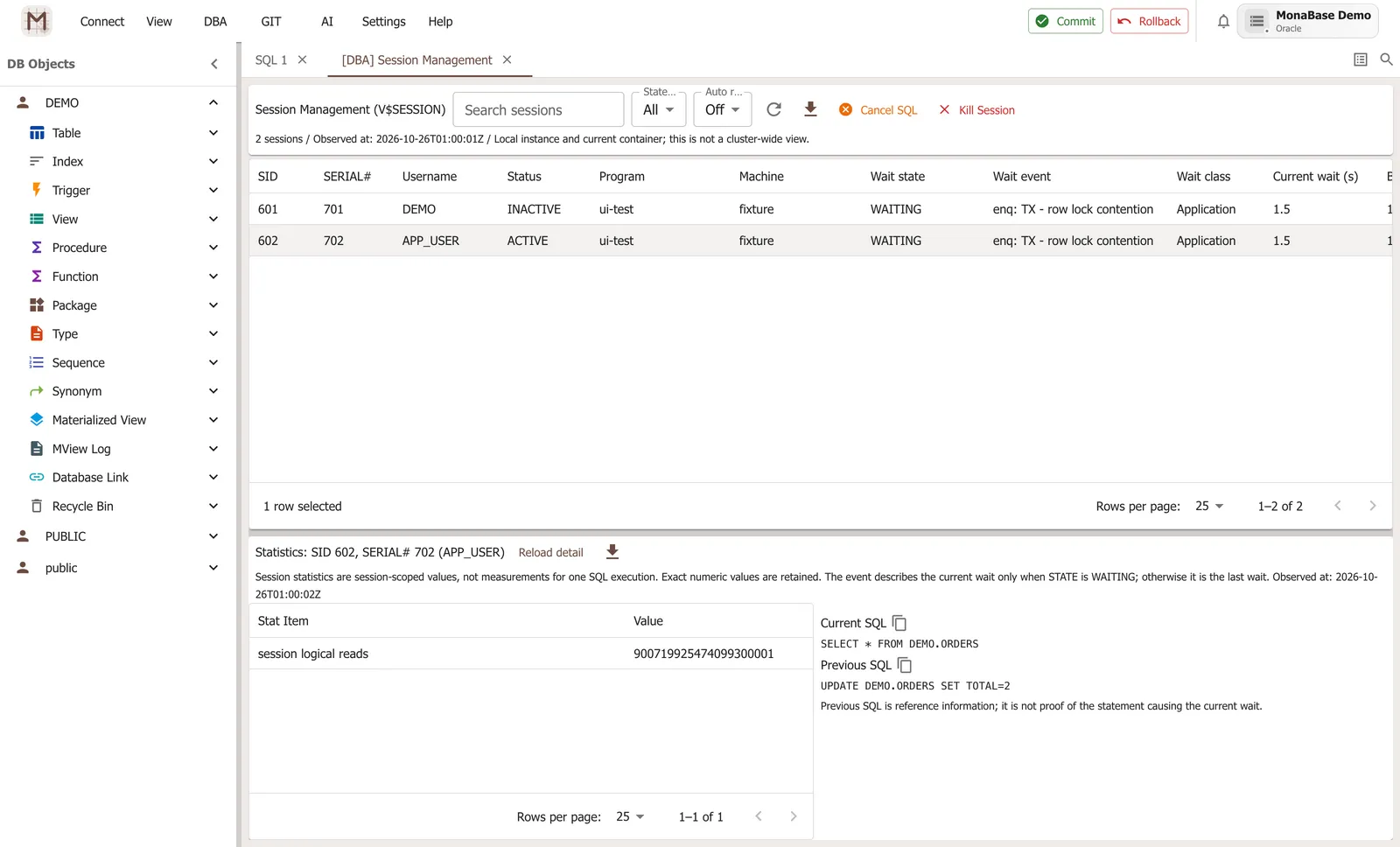
Session views show database activity and available SQL details. Destructive actions target live connections, so recheck the selected identity before using them.
How to use this screen
Section titled “How to use this screen”- Refresh the list and select a session to inspect details and SQL where permitted.
- Check the user, connection identity and activity; do not confuse the application connection with a worker you intend to manage.
- Review any cancel or terminate confirmation and inspect the actual outcome. Permission failures are not successful termination.
Database-specific behavior
Section titled “Database-specific behavior”Oracle
Section titled “Oracle”Oracle session statistics and SQL views require catalog privileges. Disconnect and cancellation use Oracle-specific checks.
PostgreSQL
Section titled “PostgreSQL”PostgreSQL activity visibility and cancellation rights depend on role privileges. The app protects its own connections.
MySQL session management uses Performance Schema thread/execution identity, with a limited SHOW FULL PROCESSLIST fallback when catalogs are unavailable. Fallback visibility is not enough to enable termination actions. Main/background/internal/self/admin connections are protected.
Oracle: session list and filters
Section titled “Oracle: session list and filters”The Oracle session screen reads V$SESSION-related information; filtering and column options only change what is shown.
| Action / setting | How to use | Effect of action or change |
|---|---|---|
| Search | Enter a SID, user, program, machine, SQL ID, or event. | Filters already retrieved session rows locally; it does not modify or search database objects. |
| Status filter: All / Active / Waiting | Select a session-status filter; Waiting excludes idle wait classes. | Restricts the visible rows; no session is stopped. |
| Auto-refresh: Off / 5 / 10 / 30 seconds | Choose the list polling interval. | The app periodically reloads information while this tab is active; it may add monitoring queries. |
| Refresh and Retry | Click refresh or Retry after a read error. | Retrieves a fresh snapshot; an unavailable or ended session may disappear. |
| Export session list | Open the export dialog for the currently displayed rows. | Writes exported monitoring data to a file; no database changes are made. |
| Column display, sorting, pagination | Adjust columns or sorting in the grid; choose 25, 50, or 100 rows per page. | Only the table presentation changes; INSTANCE_ID, CON_ID, and OSUSER start hidden. |
Oracle: selected session details
Section titled “Oracle: selected session details”Selecting a session shows its statistics and current/previous SQL in the lower pane.
| Action / setting | How to use | Effect of action or change |
|---|---|---|
| Select session row | Select a row using SID and SERIAL# as identifying information. | Loads the selected session details; it does not execute its SQL. |
| Upper/lower pane divider | Drag the separator or use keyboard arrow, Home, and End keys. | Changes space allocated to the session list and detailed information. |
| Refresh details / Retry | Refresh statistics and SQL details for the selected session. | Re-reads detail data; rapidly changing SQL can result in a changed-session warning. |
| Statistics grid / export | View NAME/VALUE statistics and export the selected session statistics. | Only reads and exports statistics; pagination is 25, 50, or 100 rows. |
| Current SQL / Previous SQL copy | Use each SQL text area copy icon when text is available. | Copies the displayed SQL to the clipboard; it is not executed. |
Oracle: cancel SQL and kill session
Section titled “Oracle: cancel SQL and kill session”These controls issue commands against the actual database; visibility and permission checks apply.
| Action / setting | How to use | Effect of action or change |
|---|---|---|
| Cancel SQL | For an active session with confirmed current SQL execution information, choose Cancel SQL and approve the confirmation. | Requests cancellation of the current SQL execution, not termination of the entire session. The button can be unavailable when unsupported or execution details are stale. |
| Kill Session | Select a manageable, unprotected session and confirm its SID, SERIAL#, user, instance, and container. | Requests session termination; ongoing work may be rolled back and locks released. Completion may be asynchronous. |
| Protected / read-only session | Check the protected marker and privilege/read-only messages before acting. | Commands are disabled if protection metadata or privileges are insufficient; merely viewing is allowed. |
| Outcome notification and refresh | Review the result message after cancellation or termination. | A request or marked-for-kill result is not proof that the session has already disappeared; reload to verify. |
PostgreSQL: session list and filters
Section titled “PostgreSQL: session list and filters”The PostgreSQL session view uses pg_stat_activity-related information; it also exposes blockers and transaction timing.
| Action / setting | How to use | Effect of action or change |
|---|---|---|
| Search | Search by PID, database, username, application, client, state, wait event, or query text. | Filters displayed sessions locally; it does not run or alter the SQL shown. |
| Scope: Current / All databases | Switch the list between current database and all visible databases. | Changes the visible session scope; access privileges can still limit information. |
| State: All / Active / Idle in transaction / Waiting / Idle | Choose a PostgreSQL state filter; Waiting checks the wait type. | Shows only matching rows; Idle in transaction can identify connections retaining open transactions. |
| Auto-refresh / Refresh / Retry | Choose Off, 5, 10, or 30 seconds; refresh manually or retry after an error. | Reloads session snapshots; frequent polling generates additional monitoring queries. |
| Export and pagination | Export displayed rows; select 25, 50, or 100 rows per page and adjust columns. | Exports a local snapshot; query and timestamp columns can be revealed from initially hidden columns. |
PostgreSQL: detail and blocking sessions
Section titled “PostgreSQL: detail and blocking sessions”The lower pane shows selected SQL and timing, with navigation to known blocking sessions.
| Action / setting | How to use | Effect of action or change |
|---|---|---|
| Select PID row | Select a connection in the upper grid. | Shows its query, start times, and status; the displayed SQL is not executed. |
| Inspect blocker (PID) | Click the blocker inspection button for a listed blocking backend. | Clears search, changes scope to all databases, and selects the blocker in the list. |
| SQL copy | Copy the selected connection query from the lower pane. | Sends text to the clipboard only; query text may be hidden by privilege restrictions. |
| Idle in transaction warning and query timing | Review highlighted idle-in-transaction status, wait information, and query/transaction times. | Helps diagnose long-running transactions or waits; reading these values does not change the connection. |
| Pane divider | Resize the list and detail panes via drag or keyboard. | Changes the layout only; no database requests are issued solely by resizing. |
PostgreSQL: cancel query and terminate connection
Section titled “PostgreSQL: cancel query and terminate connection”Cancel Query and Kill Connection are separate database actions, each requiring confirmation and permission checks.
| Action / setting | How to use | Effect of action or change |
|---|---|---|
| Cancel Query | Select an actionable backend and confirm Cancel Query. | Requests cancellation of its running query while keeping the backend connection alive when possible. |
| Kill Connection | Select an actionable, unprotected PID and confirm termination. | Requests backend termination. Uncommitted work may roll back and locks can be released. |
| Read-only / protection checks | Review privilege, self-connection, and unknown-identity protections when the buttons are disabled. | The app disables dangerous commands if it cannot safely verify the target or authorization. |
| Result and re-observation | Check notifications after a command and reload the list. | A sent request does not necessarily guarantee immediate completion; recheck state before repeating an action. |
MySQL: session list and filters
Section titled “MySQL: session list and filters”Identify connections across databases using connection IDs and THREAD_ID.
| Control / item | How to use | Behavior and limitations |
|---|---|---|
| Search | Enter an ID, user, host, database, state or SQL fragment. | Narrows the loaded list; it does not change server settings. |
| All / Active / Waiting | Choose the session filter. | Active means Query; Waiting matches wait/lock state text and is not a complete wait-event classification. |
| Auto-refresh / Refresh | Choose Off, 5, 10 or 30 seconds, or refresh manually. | Refresh pauses while inactive or reviewing an action. Failed reads leave data unconfirmed for operations. |
| Export / page size | Export the displayed rows; choose 25, 50 or 100 rows per grid page. | Exports observations, without terminating or modifying sessions. |
MySQL: statistics and SQL details
Section titled “MySQL: statistics and SQL details”Select a session in the upper grid; resize the divider to inspect details.
| Control / item | How to use | Behavior and limitations |
|---|---|---|
| Statistics / refresh detail | Select a row and refresh its detail when needed. | Shows cumulative per-thread counters, not deltas or statistics for one SQL execution. Large values retain their precision. |
| Current / previous SQL | Inspect both text panes and use their copy actions. | Previous SQL is the latest retained completed statement; disabled or unavailable instrumentation may leave it empty. Authentication SQL is hidden. |
| Export statistics / divider | Export counters; drag the horizontal divider or use its arrow/Home/End keys. | Adjusts the view only; background detail reads preserve main-session pending edits. |
MySQL: cancel SQL and terminate connections
Section titled “MySQL: cancel SQL and terminate connections”Only verified, unprotected sessions can be targeted.
| Control / item | How to use | Behavior and limitations |
|---|---|---|
| Cancel SQL | Review KILL QUERY, enter the exact connection ID and acknowledge the impact. | Cancels the verified current statement; the connection survives and earlier pending work may remain. |
| Terminate connection | Review KILL CONNECTION and confirm the selected connection ID. | Ends that connection and rolls back its pending transaction. Cleanup may take time; this is not a lock-only release. |
| Permissions and confirmation | Use a connection with complete protective metadata and directly held CONNECTION_ADMIN or SUPER. | Self/app/internal/admin or unverified connections are protected. Reviews expire after 60 seconds, are single-use and recheck identities; unknown results are not resent. Processlist fallback remains read-only. |