
PDB management
Oracle
PDB management is an Oracle multitenant administration feature. A normal local account connected to a PDB is not automatically authorized to manage CDB-level operations.
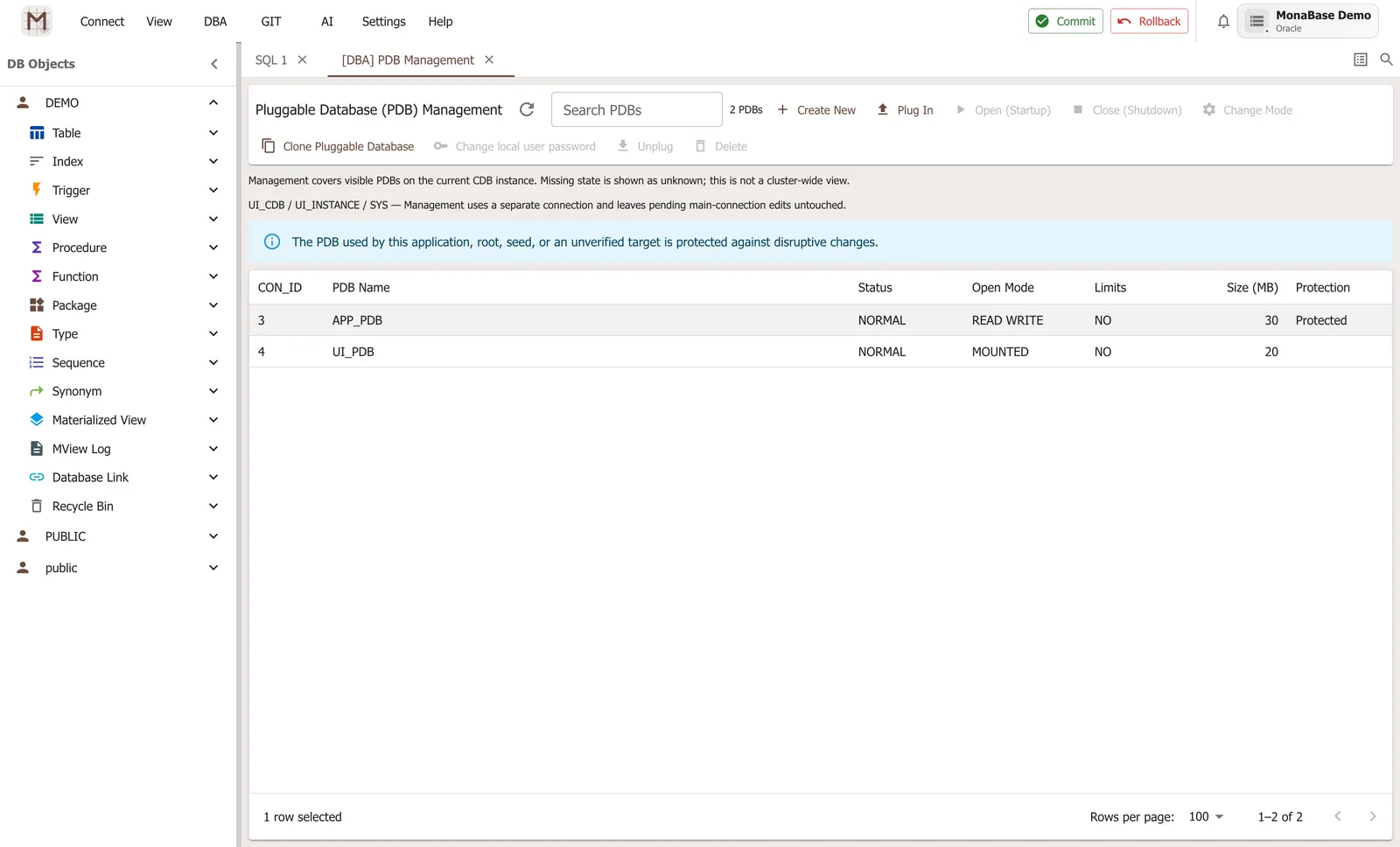
How to use this screen
Section titled “How to use this screen”- Confirm the connected container and account before opening management actions.
- Inspect the PDB identity and state using an appropriately authorized connection.
- Review creation, cloning, open/close or removal operations with a DBA and verify the resulting state.
PDB list, search, and selection
Section titled “PDB list, search, and selection”Inspect PDBs in the CDB and select a target.
| Action or setting | How to use | Effect of changing or executing |
|---|---|---|
| Refresh | Select the refresh icon. | Reloads current PDB states without modifying the database. |
| Search | Enter text in the PDB-name search box. | Filters visible PDBs by name only; does not affect the database. |
| Select PDB | Select a grid row. | Sets the target for subsequent operations; selection itself runs nothing. |
| Status and open mode | Inspect STATUS, OPEN_MODE, restricted state, size, and other columns. | Shows current conditions and helps determine available actions; read-only. |
| Page size and columns | Choose 25, 50, or 100 rows per page or adjust column visibility. | Changes grid presentation only. |
| Protected or read-only status | Inspect protected-target warnings, read-only notice, and disabled actions. | Unsafe actions are disabled according to context, permissions, and PDB state. |
Create and clone PDBs
Section titled “Create and clone PDBs”Review and execute PDB creation or cloning.
| Action or setting | How to use | Effect of changing or executing |
|---|---|---|
| Create | Choose Create and provide the PDB name, administrator username, and new password. | After review and execution, attempts to create a new PDB. |
| Clone | Select a source PDB, choose Clone, then specify the new name. | Creates a separate PDB from the source; requires READ ONLY or supported hot-clone conditions. |
| Storage mode | Choose OMF or data-file path conversion. | Determines file placement; OMF is selectable only when supported by the environment. |
| Path conversion rules | Add, edit, or remove source and destination path prefixes in conversion mode. | Controls data-file path conversion for the operation. |
| Pre-execution review | Select Review and inspect the planned operation, files, and warnings. | Review alone does not create a PDB. |
Open, close, and change mode
Section titled “Open, close, and change mode”Operations affecting the selected PDB runtime state.
| Action or setting | How to use | Effect of changing or executing |
|---|---|---|
| Open | Select a mounted PDB and choose Open. | After review and execution, attempts to open the PDB. |
| Close | Choose Close for an opened PDB. | Execution can affect connected sessions and active work. |
| Change mode | For a mounted PDB, select READ WRITE or READ ONLY. | Attempts to open in the selected mode; READ ONLY prevents ordinary writes. |
| Action eligibility | Check PDB status, privileges, and protection when buttons are disabled. | The UI prevents operations that fail its eligibility checks. |
| Operation result | Inspect applied, unconfirmed, or unknown-outcome messages. | If the outcome is unknown, reload the catalog and verify before retrying. |
Plug in, unplug, and delete
Section titled “Plug in, unplug, and delete”Operations involving metadata XML and PDB registration state.
| Action or setting | How to use | Effect of changing or executing |
|---|---|---|
| Plug in | Choose Plug in and specify the PDB name and server-side XML path. | Attempts to attach a PDB using XML metadata, subject to compatibility review. |
| Unplug | Select a PDB and specify the server-side metadata XML output path. | Runs the PDB unplug workflow; eligibility depends on PDB state and environment. |
| Compatibility check | Inspect compatibility results and violations in Review. | Incompatible metadata can prevent execution. |
| Delete | Choose Delete on the selected PDB and inspect warnings and typed-name confirmation. | May seriously affect PDB registration and files; verify the exact target. |
| UNPLUGGED state | Check available Plug in / Delete actions for an UNPLUGGED PDB. | The workflow and file-retention warnings depend on current state. |
Local password and execution safeguards
Section titled “Local password and execution safeguards”How password changes and execution safeguards work.
| Action or setting | How to use | Effect of changing or executing |
|---|---|---|
| Local password | For a READ WRITE PDB, choose Local password, then select a user and enter a new password. | Execution changes that local user’s credentials. |
| Review again | Run Review again after changing an input. | Invalidates the prior review and validates the updated operation. |
| Acknowledge | Check the acknowledgment box in the review panel. | Execution stays disabled until acknowledgment is given. |
| Type target name | Enter the exact target name for operations requiring confirmation. | Adds a safeguard against targeting the wrong PDB. |
| Execute | Select Execute only after a valid review and all confirmations. | Attempts to change the database; verify the actual result afterward. |
| Cancel and retry | Cancel an unexecuted dialog or retry a failed catalog refresh. | Closes pending inputs or reloads state; does not reverse completed DB operations. |