
Indexes
An existing index window has three tabs: Edit, Statistics and Source. New indexes open a creation form. Use Edit for supported settings and constraint-aware deletion, Statistics for database-maintained values, and Source for the actual DDL. The tables below distinguish creation-only options from changes allowed on an existing index.
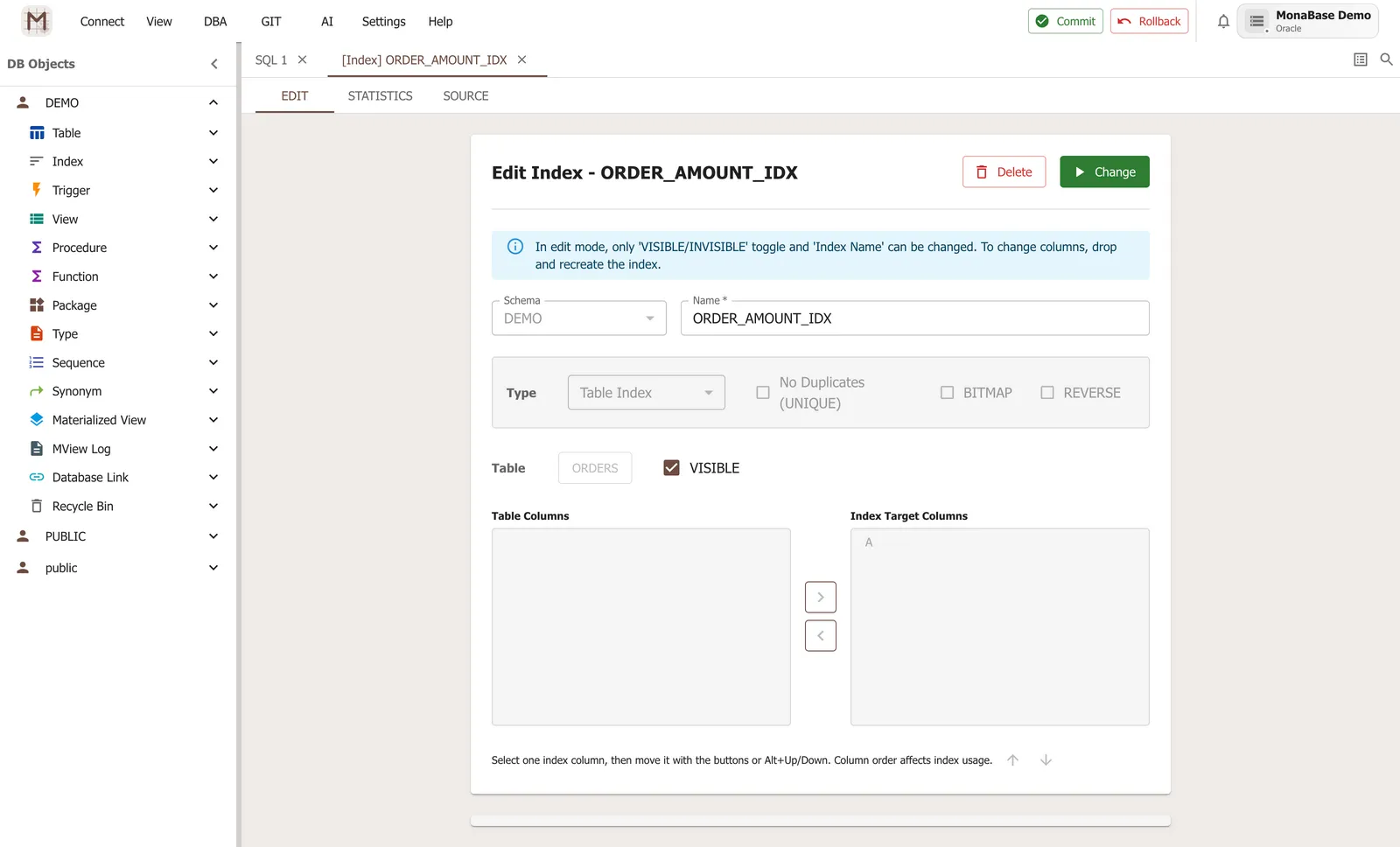
Edit / create form — choose the target and keys
Section titled “Edit / create form — choose the target and keys”Existing indexes open with Edit, Statistics and Source tabs. New indexes show a creation form without those tabs. Target/type/key controls are editable during creation; most become read-only for an existing index.
| Button / setting | How to use it | What changes |
|---|---|---|
| Schema | Select the target schema when creating an index. | Changes the table search scope and clears the selected table/columns so they cannot remain attached to the previous schema. Existing-index schema is fixed. |
| Name | Enter the index name; in existing-index mode, change it only when renaming is intended. Oracle input is uppercased by the form. | Names the new index or prepares an ALTER INDEX rename. Changing text alone does not change the DB. |
| Select table | Click the table button, search within the selected schema and choose one table from the 100-item pages. | Loads that table’s available columns. Switching tables clears previous key selections; only tables, not views, are offered. |
| Index type | Oracle: table index or function-based index. PostgreSQL: table index, primary key or expression index. | Switches between column selection and an expression editor. PostgreSQL primary-key mode creates an ALTER TABLE ADD CONSTRAINT PRIMARY KEY statement, not just a standalone index. |
| UNIQUE | Enable UNIQUE during creation; PostgreSQL primary-key mode enables it automatically and locks the checkbox. | Creates a uniqueness-enforcing definition. Existing duplicates can cause creation to fail; NULL behavior follows the database’s rules. Existing uniqueness is read-only here. |
| Add / remove target columns | Select available columns on the left and use →, or double-click a column. Use ← or double-click on the right to remove it. | Builds the index key list. Removing a key from the draft does not drop a column from the table. |
| Select multiple columns | Use Ctrl for individual selections, Shift for ranges, or drag across the list. | Moves multiple selected columns together. Selection itself does not execute any SQL. |
| Key order / Alt+Up or Alt+Down | Select one target column on the right, then use the up/down buttons or Alt+Up/Down. | Changes the key order in generated DDL. Composite key order affects how queries can use the index; it is not a sort instruction for displayed table rows. |
| Function / expression | Choose function/expression mode and enter an expression such as LOWER(“EMAIL”). Use completion for functions and table columns. | Uses the expression as the index key. The app checks for empty text and mismatched parentheses; allowed functions and expression validity are still checked by the DB. |
| Create | Review the target, type, options and ordered keys/expression, then click Create after column loading succeeds. | Executes CREATE INDEX, or PostgreSQL primary-key DDL, on the main DB connection. The sidebar and window identity update after success; this is not a dry run. |
Oracle options on the Edit / create form
Section titled “Oracle options on the Edit / create form”These controls are Oracle-specific. Visibility can be changed for an existing index; bitmap/reverse options are creation settings and are not maintenance or rebuild commands.
| Button / setting | How to use it | What changes |
|---|---|---|
| Bitmap | Enable Bitmap during creation when that index type is appropriate. | Adds BITMAP to CREATE INDEX and clears UNIQUE and Reverse in the form. This is not a universal performance improvement; assess the table workload and DB restrictions. |
| Reverse | Enable Reverse for a supported non-function index during creation. | Adds REVERSE and clears Bitmap. Switching to function mode clears Reverse; the DB remains responsible for validating the full option combination. |
| Visible / invisible | Toggle Visible; on an existing index, review the ALTER preview and click Change. | Chooses VISIBLE or INVISIBLE. Invisible is a database index-visibility setting, not hiding the object from MonaBase, and it does not drop the index or remove its maintenance cost. |
| Exclusive options | Recheck all checkboxes after enabling UNIQUE, Bitmap, Reverse or function mode. | UNIQUE clears Bitmap; Bitmap clears UNIQUE/Reverse; Reverse clears Bitmap. These adjustments avoid some conflicts but do not guarantee that every remaining combination is supported. |
Edit tab — change an existing index
Section titled “Edit tab — change an existing index”Oracle permits name and visibility changes here; PostgreSQL permits name changes. Structural replacement is not silently performed for fields that are read-only.
| Button / setting | How to use it | What changes |
|---|---|---|
| Change name | Edit the name, review the ALTER statement and click Change. | Renames the existing index. It does not change its keys, uniqueness, expression or original access method. |
| Locked structural fields | Inspect the fixed schema/table/type/uniqueness/key/expression fields. | Shows existing structure without replacing it. A key/type change needs a separately reviewed recreation or migration plan, preserving constraints and dependencies. |
| ALTER preview / Copy | Read the generated ALTER SQL below the form, and use its copy icon if needed. | Updates the planned SQL as editable settings change. Preview is read-only; copying does not run it, and the Source tab still shows the fetched existing definition. |
| No changes | Read the unchanged hint if no supported field differs. | Does not rebuild or recreate the index just because Change is pressed. Use the appropriate separate SQL workflow if maintenance is intended. |
| Load error / Retry | Use Retry after an index or column metadata read fails. | Retains previously loaded content but blocks execution/deletion until the target metadata loads successfully. A missing definition is not treated as a new empty index. |
| Console / resize / close / clear | Read SQL, result and errors in the console. Drag its boundary, close it with × or clear displayed logs with the trash icon. | Changes presentation only. If several Oracle ALTER statements run and a later one fails, check which earlier operations succeeded; clearing the log does not undo them. |
| After success / Git name tracking | Inspect the success result, updated sidebar and reopened/loaded definition after a create or rename. | The app refreshes object navigation and attempts Git object renaming for a renamed index. Git operations are separate from DB DDL; this screen has no general source-history editor. |
Edit tab — deletion and constraint protection
Section titled “Edit tab — deletion and constraint protection”An index may enforce a primary key or unique/exclusion constraint. Review the constraint notice and foreign-key reference count before deleting; removing an ordinary index and removing a constraint are different operations.
| Button / setting | How to use it | What changes |
|---|---|---|
| Constraint notice | Read the constraint name/kind, owning table and reference count shown above the form. | Explains which integrity rule relies on the index. Multiple constraints or foreign-key references can block deletion. |
| Delete an ordinary index | Click Delete and confirm the exact schema/index target. | Executes DROP INDEX when no protected constraint owns it. Table records are not deleted, but access paths and query performance can change. |
| Oracle constraint-backed index | Inspect the associated primary-key or unique constraint in the table structure workflow. | Direct index deletion is blocked. The app does not silently drop the constraint or add CASCADE to bypass it. |
| PostgreSQL constraint-backed index | Read the stronger constraint-removal confirmation when the index belongs to a single constraint without foreign-key references. | Uses ALTER TABLE DROP CONSTRAINT rather than DROP INDEX, removing its integrity rule too. Foreign-key references or multiple owning constraints block the operation. |
| Recheck before deletion | If a changed-definition or load error appears, reload/retry and review the target again. | Fetches fresh definition/dependencies before planning deletion and refuses a changed target. This protection does not eliminate concurrent changes or replace DB privilege checks. |
Statistics tab — interpret database-maintained values
Section titled “Statistics tab — interpret database-maintained values”Available for existing indexes. Oracle and PostgreSQL show different fields; these are catalog/counter snapshots, not a live query benchmark or a guarantee that an index is useful.
| Button / setting | How to use it | What changes |
|---|---|---|
| Oracle structure / sample values | Read BLEVEL, LEAF_BLOCKS, DISTINCT_KEYS, NUM_ROWS, SAMPLE_SIZE and LAST_ANALYZED. | Shows tree depth, leaf blocks and collected key/row/sample statistics. Missing or old collection values need not match current table data. |
| PostgreSQL size / scans / row fetches | Read index size, idx_scan, idx_tup_read and idx_tup_fetch. | Helps inspect recorded usage. These counters have different meanings and observation/reset periods; a zero is not sufficient reason to delete an index. |
| PostgreSQL I/O / maintenance dates | Read idx_blks_read/idx_blks_hit and last analyze/autoanalyze/vacuum/autovacuum times. | Shows disk/cache activity plus maintenance times from the related table. These dates are not an index-specific rebuild history. |
| Unavailable statistics | Read the empty/unfetched indication instead of assuming the statistic is zero. | Means that the particular values were not available. Opening this tab does not run DBMS_STATS, ANALYZE, VACUUM, REBUILD or REINDEX. |
| Statistics snapshot / reload | For a fresh inspection after external changes, reopen the index window; use Retry if loading failed. | Reloads definition/statistics when the window is initialized again. Merely switching between already-loaded tabs does not continuously refresh DB counters. |
Source tab — the actual CREATE definition
Section titled “Source tab — the actual CREATE definition”Available for existing indexes. Source is a read-only database definition, separate from the proposed ALTER preview on Edit. It is not a reconstruction from only the simplified form fields.
| Button / setting | How to use it | What changes |
|---|---|---|
| CREATE INDEX DDL | Read the source fetched through Oracle DBMS_METADATA or PostgreSQL pg_get_indexdef. | Preserves database details such as expressions and PostgreSQL predicates/INCLUDE/access-method clauses when present, even if the edit form has no field for them. |
| Copy source | Use the copy icon in the source header. | Copies the fetched DDL without executing it. The separate copy button on Edit copies planned ALTER SQL instead. |
| Read-only source | Use the source for inspection or copy it into the SQL window for a separately reviewed change. | Typing cannot modify source here. A copied CREATE statement is not an automatic replacement or recovery operation for an existing index. |
| Source versus draft ALTER | Compare current Source with the ALTER preview before changing name or Oracle visibility. | Keeps actual and proposed definitions distinct. Oracle name-plus-visibility changes can consist of several statements; review each console result and fetched state after execution. |
Example: prepare a composite index
Section titled “Example: prepare a composite index”For a new index on an orders table, choose the schema and table, move CUSTOMER_ID and ORDER_DATE into the target list, then place CUSTOMER_ID first and ORDER_DATE second with the order buttons. Check UNIQUE and any Oracle-specific options deliberately, then Create. Inspect Source and Statistics after creation, and use a representative SQL execution plan to verify whether the query actually benefits; key order and an index existing are not proof of faster execution.
Creation, alteration and maintenance are different
Section titled “Creation, alteration and maintenance are different”Creating an index or constraint is real DDL and can take time or conflict with concurrent activity. Oracle DDL can implicitly commit prior data changes. Existing-index editing intentionally limits supported changes; this form does not offer PostgreSQL access-method/predicate/INCLUDE editing or REBUILD/REINDEX controls. Preserve the full source, constraints and references before planning a structural replacement. A DB operation and any accompanying Git rename/delete are separate results; verify both if repository tracking matters.
How to use this screen
Section titled “How to use this screen”- Open the existing index and inspect Source, Statistics and the constraint notice on Edit. For a new index, choose its schema/table and wait for column loading.
- Review ordered keys or expressions and creation-only options. For an existing index, review the ALTER preview: Oracle supports name/visibility and PostgreSQL supports name changes.
- Execute the intended operation, inspect each console result and verify the resulting definition. Review constraint-removal effects before deleting and check query plans when assessing performance.
Database-specific behavior
Section titled “Database-specific behavior”Oracle
Section titled “Oracle”Existing Oracle indexes can be renamed or made VISIBLE/INVISIBLE here. Bitmap/reverse/type/key changes are creation settings. Constraint-backed index deletion is blocked; inspect the table constraint first. DDL follows Oracle implicit-commit rules.
PostgreSQL
Section titled “PostgreSQL”Existing PostgreSQL editing supports renaming only. Source retains expressions, predicates and other real DDL clauses. Creating a primary key changes a table constraint; deleting its backing index may instead require confirmed constraint removal and is blocked when foreign keys reference it.
MySQL indexes belong to a table: database + table + index name identifies the object, including same-named indexes on different tables. Definitions come from SHOW CREATE TABLE; DDL changes can implicitly commit.