
Triggers
Triggers run in response to database events. Before editing, identify the owning table and the event, timing and condition that control execution. A trigger change can affect every later write to that table.
AI assistance is available for this feature. See the AI assistant guide for details.
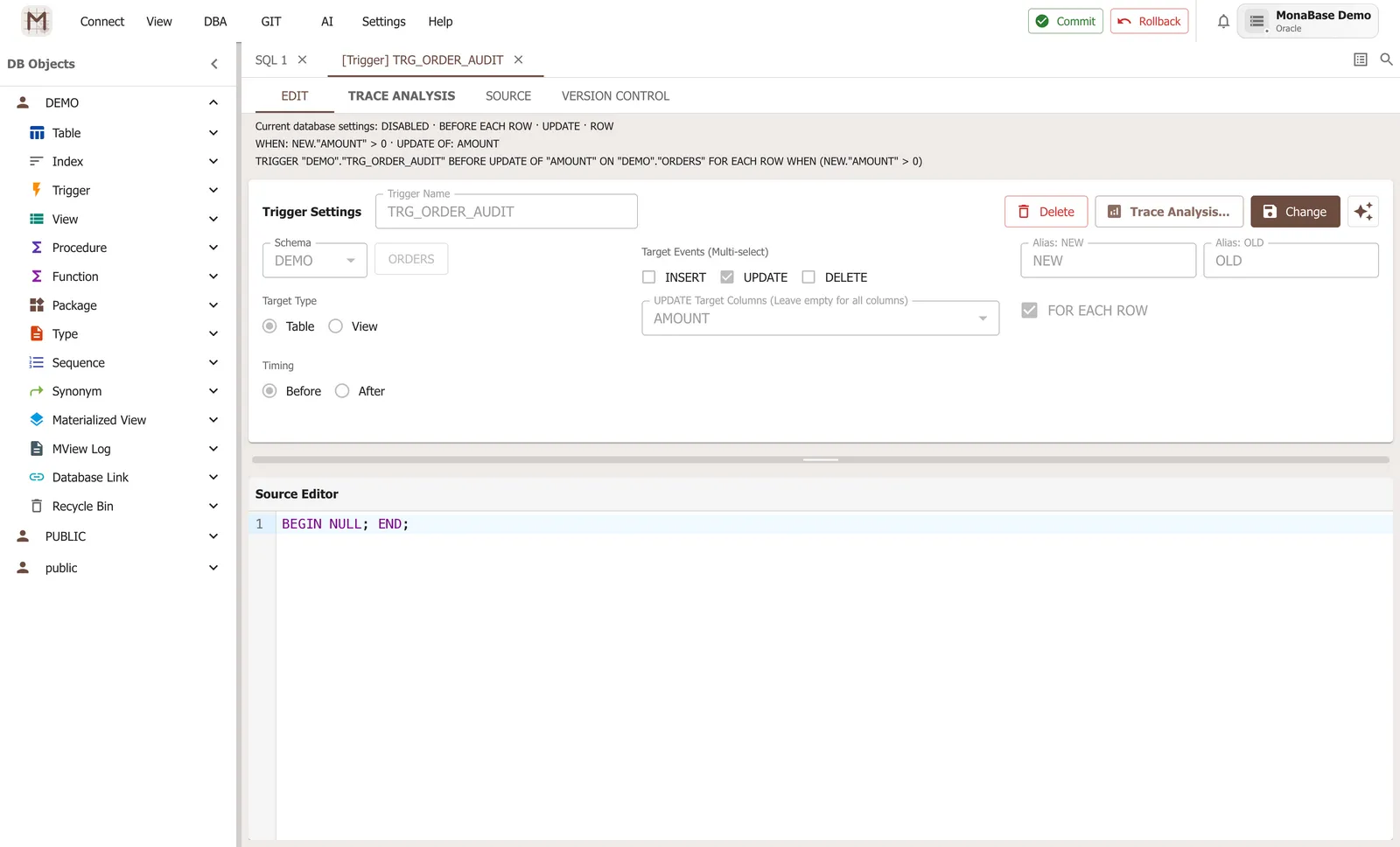
New / Edit tab — common controls
Section titled “New / Edit tab — common controls”These controls edit a trigger definition. Existing trigger settings are largely read-only; review the intended change before applying it.
| Button / setting | How to use | Effect of change |
|---|---|---|
| Trigger name | Enter a name when creating; existing names are read-only. | Sets the new trigger identifier; it does not rename an existing trigger. |
| Schema / target object | Choose the schema and a table or view for a new trigger. | Determines which object fires the trigger; the existing target is locked. |
| Target type / timing | Choose TABLE or VIEW, then a valid BEFORE, AFTER or INSTEAD OF timing. | Changes when the trigger fires; view triggers use INSTEAD OF in this form. |
| Events | Select the supported INSERT, UPDATE or DELETE events. PostgreSQL also offers TRUNCATE. | Controls which operations may fire the trigger; TRUNCATE is PostgreSQL-specific. |
| FOR EACH ROW | Turn on row-level behavior for a supported table trigger. | Runs per affected row rather than once per statement; disabled for views and PostgreSQL TRUNCATE. |
| Source editor / error log | Edit the body and open the console when compilation messages appear. | Changes are only in the editor until Create/Change succeeds; errors remain visible for review. |
| Create / Change / Delete | Create or apply a definition; Delete appears only for an existing trigger. | These operations change database objects. Confirm the target and privileges first. |
| Ask AI | Request assistance drafting or modifying the trigger body. | Produces a proposal for review; it does not replace deliberate database application. |
Database-specific settings
Section titled “Database-specific settings”The create form is not identical for Oracle and PostgreSQL.
| Button / setting | How to use | Effect of change |
|---|---|---|
| Oracle: UPDATE columns | With UPDATE selected, choose specific columns or leave the selection empty. | Restricts column-specific UPDATE triggering; empty selection means all columns. |
| Oracle: NEW / OLD aliases | Set the NEW and OLD correlation aliases when creating. | Changes how row values are referenced in the trigger body. |
| PostgreSQL: TRUNCATE | Available as an event for eligible BEFORE/AFTER table triggers. | TRUNCATE is statement-level; row-level selection is disabled. |
| PostgreSQL: trigger function body | Edit the function body shown in the editor. | A trigger uses a separate function object; do not assume editing the trigger changes unrelated functions. |
Trace analysis tab and acquisition dialog
Section titled “Trace analysis tab and acquisition dialog”The Trace analysis button opens an operation simulation setup; a recorded trace enables the Trace tab. See the Trace analysis guide for replay controls and limitations.
| Button / setting | How to use | Effect of change |
|---|---|---|
| Trace analysis button | Open settings for a selected existing trigger when trace is available. | Prepares acquisition; it does not immediately execute the configured operation. |
| Operation to simulate | Choose an enabled INSERT, UPDATE or DELETE event; PostgreSQL can also show TRUNCATE. | Determines which path and inputs are simulated. Unconfigured events are disabled. |
| Target record condition | For UPDATE or DELETE, provide a condition to locate old-row values. | Changes which existing values are used for simulation; verify the condition carefully. |
| Inserted / updated values | For INSERT or UPDATE, supply column values; date/time fields offer a calendar control. | Changes simulated NEW values and potentially the recorded branch. |
| Trace playback / breakpoints | Open the recorded Trace tab, then use step controls, breakpoints, variables and call information. | Replays the recorded path; it is not a live DBMS debugger. |
Source tab
Section titled “Source tab”This is a read-only view of the generated or loaded CREATE TRIGGER DDL.
| Button / setting | How to use | Effect of change |
|---|---|---|
| DDL display | Read the CREATE TRIGGER statement. | Shows the currently loaded source; typing here does not edit the trigger. |
| Copy | Use the copy icon above the source. | Copies the displayed DDL to the clipboard; does not execute it. |
Version control tab
Section titled “Version control tab”Review Git history separately from applying changes to the database.
| Button / setting | How to use | Effect of change |
|---|---|---|
| Current source / history | Compare the loaded trigger DDL with the Git-managed version and history. | Makes differences visible without changing the database by itself. |
| Git actions | Use the Version control tab actions after checking the repository and selected version. | Records or retrieves source in Git according to the chosen operation; database and Git outcomes are separate. |
| PostgreSQL trigger identity | The version panel passes both the trigger name and table name. | Same-named triggers on different tables are distinguished. |
Overview and safe workflow
Section titled “Overview and safe workflow”Inspect existing definition metadata and prefer a dedicated test database for trace acquisition.
| Button / setting | How to use | Effect of change |
|---|---|---|
| Overview / Retry | Inspect definition metadata, status and errors; retry if loading failed. | Reloads the displayed metadata rather than silently treating failure as an empty trigger. |
| Source changes and trace recordings | After a source change, prepare a new trace for the version under test. | An earlier recording describes the earlier path, not proof of new behavior. |
How to use this screen
Section titled “How to use this screen”- Open the trigger and inspect its table, definition, status and dependencies.
- Review source edits or enable/disable operations before applying them. Check diagnostics afterwards.
- For trace analysis, use the supported simulation workflow with representative values in a test database.
Database-specific behavior
Section titled “Database-specific behavior”Oracle
Section titled “Oracle”Oracle trigger definitions can include WHEN conditions, column-specific UPDATE predicates and ordering clauses. Preserve these details when editing.
PostgreSQL
Section titled “PostgreSQL”PostgreSQL trigger identity includes its table; a same-named trigger on another table is a different target. Trigger functions are separate objects.
MySQL triggers use a single INSERT/UPDATE/DELETE event with BEFORE/AFTER and FOR EACH ROW. Open them from the sidebar or the table Structure tab. Native timing, event, definer and relative peer order are preserved for supported definitions.